MCP server · Developer tools
Session Watcher MCP server
by nomadop
See when your long AI coding session is getting expensive and when it is time to start fresh.
Session Watcher is a small helper that watches your AI coding session and tells you when the conversation has grown so long that starting over would be cheaper. It shows this as a simple traffic light and a dashboard, so you do not have to guess. It is handy for anyone who chats with a coding assistant for hours and wonders whether to keep going or clear the chat.
What is an MCP server? The 30-second version
On its own, your AI can only chat with you. An MCP server is a small helper program that gives your AI a new skill or a connection to something else. This one connects your AI to Session Watcher, which reads your coding session's history and works out whether the current chat is still worth carrying. Once it is connected, your AI can ask Session Watcher questions and get back numbers and lists you can act on.
What this MCP server does
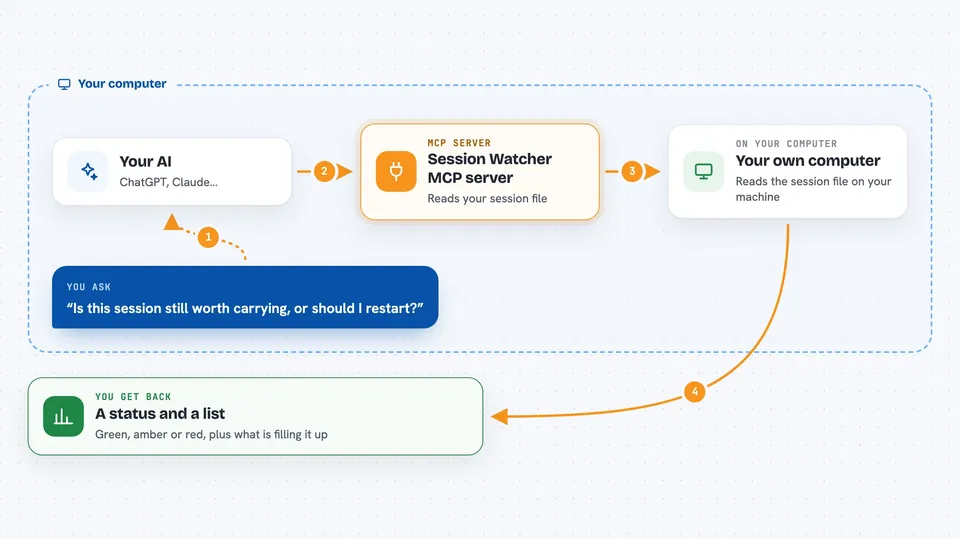
You ask your AI something like how full this session is or whether it is time to restart. The AI passes that question to Session Watcher. Session Watcher reads the session file on your computer, counts the tokens being carried, and compares that to what a fresh start would cost. It then hands back a status, a list of what is filling your context, or a prepared handoff package. You see the answer in the chat, and the dashboard shows the same thing as a live picture.
 Click to zoom
What you can do with it
- Check whether your current session is still worth continuing
- See which files, skills, and tools are eating your context budget
- Get a warning when restarting would save you money
- Prepare a handoff package so a fresh session keeps what matters
- Load a saved handoff into a new session
- Search your past turns for a phrase, path, or identifier
- Start, stop, and check the local dashboard server
Try asking your AI
- “Is this session still worth carrying, or should I restart?”
- “Show me which files and tools are taking up the most context right now”
- “Prepare a handoff so I can clear and pick this up in a fresh session”
- “Search my earlier turns for the file I mentioned about login”
What it gives back to you
You get back short answers, status lines, and lists. For example, a bucket summary shows each file, skill, or tool with its token count, and a handoff gives you a token you can use to restore the session later. The dashboard shows the same numbers as a live chart with a green, amber, or red light. Nothing is changed in your session unless you explicitly ask for a handoff.
Before you start
What you need
- Node.js version 22.16 or newer
- The Claude Code app, since that is the agent it reads from today
- A Claude Code session transcript to watch
Good to know
It reads your local session transcripts to measure them, so keep in mind that it can see what is in those files, though it never uploads them.
Install it with your AI
Add Session Watcher MCP server to your AI, no technical skills needed
You don't install anything by hand. You copy one prompt, paste it into an AI that can work on your computer, and it checks, installs and connects the server for you, asking you when it needs something.
Sign in to get the install prompt
Members get a ready-made prompt that lets the Claude desktop app check Session Watcher MCP server, install it and connect it for them, step by step. You don't need any technical skills: you copy, paste and answer a few questions. Your connected AI can also find and install any of the 4,361 MCP servers here for you.
Who it's for
Developers and anyone who uses a coding assistant for long sessions and wants to know when to start fresh.