MCP server · Finance and crypto
Octagon MCP server
by OctagonAI
Lets your AI look up company filings, earnings calls, stock and crypto data, and prediction markets for you.
This is a helper that connects your AI assistant to Octagon, a service that gathers financial and market information. Once it is set up, you can ask your AI questions about companies, stocks, crypto, and prediction markets, and it will go fetch the answers for you. It is handy for anyone who does research on companies or markets but does not want to dig through filings and news by hand.
What is an MCP server? The 30-second version
On its own, your AI can only chat with you using what it already learned. An MCP server is a small helper program that gives your AI a new skill or a connection to another service. This one connects your AI to Octagon, a market intelligence service. So when you ask about a company or a market, your AI can reach out through this helper and bring back real information instead of guessing.
What this MCP server does
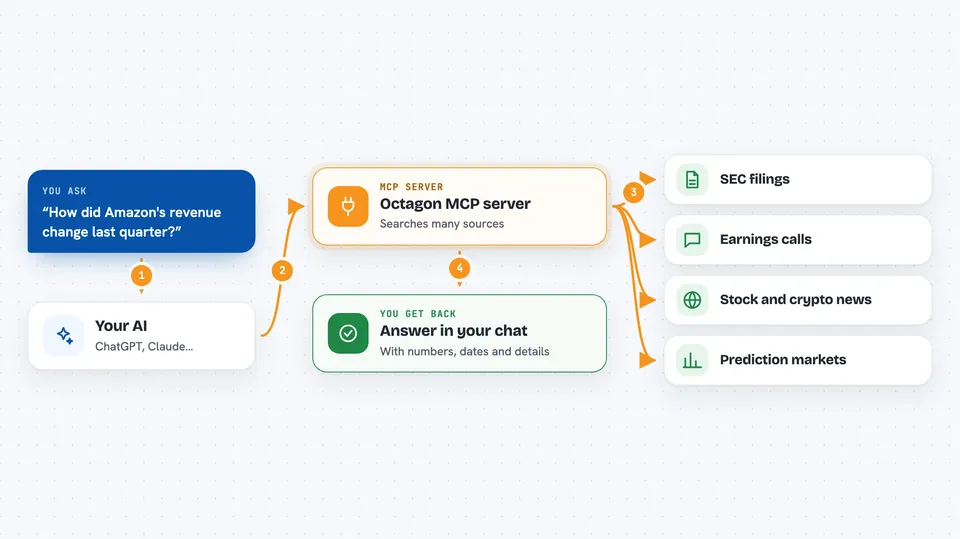
You ask your AI a question in normal words, like how a company's revenue changed or what its latest earnings call said. Your AI passes that question to this helper, which sends it to Octagon's agents. Octagon looks through filings, earnings transcripts, market data, news, and prediction market reports. Then the answer comes back and your AI explains it to you in the chat, often with numbers and details you can use.
 Click to zoom
What you can do with it
- Look up figures from SEC filings like 10-K and 10-Q reports
- Summarize what was said on a company's earnings call
- Compare financial metrics across several companies
- Pull recent stock and crypto news and press releases
- Research prediction market events and their history
- Run deeper multi-source research on an investment topic
- Search Octagon's own documentation for setup help
Try asking your AI
- “What were Amazon's revenue and net income in Q4 2023?”
- “Compare NVIDIA and AMD on latest quarterly revenue growth and margins.”
- “What guidance did NVIDIA's CEO give about AI chip demand on the latest earnings call?”
- “Generate a report for this Kalshi market: https://kalshi.com/markets/kxbtcy/btc-price-range-eoy/kxbtcy-27jan0100”
What it gives back to you
You get answers in plain text right in your chat, usually with the numbers, dates, and details you asked about. Some questions come back as lists or short summaries, like a set of financial ratios or recent headlines. If the AI needs one more detail from you, it will ask a short follow-up question. For prediction markets, you can also get structured historical data.
Before you start
What you need
- A free Octagon account
- An Octagon API key (a kind of password for apps; you generate it for free on the Octagon site)
- Node.js installed on your computer, which brings npx with it
- An MCP client like Claude Desktop or Cursor
Good to know
It uses your Octagon API key and sends your questions to Octagon's service, so keep your key private and check your account's usage limits.
Install it with your AI
Add Octagon MCP server to your AI, no technical skills needed
You don't install anything by hand. You copy one prompt, paste it into an AI that can work on your computer, and it checks, installs and connects the server for you, asking you when it needs something.
Sign in to get the install prompt
Members get a ready-made prompt that lets the Claude desktop app check Octagon MCP server, install it and connect it for them, step by step. You don't need any technical skills: you copy, paste and answer a few questions. Your connected AI can also find and install any of the 4,609 MCP servers here for you.
Who it's for
People who research companies, stocks, crypto, or prediction markets, such as analysts, investors, and students, will get the most out of this.