MCP server · Research
GenReady MCP server
by odb366
Scan a website for AI readiness and get a fix checklist your AI can apply.
GenReady checks whether a website is easy for AI search engines and AI agents to read and use. This MCP server connects GenReady to your AI assistant so you can ask it to scan a page and hand you a list of fixes. It is handy for marketers, SEO folks, and developers who want their site to show up in AI answers.
What is an MCP server? The 30-second version
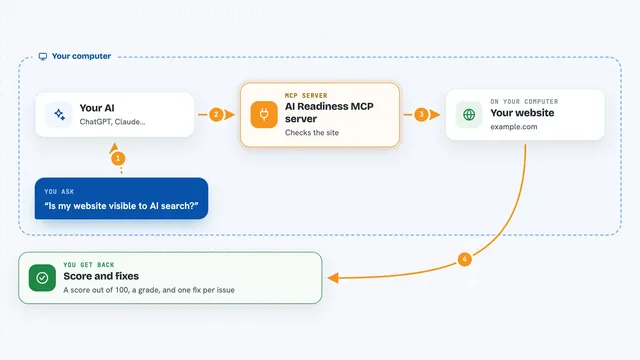
On its own, your AI can only chat with you. An MCP server is a small helper that gives your AI a new skill or a connection to another service. This one connects your AI to GenReady, a website scanning service. Once it is connected, you can ask your AI to scan a page, and it will talk to GenReady for you and bring back the results.
What this MCP server does
You ask your AI to scan a website address. Your AI sends that request to GenReady through this helper. GenReady looks at the page for things like crawler access, an llms.txt file, structured data, and agent standards. It sends back scores and a checklist of fixes. Your AI can then show you the list or even apply the fixes in your code.
What you can do with it
- Scan any web page for AI readiness and get scores
- Get a fix checklist for a page or a whole site
- Generate robots.txt, llms.txt, or JSON-LD files to fix issues
- Check past scans and see what changed
- Mark findings as fixed, pending, or ignored
- Re-check findings after you deploy a fix
- See your plan and remaining scan credits
Try asking your AI
- “Scan https://example.com for AI readiness and fix what you can in this repo.”
- “Show me the fix checklist from my last scan of example.com.”
- “Generate an llms.txt file for my site.”
- “List my past reports for example.com.”
What it gives back to you
You get back scores and a checklist of fixes, written in plain language. Your AI can show this as a list in the chat, or it can create files like robots.txt or llms.txt for you. It can also tell you which findings are already fixed and which are still open.
Before you start
What you need
- A GenReady account and an API key from genready.ai/api-keys
- For site-wide plans, enable Read site data when creating the key
- For local use, Node.js installed on your computer
Good to know
Scanning uses credits, and the fix checklist is only included on Pro and Agency plans.
Install it with your AI
Add GenReady MCP server to your AI, no technical skills needed
You don't install anything by hand. You copy one prompt, paste it into an AI that can work on your computer, and it checks, installs and connects the server for you, asking you when it needs something.
Sign in to get the install prompt
Members get a ready-made prompt that lets the Claude desktop app check GenReady MCP server, install it and connect it for them, step by step. You don't need any technical skills: you copy, paste and answer a few questions. Your connected AI can also find and install any of the 4,609 MCP servers here for you.
Who it's for
Marketers, SEO specialists, and developers who want their websites to be found and used by AI tools.