MCP server · Research
OMOP MCP server
by OHNLP
Your AI can turn everyday medical words into standard OMOP codes used in health data.
This is a helper that lets your AI map medical terms to OMOP concepts, which are the standard codes used to organize health data. It is handy if you work with clinical data and need plain words like a body temperature reading turned into the right code. You do not need to be a programmer, but someone on your team will set it up once.
What is an MCP server? The 30-second version
On its own, your AI can only chat with you. An MCP server is a small helper program that gives your AI a new skill or a connection to another service. This one connects your AI to the OMOP vocabulary, so it can look up and suggest the right medical codes for you. Once it is connected, you just ask in normal words and the AI does the lookup behind the scenes.
What this MCP server does
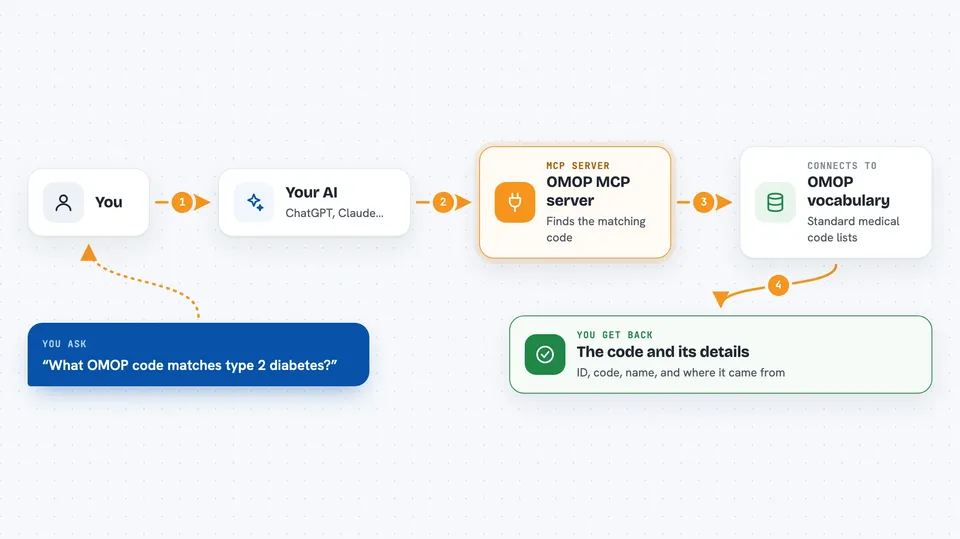
You type a medical term or a short description, like a lab measurement or a condition. Your AI sends that to this helper, which searches the OMOP vocabulary for matching concepts. The helper comes back with the best match, including the concept ID, the code, the name, and which vocabulary it came from. Your AI then shows you that answer in the chat, so you can copy the code into your data work.
 Click to zoom
What you can do with it
- Map a free-text medical term to a standard OMOP concept
- Search the OMOP vocabulary for a concept by name
- Map many terms at once from a CSV file
- Pick the right vocabulary for the domain, like LOINC for measurements or SNOMED for conditions
- Look up live OMOP documentation while you work
- Get a short reason for why a concept was chosen
Try asking your AI
- “Map Temperature Temporal Scanner - RR for measurement_concept_id in the measurement table”
- “What OMOP concept matches the term type 2 diabetes?”
- “Find the LOINC concept for body temperature measured at the temporal artery”
- “Map all the terms in my conditions.csv file to OMOP concepts”
What it gives back to you
You get a short block of details in the chat: the concept ID, the code, the name, the class, the domain, and the vocabulary it came from. It also gives a one-line reason for the match and a link to view the concept. For batch work, you get the same details for each term in your file.
Before you start
What you need
- An OMOPHub API key from omophub.com (a kind of password for the vocabulary service)
- A key for an AI provider, like OpenAI or Anthropic
- The uv tool installed on your computer
- The Claude desktop app if you want to use it there
Good to know
It needs your OMOPHub and AI provider keys, and using those services may cost money depending on your plan.
Install it with your AI
Add OMOP MCP server to your AI, no technical skills needed
You don't install anything by hand. You copy one prompt, paste it into an AI that can work on your computer, and it checks, installs and connects the server for you, asking you when it needs something.
Sign in to get the install prompt
Members get a ready-made prompt that lets the Claude desktop app check OMOP MCP server, install it and connect it for them, step by step. You don't need any technical skills: you copy, paste and answer a few questions. Your connected AI can also find and install any of the 4,609 MCP servers here for you.
Who it's for
People who work with clinical or health data, like data analysts, informaticists, and research staff who standardize medical terms.