
MCP server · Developer tools
PkgDiet MCP server
by om-tajne
Lets your AI check whether an npm package is safe, allowed, and worth adding before it suggests installing it.
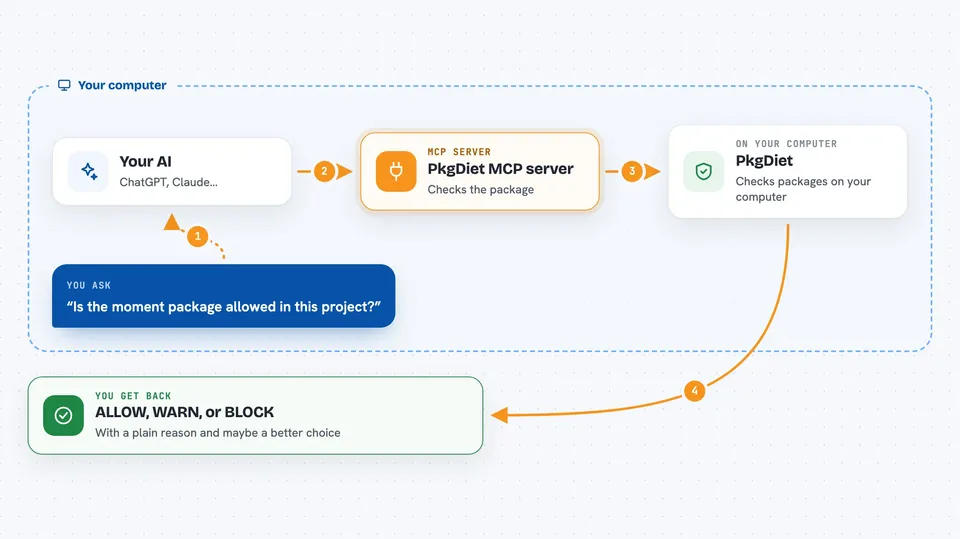
PkgDiet is a helper for JavaScript and TypeScript projects that keeps an eye on the packages your project depends on. It checks each package against rules you set for your project, and it can tell your AI assistant whether a package is allowed, worth a warning, or blocked. It is handy if you work with a coding AI and want it to stop suggesting outdated or unwanted packages.
What is an MCP server? The 30-second version
On its own, your AI can only chat with you. An MCP server is a small helper program that gives your AI a new skill or a connection to another tool. This one connects your AI to PkgDiet, which knows your project's dependency rules. So when you ask your AI to add a package, it can quietly ask PkgDiet first and get a clear yes, a warning, or a no.
What this MCP server does
You ask your AI to add or check a package. The AI sends the package name to PkgDiet through this helper. PkgDiet looks the package up in the npm registry and compares it with the rules in your project's .pkgdietrc.json file. It also checks health, whether the package is deprecated, and how big it is. Then it hands back a verdict, ALLOW, WARN, or BLOCK, and if blocked, it can suggest a modern alternative.
 Click to zoom
What you can do with it
- Check whether a package is allowed by your project rules
- Get a warning when a package is old, unmaintained, or too big
- See a clear BLOCK verdict for deprecated or banned packages
- Ask for modern alternatives to a blocked package
- Keep your AI from suggesting packages your team does not want
- Use the same rules in your editor and in your CI checks
Try asking your AI
- “Is the moment package allowed in this project?”
- “Check if axios is fine to add here.”
- “request is blocked, what should I use instead?”
- “Can you check lodash against our dependency policy before installing it?”
What it gives back to you
You get a short verdict in the chat: ALLOW, WARN, or BLOCK, with a plain reason. If the package is blocked, PkgDiet can also suggest a modern replacement. The AI then uses that answer to decide what to do next, like picking a different package or warning you.
Before you start
What you need
- Node.js installed on your computer
- A JavaScript or TypeScript project with a package.json file
- A .pkgdietrc.json policy file in your project (the setup command creates one)
Good to know
It only reads and checks packages, it does not install or change anything by itself, but the verdicts depend on the rules in your project's .pkgdietrc.json file, so keep that file up to date.
Install it with your AI
Add PkgDiet MCP server to your AI, no technical skills needed
You don't install anything by hand. You copy one prompt, paste it into an AI that can work on your computer, and it checks, installs and connects the server for you, asking you when it needs something.
Sign in to get the install prompt
Members get a ready-made prompt that lets the Claude desktop app check PkgDiet MCP server, install it and connect it for them, step by step. You don't need any technical skills: you copy, paste and answer a few questions. Your connected AI can also find and install any of the 4,609 MCP servers here for you.
Who it's for
JavaScript and TypeScript developers who use AI coding assistants and want consistent rules about which packages are allowed.




