
MCP server · Security
Operant security testing MCP server
by operantlabs
Lets your AI run security checks like SQL injection tests, network capture analysis and memory forensics for you.
Operant is a helper that gives your AI a set of security testing tools. It is made for people who do penetration testing, look at network captures, or check systems for weaknesses. If you are new to security work, this is a way to try common checks without learning every command line tool by hand.
What is an MCP server? The 30-second version
On its own, your AI can only chat with you. An MCP server is a small helper program that gives your AI a new skill or a connection to another tool. This one connects your AI to a collection of security testing utilities, so when you ask it to test a login page or look at a network capture, it can actually run those checks. You stay in the chat, and the helper does the technical work behind the scenes.
What this MCP server does
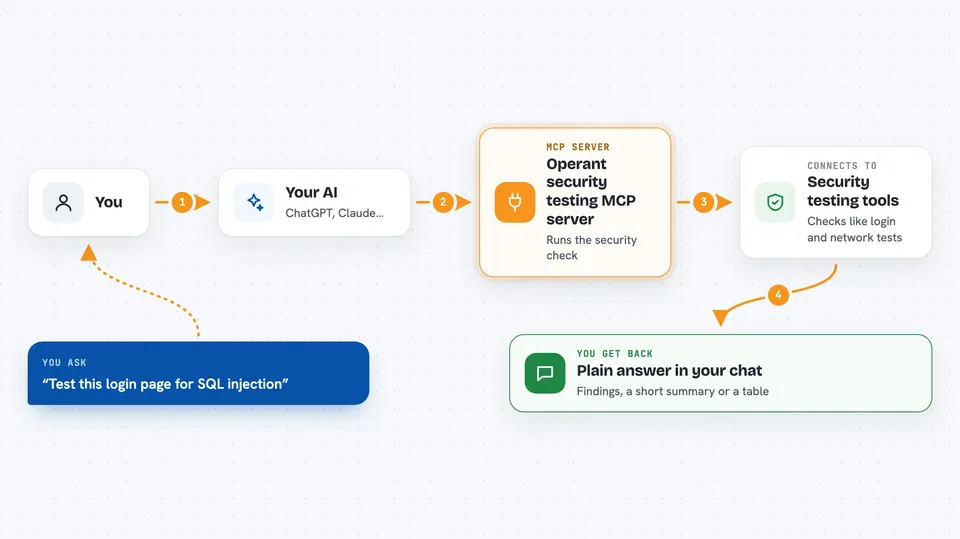
You ask your AI something like test this login form for SQL injection. The AI picks the right tool from this server, for example the login bypass tester. The helper runs the check against the target you gave it and collects the result. Then the AI explains what it found in plain words in your chat. The same pattern works for network captures, memory dumps, cloud logs and many other security checks.
 Click to zoom
What you can do with it
- Test a web login or search box for SQL injection
- Check a page for reflected cross site scripting
- Look through a network capture file for credentials or port scans
- Run reconnaissance on a domain, like DNS records and common folders
- Analyze a memory dump for signs of a rootkit
- Pull macros out of a suspicious Office document
- Look for unusual events in cloud audit logs
Try asking your AI
- “Test this login page for SQL injection: https://example.com/login”
- “Look at this pcap file and tell me if anyone extracted passwords”
- “Run a quick recon on example.com and list what you find”
- “Check this memory dump for a Linux rootkit”
What it gives back to you
You get answers in the chat, not raw files. The AI usually replies with a short summary, a list of findings, or a table of results like endpoints, credentials or suspicious events. For some tasks it may show snippets of extracted data, like a macro or a DNS query list. It also tells you which tool it used and what it saw.
Before you start
What you need
- Node.js 18 or newer on your computer
- The Claude desktop app or another AI app that supports MCP servers
- Extra command line tools depending on what you want to do, like curl, tshark, dig, volatility, olevba or jq
- Permission to test the systems you point it at
Good to know
These tools actively test and probe systems, so only point them at machines you own or have written permission to test, and be aware that some checks send real traffic or try to log in.
Install it with your AI
Add Operant security testing MCP server to your AI, no technical skills needed
You don't install anything by hand. You copy one prompt, paste it into an AI that can work on your computer, and it checks, installs and connects the server for you, asking you when it needs something.
Sign in to get the install prompt
Members get a ready-made prompt that lets the Claude desktop app check Operant security testing MCP server, install it and connect it for them, step by step. You don't need any technical skills: you copy, paste and answer a few questions. Your connected AI can also find and install any of the 4,609 MCP servers here for you.
Who it's for
Penetration testers, security analysts and IT people who want to run common security checks from a chat instead of typing every command.



