
MCP server · Productivity
AI Tool Optimizer MCP server
Trims the wordy descriptions of your AI's tools so they use fewer tokens and cost less.
This is a small helper that tidies up the descriptions of the tools your AI can use. Long, wordy tool descriptions eat up space and money every time your AI reads them. If you use many tools, this one trims that text down so things run leaner.
What is an MCP server? The 30-second version
On its own, your AI can only chat with you. An MCP server is a small helper program that gives your AI a new skill or a connection to something else. This one is a helper that looks at the descriptions of your AI's other tools and shortens them. So instead of your AI reading pages of text about each tool, it reads a trimmed version, which saves tokens.
What this MCP server does
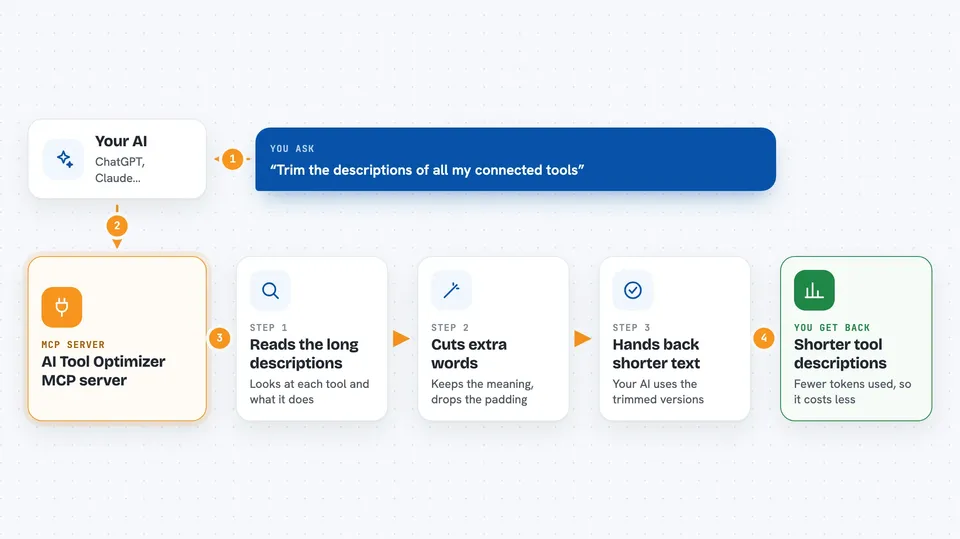
You connect this helper to your AI alongside your other tools. When your AI loads its list of tools, this helper steps in and rewrites the long descriptions into shorter ones. The idea is to keep the meaning but drop the extra words. Your AI then works with those shorter descriptions, which uses fewer tokens. You do not have to type anything special; it just does its tidying in the background.
 Click to zoom
What you can do with it
- Shorten long tool descriptions so they use fewer tokens
- Keep the meaning of each tool while cutting extra words
- Lower the token cost of loading your AI's tool list
- Work alongside the other MCP tools you already use
Try asking your AI
- “Trim the descriptions of all my connected tools”
- “How many tokens do my tool descriptions use right now”
- “Shorten the tool descriptions without changing what they do”
What it gives back to you
It gives back shorter versions of your tool descriptions. In the chat you would see the trimmed text or a note about how much was saved. The exact format depends on how the server is set up, and the project does not spell this out.
Before you start
What you need
- An AI app that supports MCP servers, like the Claude desktop app
- At least one other MCP tool connected so there is something to trim
Good to know
It rewrites the descriptions of your other tools, so if it trims too much your AI might misunderstand what a tool does.
Install it with your AI
Add AI Tool Optimizer MCP server to your AI, no technical skills needed
You don't install anything by hand. You copy one prompt, paste it into an AI that can work on your computer, and it checks, installs and connects the server for you, asking you when it needs something.
Sign in to get the install prompt
Members get a ready-made prompt that lets the Claude desktop app check AI Tool Optimizer MCP server, install it and connect it for them, step by step. You don't need any technical skills: you copy, paste and answer a few questions. Your connected AI can also find and install any of the 4,361 MCP servers here for you.
Who it's for
People who use many MCP tools at once and want to keep their token use and costs down.





