
MCP server · Developer tools
Patchloom MCP server
by patchloom
Lets your AI edit config files and code safely, with previews and undo, without breaking formatting.
Patchloom is a small helper program that lets your AI edit files like JSON, YAML, TOML, Markdown, and code in a careful, structured way instead of doing blind find-and-replace. It is handy if you or your AI often touch config files or need to change several files at once and want to avoid breaking them.
What is an MCP server? The 30-second version
On its own, your AI can only chat. An MCP server is a small helper program that gives your AI a new skill or a connection to something, and here that something is Patchloom, a file-editing tool. Once it is connected, your AI can ask Patchloom to change a value in a config file, update a Markdown section, or edit several files together. Patchloom does the actual careful work and reports back what it changed.
What this MCP server does
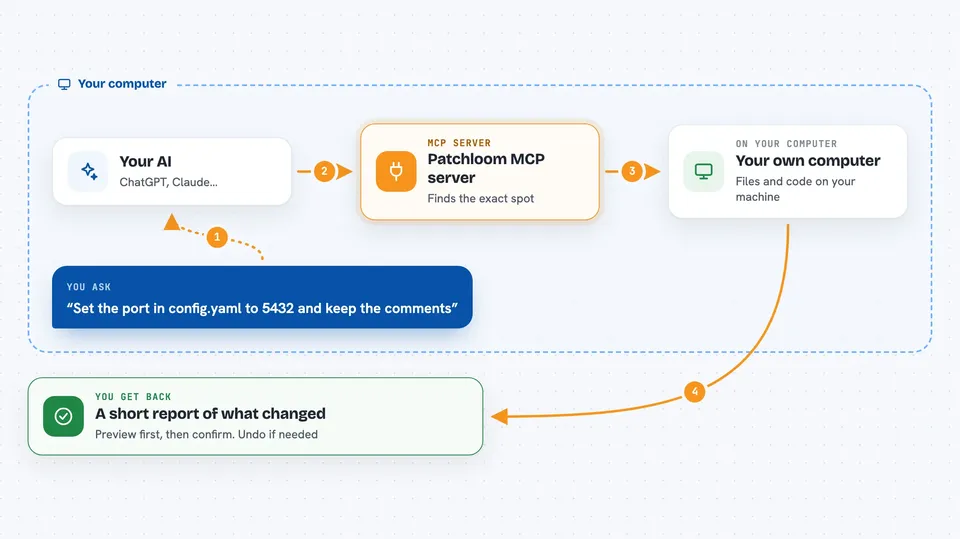
You ask your AI to change something, for example a version number in a config file or a row in a Markdown table. Your AI sends that request to Patchloom through this MCP server. Patchloom opens the file, finds the exact spot by name (not by guessing text), and changes only that value while keeping comments and formatting intact. If you asked for several changes, it can do them all in one go and undo everything if one step fails. Then it tells your AI what it did, and your AI tells you.
 Click to zoom
What you can do with it
- Change a value in a JSON, YAML, or TOML file by name, keeping comments intact
- Add or update a bullet or table row in a Markdown file by heading
- Edit several files in one request, with automatic undo if something fails
- Preview changes before they are written, so you can check first
- Rename or replace a symbol across code files in many languages
- Create a new file with specific content
- Search and read files in your project
Try asking your AI
- “Set the port in config.yaml to 5432 and keep the comments”
- “Update the version to 2.0.0 in package.json, config.yaml, and config.toml, and add a VERSION file”
- “Add a new row to the table under the API heading in README.md”
- “Show me a preview of changing the database host in config.yaml before applying it”
What it gives back to you
You get back a short report of what changed, often with a preview of the difference before and after. For previews, nothing is written to disk yet, so you can review it first. When changes are applied, it confirms which files were updated. If something goes wrong, it tells you what failed and can roll back the whole batch.
Before you start
What you need
- The Patchloom program installed on your computer (for example with Homebrew, Scoop, or npx)
- An AI tool that supports MCP servers, like Claude Desktop, Cursor, or VS Code
- A project folder with the files you want your AI to edit
Good to know
It can change and delete files in your project, and plans you run can execute shell commands, so only use plans and files you trust.
Install it with your AI
Add Patchloom MCP server to your AI, no technical skills needed
You don't install anything by hand. You copy one prompt, paste it into an AI that can work on your computer, and it checks, installs and connects the server for you, asking you when it needs something.
Sign in to get the install prompt
Members get a ready-made prompt that lets the Claude desktop app check Patchloom MCP server, install it and connect it for them, step by step. You don't need any technical skills: you copy, paste and answer a few questions. Your connected AI can also find and install any of the 4,361 MCP servers here for you.
Who it's for
Developers and anyone who uses an AI assistant to edit config files, documentation, or code and wants those edits to be safe and predictable.





