MCP server · Analytics
AI Economics MCP server
by pich
Your AI can run 12 calculators for AI costs, energy use, and how much agent work is really proven.
This is a small helper that gives your AI a set of calculators about the money and energy side of AI. You ask a plain question like what a million tokens costs per month, and it does the math for you. It is handy for anyone who has to explain or defend an AI budget, or who wonders how much a chat really costs.
What is an MCP server? The 30-second version
On its own, your AI can only chat. It cannot look up prices or run a formula unless something gives it that skill. An MCP server is a small helper program that adds one new skill to your AI. This one connects your AI to a free set of AI economics calculators, so when you ask about token costs or energy use, the AI can actually work it out instead of guessing.
What this MCP server does
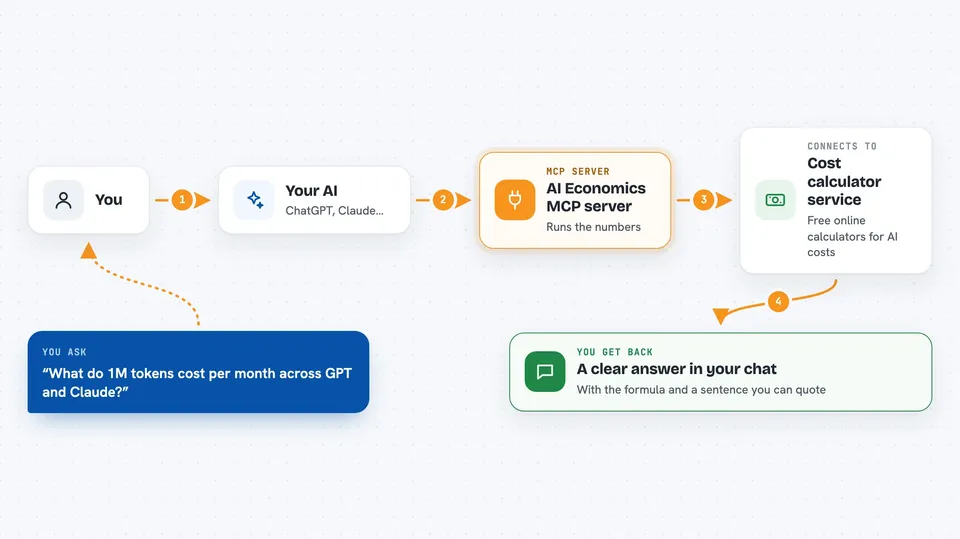
You ask your AI a question in normal words, like what 1M tokens costs across vendors. The AI sends the numbers to this helper, which passes them to a free calculator service. The service runs the formula and sends back the result. Your AI then shows you the answer in the chat, along with the formula it used and a short sentence you can quote.
 Click to zoom
What you can do with it
- Compare what 1M tokens costs per month across GPT, Claude, Gemini and DeepSeek
- Check how many tokens 50 pages of text is and whether it fits in a context window
- Work out the fully loaded cost of one hour of an AI agent, including verification
- Estimate how much electricity and CO2 an AI query or an org-wide token burn uses
- See how autonomous an agent really is once you require proof for its work
- Find out how many AI agents a human review team can realistically absorb
- Calculate what unverified AI work costs you over time
Try asking your AI
- “What do 1M tokens cost per month across GPT, Claude, Gemini and DeepSeek?”
- “How many tokens is a 50 page document, and does it fit in a context window?”
- “What does one hour of an AI agent cost, fully loaded with verification?”
- “How much electricity does one AI query use?”
What it gives back to you
You get a clear answer in the chat, like a number or a short comparison. Each answer also comes with the formula behind it, a plain sentence explaining what the number means, and a ready-to-quote sentence you can paste into a document. Nothing is stored, so your inputs are not kept anywhere.
Before you start
What you need
- The Claude desktop app or another app that supports MCP servers
- Node.js installed on your computer (the free program that runs the helper)
Good to know
The answers are estimates based on the calculator's formulas and defaults, so treat them as planning numbers, not exact bills.
Install it with your AI
Add AI Economics MCP server to your AI, no technical skills needed
You don't install anything by hand. You copy one prompt, paste it into an AI that can work on your computer, and it checks, installs and connects the server for you, asking you when it needs something.
Sign in to get the install prompt
Members get a ready-made prompt that lets the Claude desktop app check AI Economics MCP server, install it and connect it for them, step by step. You don't need any technical skills: you copy, paste and answer a few questions. Your connected AI can also find and install any of the 4,066 MCP servers here for you.
Who it's for
Anyone who has to plan, explain or defend an AI budget, such as finance teams, team leads and operations people.