MCP server · Developer tools
Plopino MCP server
by plopino
Lets your AI publish a page or file and hand you back a public link anyone can open.
Plopino is a service that turns a page, a report or a folder of files into a public web link. This MCP server connects your AI assistant to Plopino, so when your AI writes something, it can put it online for you and give you the link. It is handy if you want to share what your AI made without touching a browser or a web host.
What is an MCP server? The 30-second version
On its own, your AI can only chat with you. An MCP server is a small helper program that gives your AI one extra skill, in this case the ability to publish things to Plopino. Once it is connected, you can say "publish this" and the AI uses this helper to send your page or file to Plopino and get a link back. You do not need to understand how it works inside; you just ask in normal words.
What this MCP server does
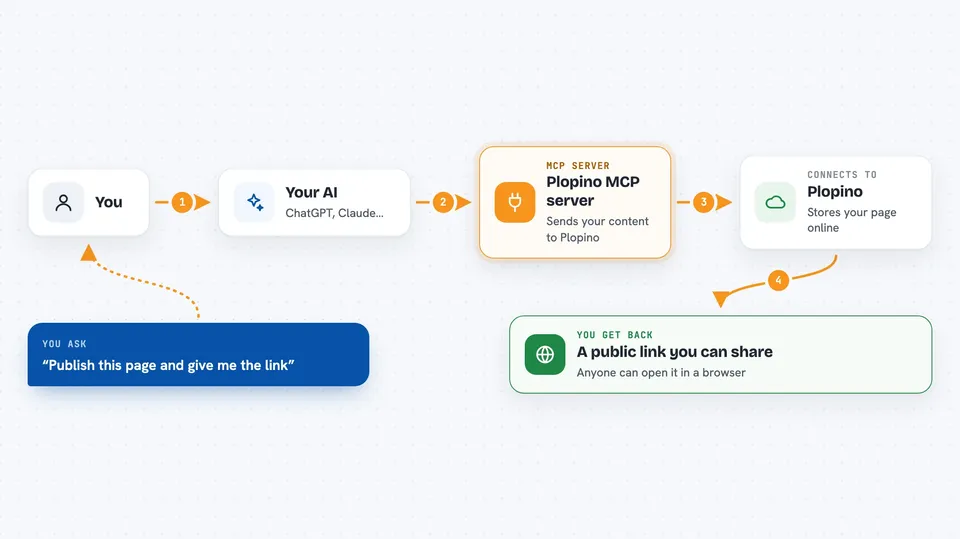
You ask your AI to publish something, for example a page it just wrote or a report sitting on your computer. The AI passes that content to this helper program. The helper sends it to Plopino, which stores it and puts it on a public web address. Then the AI tells you the link in the chat, and you can send that link to anyone. If you have a Plopino account and a token, the page can also be updated later while keeping the same link.
 Click to zoom
What you can do with it
- Publish a page your AI just wrote and get a public link
- Share a folder of files, like a small website with images and styles, keeping the folder structure
- Turn a Word, Excel or Markdown document into a readable web page
- Share code or data files with a nice highlighted preview
- Replace the content of an already published page while the link stays the same
- Publish without creating an account, then claim the page later if you want to keep it
Try asking your AI
- “Publish this page to Plopino and give me the link”
- “Turn my report.docx into a web page and share the link”
- “Upload the folder at ./dist and send me the URL”
- “Update the page at this link with the new version, keep the same address”
What it gives back to you
You get a short answer in the chat with the public link to your published page or files. If you published anonymously, you also get a private claim link you can open yourself to keep that page in your account. With a token, the reply can include the same link so you can update the page later. The chat does not show the whole file back to you, just the link and a short confirmation.
Before you start
What you need
- Node.js 20 or newer if you run it on your own computer
- An MCP client that can add servers, like Claude Desktop, Claude Code, Cursor or VS Code
- A Plopino token from plopino.com/b only if you want permanent pages, updates or private boards (optional)
Good to know
Anything you publish gets a public link, so do not publish private or secret files, and remember that anonymous pages are deleted after 30 days unless you claim them or use a token.
Install it with your AI
Add Plopino MCP server to your AI, no technical skills needed
You don't install anything by hand. You copy one prompt, paste it into an AI that can work on your computer, and it checks, installs and connects the server for you, asking you when it needs something.
Sign in to get the install prompt
Members get a ready-made prompt that lets the Claude desktop app check Plopino MCP server, install it and connect it for them, step by step. You don't need any technical skills: you copy, paste and answer a few questions. Your connected AI can also find and install any of the 4,066 MCP servers here for you.
Who it's for
Anyone who wants to share something their AI made, like reports, small web pages or documents, without setting up a website.