MCP server · Developer tools
dibs MCP server
by polymatx
Lets your coding AI claim files, check who is using what, and share notes with other AI agents working in the same project.

dibs is a helper for teams of AI coding agents that work on the same project at the same time. It lets each agent say "I am working on these files" so two agents do not overwrite each other's work. It is handy if you run more than one AI coding session on the same code at once, or if you want your AI to remember lessons from past sessions.
What is an MCP server? The 30-second version
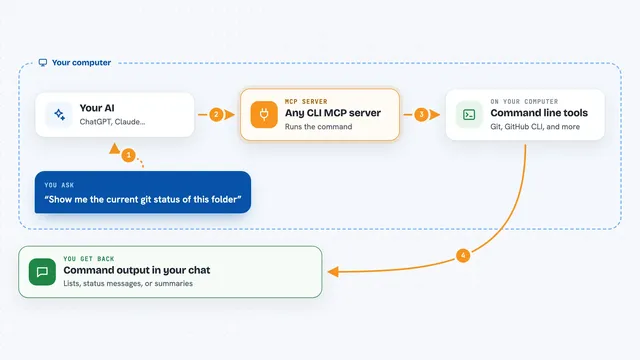
On its own, your AI can only chat with you. An MCP server is a small helper program that gives your AI a new skill or a connection to another tool. This one, dibs, gives your AI a way to talk to a shared file-claim system inside your project folder, so it can reserve files, check what others are using, and leave notes. Once connected, your AI can do those things for you when you ask.
What this MCP server does
You ask your AI to work on some files, and it uses dibs to claim them first. dibs writes a small claim file with an expiry time, so other agents can see the files are taken. If another agent tries to edit the same files, dibs can block the edit and tell that agent who is holding the claim and why. When your AI is done, it releases the claim, and you can also leave notes or save lessons for later sessions.
 Click to zoom
What you can do with it
- Claim files or folders so other agents know they are in use
- Check whether a file is free or held by another agent
- Release claims when work is finished
- See all active agents and claims in the project
- Send a short note to other agents working in the same project
- Save a lesson so future sessions do not repeat the same mistake
- Search past lessons to find answers to common problems
Try asking your AI
- “Claim the src/auth folder for me and tell me when it expires”
- “Is anyone else using src/api/routes.go right now”
- “Leave a note for the other agents that I am refactoring the login flow”
- “Search the lessons for anything about the rate limiter panicking”
What it gives back to you
You get short answers in the chat: whether a claim was granted or denied, who is holding a file, when a claim expires, and a list of active agents and claims. Notes and lessons come back as text you can read. If a claim is denied, you also see the other agent's name and reason, so you know who to wait for or talk to.
Before you start
What you need
- A project folder that uses git
- The dibs program installed on your computer
- An AI coding tool that supports MCP servers, like Claude Code or Codex
Good to know
dibs coordinates well-behaved agents, but it is not a security boundary, so it will not stop a process that deliberately ignores it.
Install it with your AI
Add dibs MCP server to your AI, no technical skills needed
You don't install anything by hand. You copy one prompt, paste it into an AI that can work on your computer, and it checks, installs and connects the server for you, asking you when it needs something.
Sign in to get the install prompt
Members get a ready-made prompt that lets the Claude desktop app check dibs MCP server, install it and connect it for them, step by step. You don't need any technical skills: you copy, paste and answer a few questions. Your connected AI can also find and install any of the 4,609 MCP servers here for you.
Who it's for
Developers and teams who run more than one AI coding agent on the same project at the same time.