MCP server · Productivity
NCP MCP server
by portel-dev
Lets your AI search and use all your other MCP tools through one simple connection.
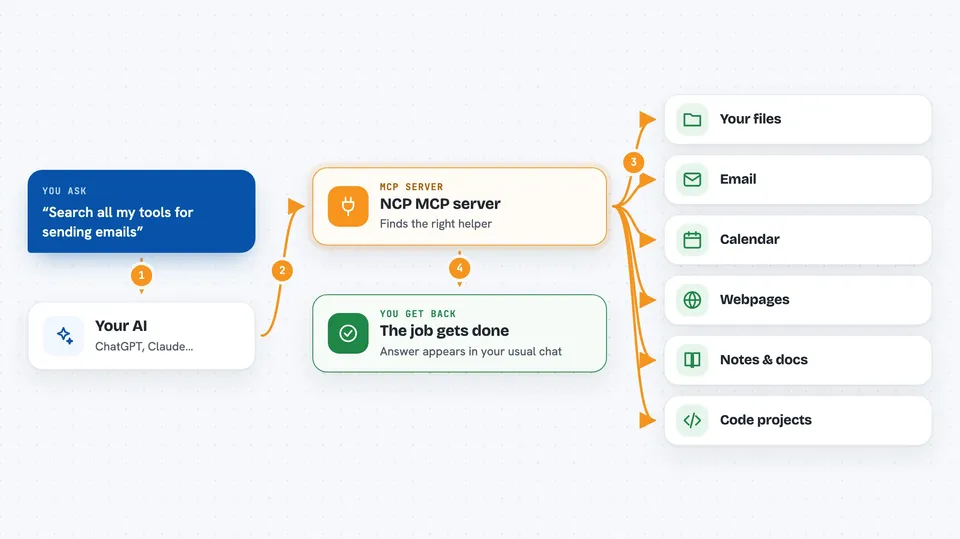
NCP is a helper that sits between your AI and all the other MCP servers you have connected. Instead of your AI juggling dozens of tools at once, it talks to NCP, and NCP finds and runs the right tool for the job. It is handy for anyone who has added several MCP servers and notices their AI getting slow or confused.
What is an MCP server? The 30-second version
On its own, your AI can only chat with you. An MCP server is a small helper program that gives your AI a new skill, like reading files or searching the web. NCP is a special kind of MCP server: instead of adding one skill, it connects to all your other MCP servers and manages them for you. So your AI asks NCP for what it needs, and NCP quietly finds the right tool and runs it.
What this MCP server does
You ask your AI to do something, like read a file or send an email. Your AI asks NCP to find a tool that can do that. NCP searches through all the MCP servers you have connected, picks the best match, and runs it. The result comes back to your AI, and your AI tells you what happened. NCP can also run tools on a schedule and let your AI write small scripts that combine several tools at once.
 Click to zoom
What you can do with it
- Search all your connected MCP tools at once by describing what you need
- Run any tool from any of your MCP servers through one connection
- Combine several tools into a single step using short scripts
- Schedule a tool to run automatically at a set time
- Discover extra skills and capabilities that are available to your AI
- See a list of all the MCP servers and tools you have connected
Try asking your AI
- “Find a tool that can read a file and use it to open my notes”
- “Search all my tools for something that can send an email”
- “Set up a task that checks a website every morning at 9am”
- “What tools do I have available for working with GitHub?”
What it gives back to you
You get answers in your normal chat, as if your AI had used the tool directly. If NCP found a file, you see its contents. If it ran a search, you see the results. If it set up a schedule, it tells you when the task will run. You usually will not see NCP itself, just the outcome.
Before you start
What you need
- Node.js 18 or newer installed on your computer
- At least one other MCP server already set up if you want NCP to manage tools
- An MCP-compatible AI client like Claude Desktop, Cursor, or VS Code
Good to know
NCP can run tools that change or delete things on your computer or in your connected apps, so check what your AI is about to do before saying yes.
Install it with your AI
Add NCP MCP server to your AI, no technical skills needed
You don't install anything by hand. You copy one prompt, paste it into an AI that can work on your computer, and it checks, installs and connects the server for you, asking you when it needs something.
Sign in to get the install prompt
Members get a ready-made prompt that lets the Claude desktop app check NCP MCP server, install it and connect it for them, step by step. You don't need any technical skills: you copy, paste and answer a few questions. Your connected AI can also find and install any of the 4,361 MCP servers here for you.
Who it's for
People who have added several MCP servers to their AI and want a simpler, faster way to use them all.