MCP server · Productivity
Japanese SaaS connectors (mcp-jp)
by mediiiiium
Let your AI work with Japanese business tools like SmartHR, KING OF TIME, Smaregi and CloudSign.
This is a collection of small helper programs that connect your AI assistant to Japanese business services. Many of these services do not have their own official AI connection yet, so someone built one for each of them here. It is handy if your company uses tools like SmartHR, KING OF TIME, kaonavi, Smaregi, LINE Lstep or CloudSign and you want your AI to help with them.
What is an MCP server? The 30-second version
On its own, your AI can only chat with you. An MCP server is a small helper program that gives your AI a new skill or a connection to an app. This project is a set of such helpers, one for each Japanese service, so your AI can look things up or do things there when you ask. You install only the ones you need, for example the SmartHR helper or the KING OF TIME helper.
What this MCP server does
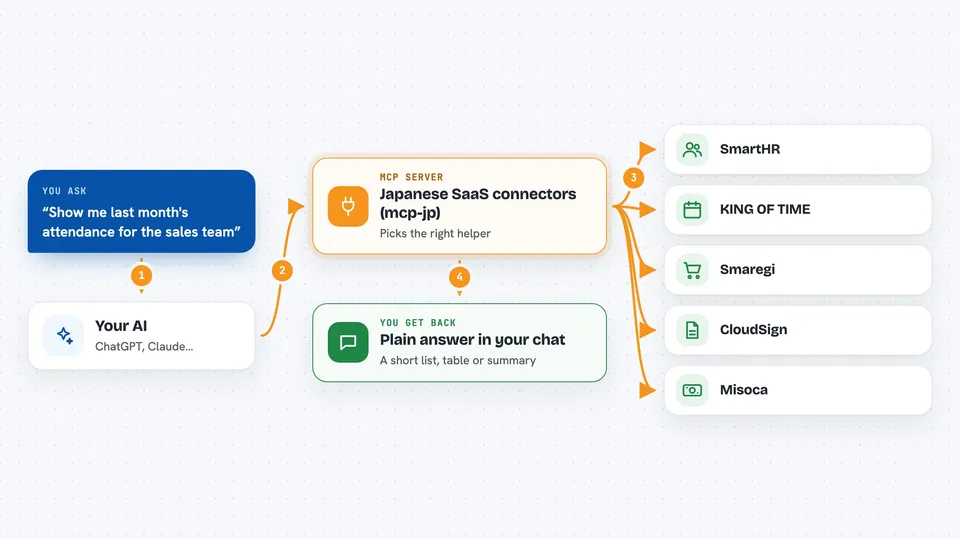
You ask your AI a question in plain words, like checking attendance or finding an employee. The AI uses the matching helper from this project. That helper talks to the service, for example SmartHR or Smaregi, using the login details you set up. The service sends back the information, and the helper tidies it up so it fits nicely in your chat. You then see the answer or the change that was made, without opening the service yourself.
 Click to zoom
What you can do with it
- Look up employee or staff information in SmartHR or kaonavi
- Check attendance and time records in KING OF TIME or AKASHI
- See sales and store data in Smaregi
- Check or manage electronic contracts in CloudSign
- Look at LINE marketing contacts in Lステップ
- Search invoices and quotes in Misoca or MakeLeaps
- Review hiring candidates in HERP Hire or Talentio
Try asking your AI
- “Show me the attendance summary for our sales team last month in KING OF TIME”
- “Find the employee profile for Tanaka-san in SmartHR”
- “What were yesterday's sales at our main store in Smaregi”
- “List the contracts waiting for signature in CloudSign”
What it gives back to you
You get back plain answers in the chat, like a short list of people, a table of numbers, or a summary of records. If you asked to change something, it tells you what was changed. Long results are trimmed so they stay readable. Everything appears as normal text in your conversation.
Before you start
What you need
- Python 3.10 or newer installed on your computer
- The Claude desktop app or another AI app that supports MCP
- Login details (like a client ID and secret) for the service you want to connect, which you get from that service's admin settings
Good to know
Some helpers can change or add data in your company's services, so check what your AI is about to do before saying yes.
Install it with your AI
Add Japanese SaaS connectors (mcp-jp) to your AI, no technical skills needed
You don't install anything by hand. You copy one prompt, paste it into an AI that can work on your computer, and it checks, installs and connects the server for you, asking you when it needs something.
Sign in to get the install prompt
Members get a ready-made prompt that lets the Claude desktop app check Japanese SaaS connectors (mcp-jp), install it and connect it for them, step by step. You don't need any technical skills: you copy, paste and answer a few questions. Your connected AI can also find and install any of the 4,361 MCP servers here for you.
Who it's for
Office workers at small and mid-size Japanese companies who use tools like SmartHR, KING OF TIME or Smaregi and want their AI to help with everyday tasks.