MCP server · Productivity
KanseiLink MCP server
by kansei-link
Lets your AI look up how to connect to popular work apps without burning tokens on web searches.
KanseiLink is a helper that gives your AI a built-in reference book about hundreds of work apps and how to connect to them. Instead of your AI searching the web and guessing, it looks up the answer locally on your computer. It is handy if you often ask your AI to help connect tools like Stripe, Slack, or freee.
What is an MCP server? The 30-second version
On its own, your AI can only chat with you. An MCP server is a small helper program that gives your AI a new skill or a connection to an app or service. This one connects your AI to a local database of SaaS services, API guides, and workflow recipes. So when you ask about connecting to a service, your AI can look it up right away instead of searching the web.
What this MCP server does
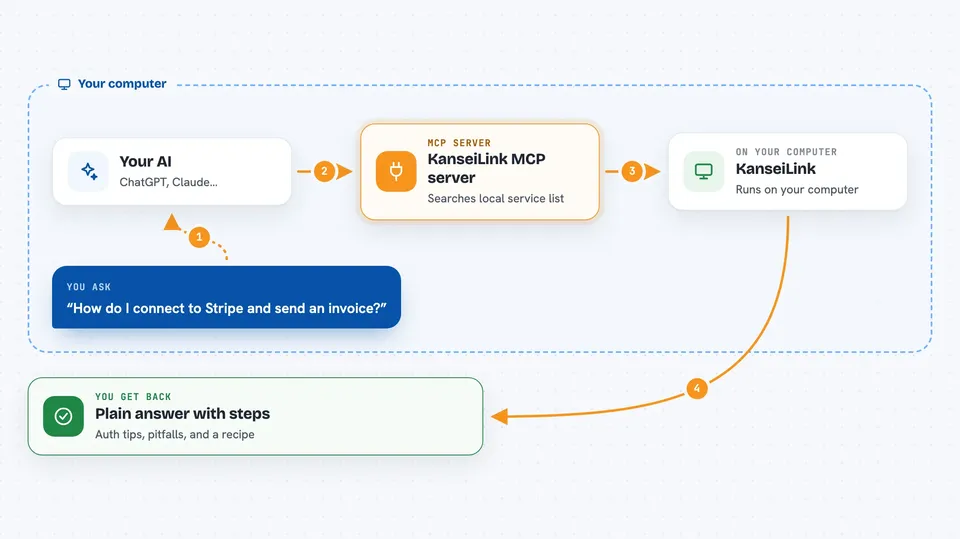
You ask your AI something like how to send an invoice through a service. Your AI uses this helper to search a local list of services and find the right one. The helper then gives back tips, auth steps, common pitfalls, and workarounds. Your AI uses that to make the API call correctly on the first try. You get a working answer faster, with fewer tokens spent.
 Click to zoom
What you can do with it
- Find a service by what you want to do, like send an invoice
- Look up auth steps and common pitfalls for a specific service
- Get a step-by-step recipe for a multi-service workflow
- See combinations of services that work well together
- Report whether a connection attempt worked or failed
- Submit feedback or share your opinion about a service
- Check your token usage and savings with a monthly report
Try asking your AI
- “How do I connect to Stripe and send an invoice?”
- “Find me a service that can send invoices to clients”
- “Give me a recipe for onboarding a new employee using freee and Slack”
- “What are the common auth problems with the freee API?”
What it gives back to you
You get back plain answers in the chat: a list of matching services, a short guide with auth steps and pitfalls, or a step-by-step recipe. It can also show you a monthly report of how many tokens your sessions used and how many KanseiLink saved. Everything comes back as text you can read and act on.
Before you start
What you need
- Node.js installed on your computer (the free runtime that runs npx commands)
- An MCP client like Claude Code, Cursor, Cline, Zed, or Windsurf
- No account or signup needed
Good to know
By default nothing leaves your computer, but if you turn on sharing or the reporting hook, small anonymous numbers about your usage are sent to KanseiLink's servers.
Install it with your AI
Add KanseiLink MCP server to your AI, no technical skills needed
You don't install anything by hand. You copy one prompt, paste it into an AI that can work on your computer, and it checks, installs and connects the server for you, asking you when it needs something.
Sign in to get the install prompt
Members get a ready-made prompt that lets the Claude desktop app check KanseiLink MCP server, install it and connect it for them, step by step. You don't need any technical skills: you copy, paste and answer a few questions. Your connected AI can also find and install any of the 4,361 MCP servers here for you.
Who it's for
Office workers and developers who often ask their AI to help connect or use work apps like Stripe, Slack, or freee.