MCP server · Analytics
Anyquery MCP server
by julien040
Lets your AI ask questions about your files, databases and apps using simple SQL, all from one small local program.
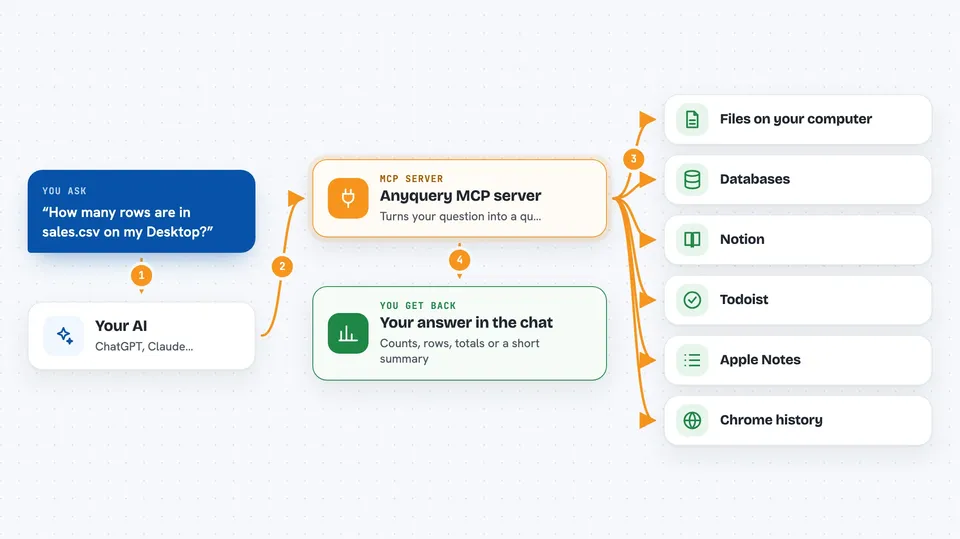
Anyquery is a small program you install on your own computer. It can read your files, your databases and many apps, and it lets your AI assistant ask questions about them using SQL, which is a plain way of asking for data. It is handy if you keep information in lots of places and want one assistant to look across all of it.
What is an MCP server? The 30-second version
On its own, your AI can only chat with you. An MCP server is a small helper program that gives your AI a new skill or a connection to something else. This one connects your AI to Anyquery, so the AI can run SQL queries on your files, databases and apps and bring the answers back to the chat. You do not write the SQL yourself; you just ask in normal words and the AI handles the rest.
What this MCP server does
You ask your AI a question in plain words, like how many rows are in a spreadsheet or what tasks are open in Todoist. The AI turns that into a SQL query and sends it to Anyquery on your machine. Anyquery runs the query against the file, database or app you pointed it at, using plugins to reach each one. It sends the result back to the AI, and the AI explains it to you in the chat. You never have to open a terminal or write SQL.
 Click to zoom
What you can do with it
- Ask questions about CSV, JSON and other files on your computer
- Look things up in PostgreSQL, MySQL and SQLite databases
- Pull data from apps like Notion, Todoist, Apple Notes and Chrome history
- Combine data from two places in one question, like joining a spreadsheet with a database table
- Get counts, totals and simple summaries without opening a spreadsheet
- Let your AI suggest and run a query, then show you the rows it found
Try asking your AI
- “How many rows are in the sales.csv file on my Desktop?”
- “List the open tasks in my Todoist project called Work”
- “Show me the last 10 orders from the customers database”
- “Which pages did I visit most often in Chrome last week?”
What it gives back to you
You get answers in the chat: lists of rows, counts, totals, or short summaries the AI writes from the data. If you asked a question, the AI usually shows the result as a small table or a few bullet points. If it ran a query that changed something, it tells you what changed. Everything stays in the conversation, so you can ask follow-up questions.
Before you start
What you need
- The Anyquery program installed on your computer (the README shows free install commands for Mac, Windows and Linux)
- The Claude desktop app or another AI client that supports MCP
- Any plugins you want to use, like the Notion or Todoist plugin, installed through Anyquery
Good to know
Anyquery can read your files, databases and app data, so only connect the sources you are comfortable sharing with your AI, and check any query that changes or deletes data before you run it.
Install it with your AI
Add Anyquery MCP server to your AI, no technical skills needed
You don't install anything by hand. You copy one prompt, paste it into an AI that can work on your computer, and it checks, installs and connects the server for you, asking you when it needs something.
Sign in to get the install prompt
Members get a ready-made prompt that lets the Claude desktop app check Anyquery MCP server, install it and connect it for them, step by step. You don't need any technical skills: you copy, paste and answer a few questions. Your connected AI can also find and install any of the 4,361 MCP servers here for you.
Who it's for
Office workers who keep data in spreadsheets, databases and everyday apps and want one assistant to look across all of it without learning SQL.