MCP server · Productivity
Claude Skills MCP server
by K-Dense-AI
Let your AI search a big library of ready-made skills and use the right one for your task.
This is a small helper that gives your AI assistant a library of ready-made skills to look through. Skills are little instruction packs that teach your AI how to do a specific job well, like working with documents or scientific data. It is handy if you use an AI tool that does not already have skills built in, and you want it to find and use the right one on its own. One important note: the makers have stopped hosting and maintaining this project, so it may not get updates.
What is an MCP server? The 30-second version
On its own, your AI can only chat with you using what it already learned. An MCP server is a small helper program that gives your AI a new skill or a connection to something outside the chat. This one connects your AI to a library of Claude Agent Skills, so it can search that library and pull up the right skill when you ask for something. Think of it as handing your AI a well-organized filing cabinet of how-to guides it can open on demand.
What this MCP server does
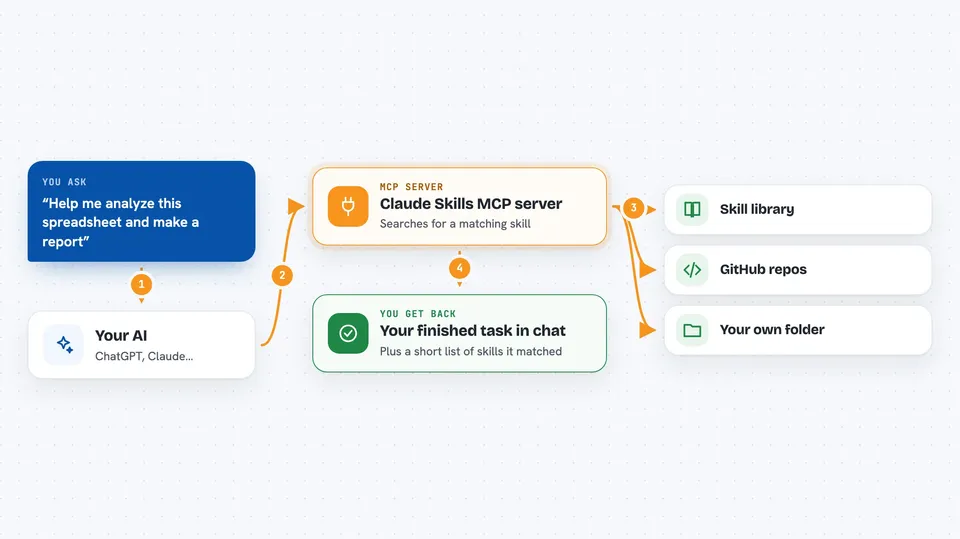
You ask your AI to do something, like analyze a spreadsheet or prepare a scientific report. The AI uses this helper to search the skill library for a matching skill, based on the meaning of your request, not just keywords. The helper finds the closest matches and hands back the skill's details. Your AI then reads the full instructions and any extra files it needs, and uses them to do your task. You just see the finished result in the chat.
 Click to zoom
What you can do with it
- Search a library of over 160 ready-made skills by describing your task
- Pull up the full instructions for a skill the AI found
- Fetch supporting files from a skill, like scripts or reference data
- List every skill currently loaded so you can browse what is available
- Load skills from GitHub repositories or a folder on your own computer
- Keep the skill list fresh by checking for updates every hour
What it gives back to you
You get answers in plain chat text. When the AI searches, it shows you a short list of matching skills with names and descriptions. When it opens a skill, it reads the instructions quietly and then uses them to do your task, so what you see is the finished work, not the raw skill files. If you ask it to list skills, you get a full inventory in the chat.
Before you start
What you need
- Python installed on your computer (the tool runs through a Python runner called uvx)
- An AI app that supports MCP servers, like Cursor or Claude Desktop
- About 250 MB of free space for the background part to download on first use
Good to know
This project is no longer hosted or maintained by its makers, so it may stop working over time and will not get fixes or updates.
Install it with your AI
Add Claude Skills MCP server to your AI, no technical skills needed
You don't install anything by hand. You copy one prompt, paste it into an AI that can work on your computer, and it checks, installs and connects the server for you, asking you when it needs something.
Sign in to get the install prompt
Members get a ready-made prompt that lets the Claude desktop app check Claude Skills MCP server, install it and connect it for them, step by step. You don't need any technical skills: you copy, paste and answer a few questions. Your connected AI can also find and install any of the 4,361 MCP servers here for you.
Who it's for
People who use an AI coding assistant or chat app that does not have skills built in, and who want it to find and apply the right ready-made skill for tasks like document work or scientific analysis.