MCP server · Apple, iOS and Mac
iMessage MCP server
Let your AI read, search and catch up on your iMessage and SMS chats, open attachments, and send replies you approve.
This is a small helper that runs on a Mac you own and lets your AI assistant look at your iMessage and SMS conversations. You can ask it what your latest texts are, search old messages, or open a photo someone sent. It is handy if you want an assistant to keep an eye on your messages for you.
What is an MCP server? The 30-second version
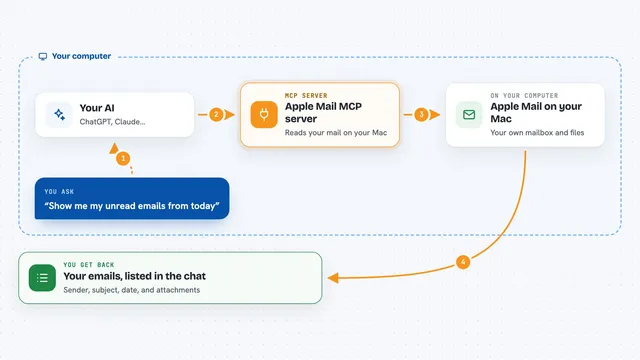
On its own, your AI can only chat with you. An MCP server is a small helper program that gives your AI a new skill or a connection to an app or service. This one connects your AI to the Messages app on your Mac, so it can look things up or send things there when you ask. It runs on your own computer, not on someone else's.
What this MCP server does
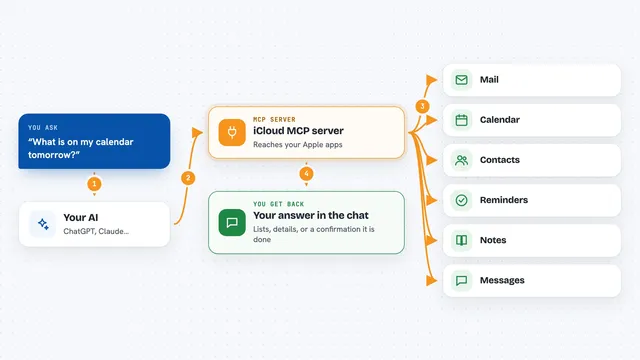
You ask your AI something like what are my latest texts. The AI passes that request to this helper. The helper talks to the Messages app on your Mac and reads the conversations. It hands the results back to the AI, which turns them into a plain answer for you. If you want to reply, the AI shows you a draft first, and only sends it after you say yes.
What you can do with it
- List your recent conversations, filtered by name, number or email
- Read the history of one chat, oldest to newest
- Catch up on new texts that arrived since the last time it looked
- Search your messages for a word or phrase
- Open a photo, video, PDF or document someone sent you
- Check the server's health and how many sends are left in the rate limit
- Send a reply, a file or both, but only to people you put on an allowlist
Try asking your AI
- “What are my latest texts?”
- “Search my messages for the word invoice.”
- “What is in the photo Mom sent me yesterday?”
- “Tell Sam no rush, I will be there soon.”
What it gives back to you
You get back plain answers in the chat: a list of chats, a set of messages with who sent them and when, or a description of a photo or document. When it sends a message, it tells you who it texted and what it said. Every result that contains someone else's words is marked as untrusted, so the AI knows to treat it as information, not instructions.
Before you start
What you need
- A Mac running macOS 14 or later, signed in to Messages
- The imsg helper installed (brew install steipete/tap/imsg)
- Full Disk Access granted to the app that runs the server, so it can read your messages
- For remote use: a domain on Cloudflare and a Cloudflare Zero Trust account
Good to know
Anyone can text your number, so a malicious message could try to trick the AI. That is why sending is off by default, limited to an allowlist, rate limited and logged, and you should always approve each draft before it goes out.
Install it with your AI
Add iMessage MCP server to your AI, no technical skills needed
You don't install anything by hand. You copy one prompt, paste it into an AI that can work on your computer, and it checks, installs and connects the server for you, asking you when it needs something.
Sign in to get the install prompt
Members get a ready-made prompt that lets the Claude desktop app check iMessage MCP server, install it and connect it for them, step by step. You don't need any technical skills: you copy, paste and answer a few questions. Your connected AI can also find and install any of the 4,960 MCP servers here for you.
Who it's for
People who want an AI assistant to keep an eye on their texts and draft replies, especially those who run a Mac mini or always-on Mac at home.