
MCP server · Coding
DeepSeek as Sub-Agent for Claude Code
by PsChina
Let Claude Code hand off coding tasks to DeepSeek, which can read, edit, and run commands in your project.
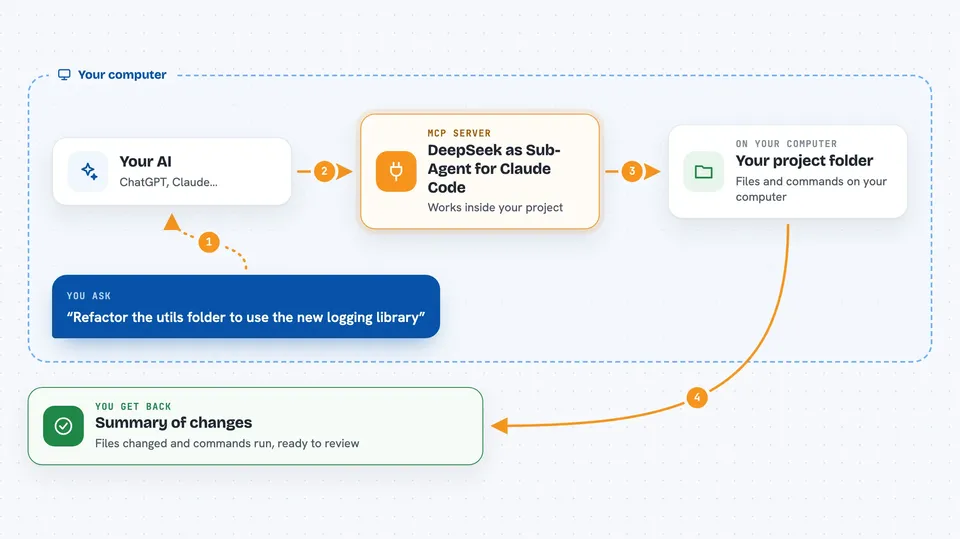
This is a helper that lets Claude Code (or Codex CLI) pass coding work to DeepSeek, a different AI model. DeepSeek then works inside your project folder: reading files, making edits, and running commands. It is handy if you already use Claude Code and want a second, cheaper worker for bigger jobs like refactors or test writing.
What is an MCP server? The 30-second version
On its own, your AI can only chat with you. An MCP server is a small helper program that gives your AI a new skill or a connection to another tool or service. This MCP server connects Claude Code to DeepSeek, so Claude can hand off a coding task and get the finished result back. You do not talk to DeepSeek directly; Claude does it for you when you ask.
What this MCP server does
You ask Claude Code to do a coding task, like refactor a file or write tests. Claude decides to delegate that task to DeepSeek by calling this MCP server. The server starts DeepSeek in its own loop, letting it read files, make edits, and run commands inside your project folder. When DeepSeek finishes, the result comes back to Claude, which then checks the changes. You see the outcome in your Claude Code chat.
 Click to zoom
What you can do with it
- Hand off multi-file coding tasks to DeepSeek
- Let DeepSeek read, edit, and run commands in your workspace
- Run read-only analysis tasks without command execution
- Start background jobs you can steer or cancel
- Choose between Flash and Pro DeepSeek models
- Recover from interrupted edits with a mutation journal
- Force delegation with the /ds command in Claude Code
Try asking your AI
- “Refactor the utils folder to use the new logging library”
- “Write unit tests for all functions in math_helpers.py”
- “Scan the logs directory and summarize any errors from yesterday”
- “Inspect this workspace and summarize its structure”
What it gives back to you
You get back a summary of what DeepSeek did, including any files it changed and commands it ran. If it wrote or edited files, you also get a list of those changes so you can review them. For analysis tasks, you get a written conclusion. The result appears in your Claude Code chat as a message from Claude.
Before you start
What you need
- Claude Code or Codex CLI installed
- Python 3.10 to 3.12
- A DeepSeek API key from platform.deepseek.com
Good to know
DeepSeek can change or delete files in your project and run commands on your computer, so only use it on projects you can afford to have modified, and review its changes.
Install it with your AI
Add DeepSeek as Sub-Agent for Claude Code to your AI, no technical skills needed
You don't install anything by hand. You copy one prompt, paste it into an AI that can work on your computer, and it checks, installs and connects the server for you, asking you when it needs something.
Sign in to get the install prompt
Members get a ready-made prompt that lets the Claude desktop app check DeepSeek as Sub-Agent for Claude Code, install it and connect it for them, step by step. You don't need any technical skills: you copy, paste and answer a few questions. Your connected AI can also find and install any of the 4,361 MCP servers here for you.
Who it's for
Developers who use Claude Code and want to delegate larger coding tasks to a cheaper model.



