
MCP server · Developer tools
KoliBri MCP server
by public-ui
Look up accessible KoliBri web components, their specs, docs, and usage examples right inside your AI chat.
KoliBri is a free, open source set of ready-made web building blocks (buttons, inputs, and so on) that are built to be accessible for everyone. This helper lets your AI look up how those building blocks work, what they are called, and how to use them. It is handy if you write or review web pages and want quick, correct answers without digging through documentation yourself.
What is an MCP server? The 30-second version
On its own, your AI can only chat with you using what it already learned. An MCP server is a small helper program that gives your AI a new skill or a connection to something outside the chat. This one connects your AI to KoliBri, the accessible web component library, so it can look things up there for you. You just ask a question in plain words, and the helper fetches the details so the AI can answer with real information instead of guessing.
What this MCP server does
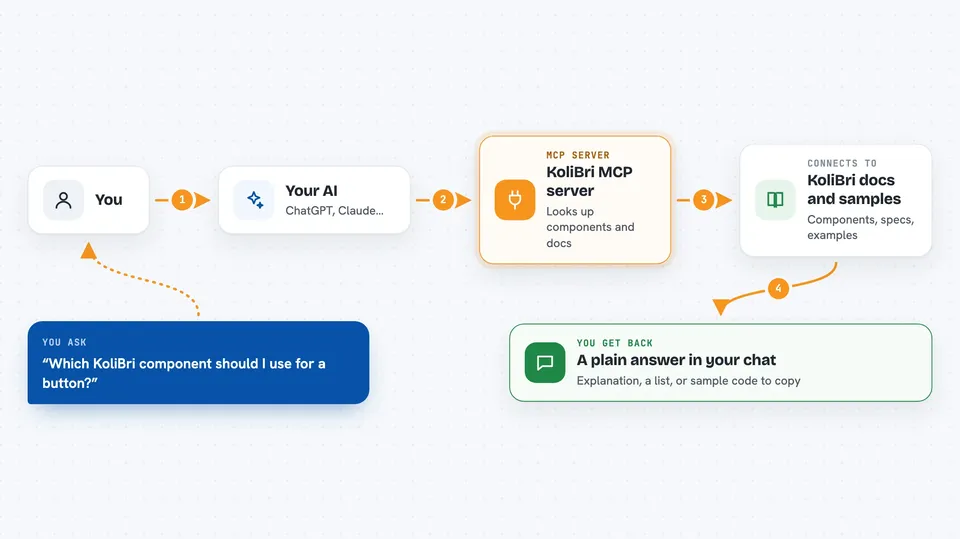
You ask your AI something about KoliBri, like which component to use for a form or how a button is set up. The AI passes your question to this helper. The helper looks through KoliBri's samples, specs, docs, and scenarios. It sends the matching details back to the AI. The AI then explains it to you in the chat, in normal words.
 Click to zoom
What you can do with it
- Find the right KoliBri component for a job, like a button, input, or table
- Read the specs and documentation for a specific component
- Look at sample code and scenarios showing how components are used
- Check what a component is called and what options it has
- Get help understanding how KoliBri keeps things accessible
- Compare components to pick the best fit for your page
Try asking your AI
- “Which KoliBri component should I use for a simple button?”
- “Show me a sample of how the KoliBri input component is used”
- “What does the KoliBri documentation say about accessibility for forms?”
- “List the KoliBri components that are good for building a table”
What it gives back to you
You get answers in plain words right in the chat. That can be a short explanation, a list of components, or a snippet of sample code you can copy. It may also point you to the part of the documentation it used. Nothing on your computer or in your accounts gets changed.
Install it with your AI
Add KoliBri MCP server to your AI, no technical skills needed
You don't install anything by hand. You copy one prompt, paste it into an AI that can work on your computer, and it checks, installs and connects the server for you, asking you when it needs something.
Sign in to get the install prompt
Members get a ready-made prompt that lets the Claude desktop app check KoliBri MCP server, install it and connect it for them, step by step. You don't need any technical skills: you copy, paste and answer a few questions. Your connected AI can also find and install any of the 4,609 MCP servers here for you.
Who it's for
Web developers, designers, and anyone building or reviewing websites who wants quick, correct answers about accessible KoliBri components.



