
MCP server · Coding
Ouroboros MCP server
by Q00
Turn a vague coding idea into a clear plan your AI can build and check step by step.
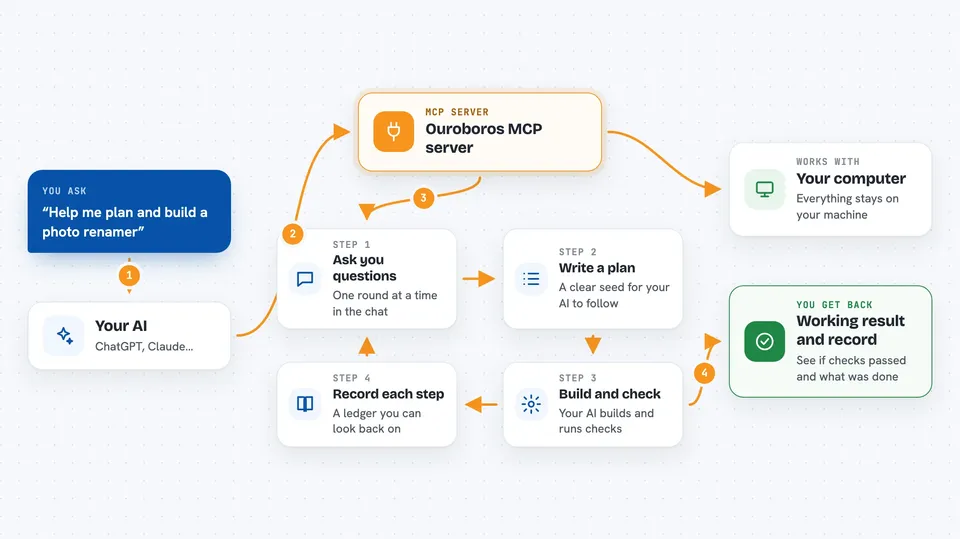
Ouroboros is a helper for people who use AI to write code. Instead of you writing a long, careful prompt, it asks you questions first, writes down what you really want, then lets your AI build and test it. It is handy if your AI projects often go off track because the request was fuzzy.
What is an MCP server? The 30-second version
On its own, your AI can only chat with you. An MCP server is a small helper program that gives your AI a new skill or a connection to another tool. This one connects your AI to Ouroboros, a local workflow engine that runs on your own computer. Once connected, your AI can start an interview, save a plan, run the build, and check the result, all when you ask it to.
What this MCP server does
You tell your AI what you want to build, even if it is vague. Your AI uses this helper to ask you a round of questions, like what the tool should do and what counts as done. The helper turns your answers into a written plan called a seed, and records every step in a ledger so you can look back later. Then your AI builds the thing and runs checks against the plan. You get back a working result plus a clear record of what happened.
 Click to zoom
What you can do with it
- Turn a rough idea into a written plan before any code is written
- Answer a guided interview that surfaces things you forgot to mention
- Run the build and the checks in a repeatable way
- See a record of each step so you can replay or review it
- Use it from several AI coding tools like Claude Code, Codex, or Copilot
- Keep everything on your own machine instead of a remote service
Try asking your AI
- “ooo setup”
- “ooo interview I want to build a task management CLI”
- “Start an Ouroboros interview for a small tool that renames my photos by date”
- “Run the Ouroboros workflow to build and test the plan we just made”
What it gives back to you
You get back the interview questions first, one round at a time, so you can answer in the chat. After that, you get a written plan, then progress updates as the build and checks run. At the end you see whether the checks passed and a short record of what was done. Everything stays in your chat window and on your machine.
Before you start
What you need
- A supported AI coding tool such as Claude Code, Codex CLI, or GitHub Copilot CLI
- Python and the uv tool, which the installer can set up for you
- A one-time run of ooo setup inside your AI tool
Good to know
It runs commands and writes files on your own computer as part of building and testing, so only point it at projects you are comfortable letting it change.
Install it with your AI
Add Ouroboros MCP server to your AI, no technical skills needed
You don't install anything by hand. You copy one prompt, paste it into an AI that can work on your computer, and it checks, installs and connects the server for you, asking you when it needs something.
Sign in to get the install prompt
Members get a ready-made prompt that lets the Claude desktop app check Ouroboros MCP server, install it and connect it for them, step by step. You don't need any technical skills: you copy, paste and answer a few questions. Your connected AI can also find and install any of the 4,609 MCP servers here for you.
Who it's for
Developers and technical teams who use AI coding tools and want a steadier, spec-first way to build software.



