
MCP server · Developer tools
Locust MCP server
by QAInsights
Ask your AI to run Locust load tests and read the results back to you in chat.
This is a small helper that lets your AI run Locust, a free tool for load testing websites and apps. Instead of typing Locust commands yourself, you just tell your AI what to test and it starts the test for you. It is handy for anyone who needs to check how a site holds up under traffic but does not want to memorize command line flags.
What is an MCP server? The 30-second version
On its own, your AI can only chat with you. An MCP server is a small helper program that gives your AI a new skill or a connection to another tool. This one connects your AI to Locust, a load testing tool that pretends many visitors are hitting your site at once. Once it is connected, you can ask your AI to run a Locust test and it will actually do it, then tell you what happened.
What this MCP server does
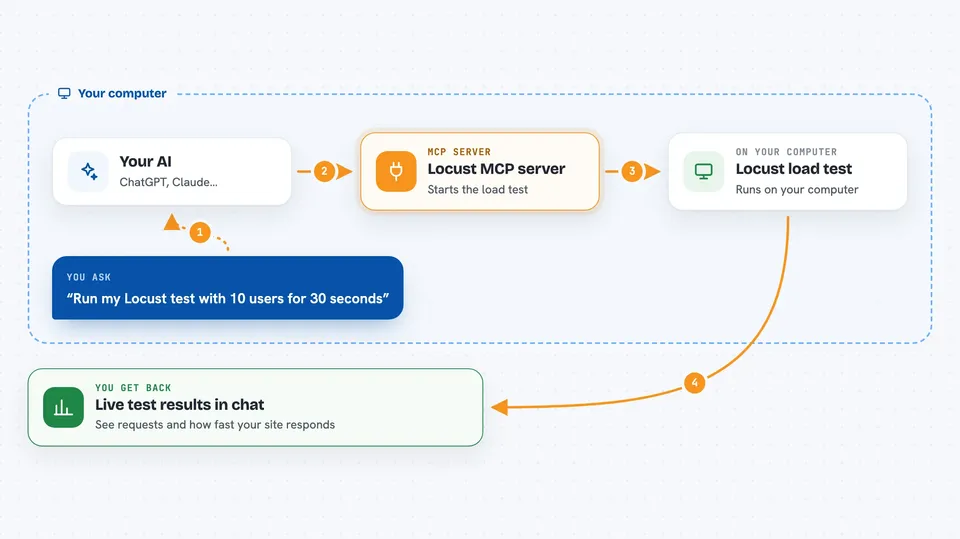
You write a small Locust test script that describes what to visit on your site. You ask your AI to run that script. Your AI passes the request to this helper, which starts Locust with the options you gave it, like how many users to simulate and how long to run. Locust sends the fake traffic and prints live output. The helper hands that output back to your AI, which shows it to you in the chat.
 Click to zoom
What you can do with it
- Run a Locust test script you already have
- Choose how many fake users to simulate
- Set how long the test should run
- Set how quickly fake users join in
- Point the test at a different host
- Run the test quietly without the Locust web page, or with it
- See the test output as it happens
Try asking your AI
- “Run locust test for hello.py”
- “Run my Locust test against http://localhost:8089 with 10 users for 30 seconds”
- “Start a load test on hello.py with a spawn rate of 2 and a runtime of 1m”
- “Run hello.py in headless mode with 5 users”
What it gives back to you
You get the live output from Locust in the chat, which includes the requests being made and the results as the test runs. Your AI can then summarize what happened, point out slow endpoints, or help you figure out why something failed. You can also ask follow up questions about the numbers it shows you.
Before you start
What you need
- Python 3.13 or newer
- The uv package manager (a tool that installs and runs Python programs)
- A Locust test script file you want to run
- An MCP client like Claude Desktop, Cursor, or Windsurf
Good to know
A load test sends real traffic to whatever host you point it at, so only run it against sites you own or have permission to test.
Install it with your AI
Add Locust MCP server to your AI, no technical skills needed
You don't install anything by hand. You copy one prompt, paste it into an AI that can work on your computer, and it checks, installs and connects the server for you, asking you when it needs something.
Sign in to get the install prompt
Members get a ready-made prompt that lets the Claude desktop app check Locust MCP server, install it and connect it for them, step by step. You don't need any technical skills: you copy, paste and answer a few questions. Your connected AI can also find and install any of the 4,609 MCP servers here for you.
Who it's for
Developers, QA engineers, and anyone who checks how a website or app performs under heavy traffic.




