
MCP server · Developer tools
DocGuard MCP server
by raccioly
Lets your AI check whether a project's documentation still matches its code, and suggest fixes.
DocGuard is a tool that checks whether a project's written documentation still matches what the code actually does. It finds things like an endpoint described in the docs that no longer exists, or a section that has drifted out of date. It is handy if you write or maintain docs for a software project and want to catch mistakes before they confuse people.
What is an MCP server? The 30-second version
On its own, your AI can only chat with you using what it already knows. An MCP server is a small helper program that gives your AI a new skill or a connection to another tool. This one connects your AI to DocGuard, a documentation checker. Once it is connected, you can ask your AI to run a documentation check on a project, and it will use DocGuard behind the scenes to look things up and report back.
What this MCP server does
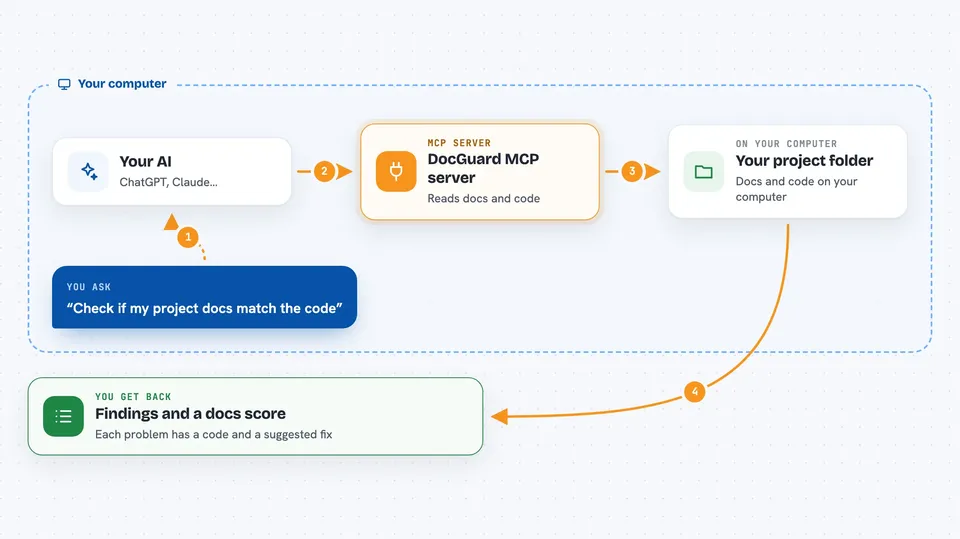
You ask your AI to check the documentation in a project folder. Your AI passes that request to DocGuard through this helper. DocGuard reads the project's docs and code, compares the claims in the docs against what it finds, and produces a list of findings with clear codes. Your AI then shows you those findings in the chat, along with suggested fixes. It only reads; it does not change your files.
 Click to zoom
What you can do with it
- Check a project's docs against its code and list any mismatches
- Get a maturity score for how complete and consistent the docs are
- See a detailed diagnosis with suggested fixes for each problem found
- Look up one section of a document at a time without loading the whole thing
- Run the same checks your team uses in CI, right from the chat
Try asking your AI
- “Run a DocGuard check on this project and tell me what documentation problems it finds”
- “What is the documentation maturity score for this repo, and what is dragging it down?”
- “Diagnose the docs in this folder and give me the suggested fixes”
- “Show me the API reference section of this project's docs”
What it gives back to you
You get back a list of findings, each with a short code, a plain description, and a suggested fix. You also get a score that summarizes how mature the documentation is, and a diagnosis that groups the issues. Everything shows up as text in your chat, so you can read it and decide what to do next. Nothing in your project is changed.
Before you start
What you need
- Node.js 18 or newer if you run it with npx, or Docker if you prefer the container
- An MCP client such as Claude Desktop, Claude Code, or Cursor
- A project folder with documentation you want to check
Good to know
It only reads your project and never changes files, so it is safe to run, but the findings are automated checks and may need a human eye to judge.
Install it with your AI
Add DocGuard MCP server to your AI, no technical skills needed
You don't install anything by hand. You copy one prompt, paste it into an AI that can work on your computer, and it checks, installs and connects the server for you, asking you when it needs something.
Sign in to get the install prompt
Members get a ready-made prompt that lets the Claude desktop app check DocGuard MCP server, install it and connect it for them, step by step. You don't need any technical skills: you copy, paste and answer a few questions. Your connected AI can also find and install any of the 4,361 MCP servers here for you.
Who it's for
Developers, technical writers, and anyone who keeps project documentation in step with the code.



