MCP server · Developer tools
Schema Bridge MCP server
by rafim-dev
Turn database table definitions into ready-to-use data rules, type files, and fake sample data.
Schema Bridge is a small helper that reads a description of a database table and rewrites it into other formats you can paste into your code. It can also make up realistic fake rows of data that match your table, which is handy for testing. It is most useful if you work with databases, APIs, or testing and keep retyping the same field lists by hand.
What is an MCP server? The 30-second version
On its own, your AI can only chat with you. An MCP server is a small helper program that gives your AI a new skill or a connection to another tool. This one connects your AI to a schema converter, so it can take a database table description you paste in and turn it into other formats or fake sample data. You just ask in plain words, and the helper does the translating behind the scenes.
What this MCP server does
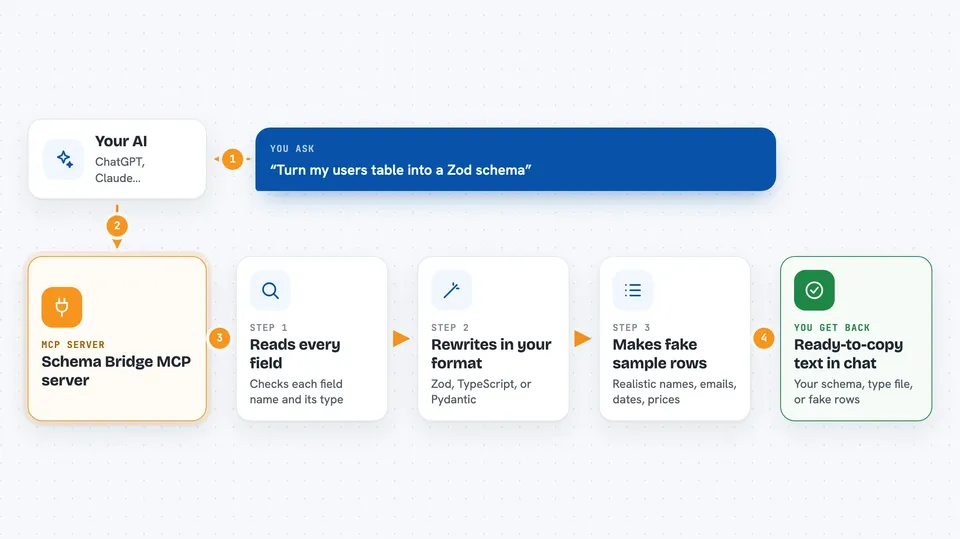
You paste in a description of a database table, written as SQL, a Prisma schema, or plain JSON. You tell your AI which format you want back, like Zod, TypeScript, or Pydantic. The AI hands your text to this helper, which reads every field and its type. The helper rewrites it in the format you asked for, or makes up realistic fake rows that match your fields. You get the result right in the chat, ready to copy.
 Click to zoom
What you can do with it
- Convert a SQL CREATE TABLE statement into a Zod validation schema
- Turn a Prisma schema into TypeScript interfaces
- Turn a SQL or Prisma schema into Python Pydantic v2 models
- Generate realistic fake rows of data that match your table fields
- Choose how many fake records you want
- Check a JSON payload against a schema and spot missing or wrong fields
Try asking your AI
- “Here is my users table in SQL. Convert it to a Zod schema.”
- “Turn this Prisma schema into TypeScript interfaces.”
- “Make me 5 fake rows of order data based on this table.”
- “Compare this JSON payload to my schema and tell me what is missing.”
What it gives back to you
You get text back in the chat: the converted schema or type file, or a list of fake records with names, emails, dates, prices, and statuses filled in. For the check tool, you get a short report of any missing fields or type mismatches. Everything is shown as text you can copy and paste into your project.
Before you start
What you need
- Node.js installed on your computer
- The schema-bridge-mcp files downloaded and built with npm install and npm run build
- The full path to the built index.js file on your machine
- The Claude Desktop app or Cursor, with its config file open for editing
Good to know
It only reads the schema text you paste in and gives text back, so it does not touch your real database, but always check the generated code before using it.
Install it with your AI
Add Schema Bridge MCP server to your AI, no technical skills needed
You don't install anything by hand. You copy one prompt, paste it into an AI that can work on your computer, and it checks, installs and connects the server for you, asking you when it needs something.
Sign in to get the install prompt
Members get a ready-made prompt that lets the Claude desktop app check Schema Bridge MCP server, install it and connect it for them, step by step. You don't need any technical skills: you copy, paste and answer a few questions. Your connected AI can also find and install any of the 4,609 MCP servers here for you.
Who it's for
Developers, testers, and data people who work with database tables and APIs and want to skip retyping field lists by hand.