MCP server · Developer tools · official
Appwrite MCP server
by appwrite · official
Connect your AI to Appwrite so it can manage your databases, users, functions and files for you.

This is the official Appwrite helper for your AI assistant. Appwrite is a service where you keep your app's data, user accounts, files and small pieces of code. Once you connect this, your AI can look at and change those things for you, just by asking in plain words.
What is an MCP server? The 30-second version
On its own, your AI can only chat. An MCP server is a small helper program that gives your AI a new skill or a connection to an app. This one connects your AI to Appwrite, so it can look things up and do things there for you when you ask. You connect it once, sign in through your browser, and then it just works in the background.
What this MCP server does
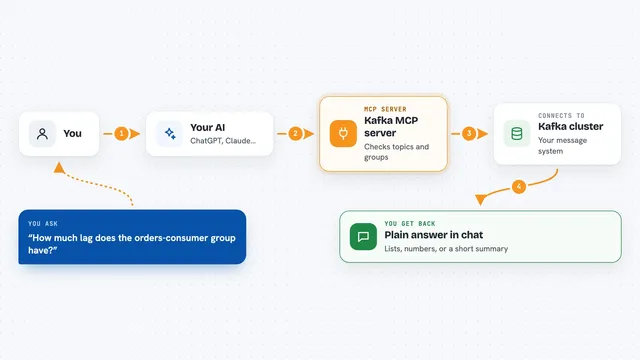
You ask your AI something about your Appwrite project, like how many users you have or what is in a collection. Your AI uses this helper to talk to Appwrite on your behalf. The helper sends the request to Appwrite, gets the answer back, and hands it to your AI. Your AI then explains it to you in the chat, or makes the change you asked for. You never have to open the Appwrite dashboard yourself.
 Click to zoom
What you can do with it
- List your Appwrite databases and the collections inside them
- Look up users and see their details
- Add, change or remove documents in your collections
- Check your storage buckets and the files in them
- See your functions and their settings
- Look at your teams and who is in them
- Search Appwrite's own documentation for answers
Try asking your AI
- “How many users signed up in my Appwrite project this month?”
- “Show me the collections in my main database.”
- “Add a new document to my customers collection with the name Jane and email jane@example.com.”
- “What functions do I have in Appwrite and when did they last run?”
What it gives back to you
You get answers in plain words right in the chat. That can be a list of users, a table of documents, a count, or a short summary of what your project looks like. When you ask it to change something, it tells you what it did. You do not get raw code or files unless you ask for them.
Before you start
What you need
- An Appwrite account (free to start)
- An MCP client that supports remote servers, like Claude Desktop, Cursor, VS Code or Claude Code
- A browser to sign in and approve access the first time
Good to know
It can change or delete things in your Appwrite project, so be careful with requests that ask it to remove data.
Install it with your AI
Add Appwrite MCP server to your AI, no technical skills needed
You don't install anything by hand. You copy one prompt, paste it into an AI that can work on your computer, and it checks, installs and connects the server for you, asking you when it needs something.
Sign in to get the install prompt
Members get a ready-made prompt that lets the Claude desktop app check Appwrite MCP server, install it and connect it for them, step by step. You don't need any technical skills: you copy, paste and answer a few questions. Your connected AI can also find and install any of the 4,361 MCP servers here for you.
Who it's for
Anyone who runs an app or website on Appwrite and wants to check or update things without clicking through the dashboard.