
MCP server · Developer tools
Credit Optimizer MCP server
by rafsilva85
Helps your AI pick cheaper Manus settings so you spend fewer credits on the same tasks.
This is a small helper that works with Manus AI to cut down how many credits your tasks use. It looks at what you are asking and tries to pick the cheapest way to do it without making the result worse. It is handy for anyone who uses Manus often and watches their credits disappear too fast.
What is an MCP server? The 30-second version
On its own, your AI can only chat with you. An MCP server is a small helper program you connect to your AI, and it gives the AI a new skill. This one gives your AI a sense of how to save Manus credits. So when you ask for something, the AI can check with this helper first and pick a cheaper path if the result will be just as good.
What this MCP server does
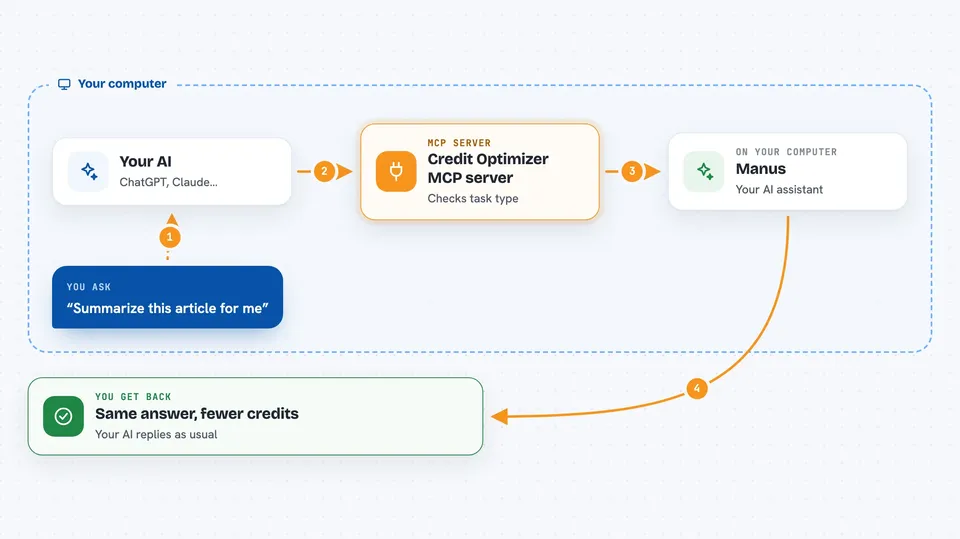
You ask your AI to do a task, like write some code or research a topic. The AI sends your request to this helper before running it. The helper looks at what kind of task it is and suggests the cheapest Manus mode that still gives the same quality. Your AI then runs the task that way, and you get the same result for fewer credits. If saving would hurt the quality, the helper leaves the task alone.
 Click to zoom
What you can do with it
- Route simple questions to Manus Chat Mode so they cost nothing
- Pick Standard mode instead of Max mode when the task is not complex
- Group related tasks together to reduce overhead
- Compress built-up context so later steps cost less
- Detect what kind of task you are asking for, like code or translation
- Skip any saving that would lower the quality of your result
Try asking your AI
- “Summarize this article for me”
- “Write a Python script that reads a CSV and prints the average”
- “Translate this paragraph into French”
- “Research the top three project management tools and compare them”
What it gives back to you
You get your normal answer back in the chat, same as always. Behind the scenes, the helper has nudged your AI toward a cheaper setting. You may notice your credit usage goes down over time. There is no separate report or file to look at.
Before you start
What you need
- A Manus AI account
- Python installed on your computer
- The mcp-credit-optimizer package from PyPI (free)
- An MCP-compatible app like Claude Desktop, Cursor, or Windsurf
Good to know
The MCP server only saves credits when you or your AI remember to call it, so it may not help on every task.
Install it with your AI
Add Credit Optimizer MCP server to your AI, no technical skills needed
You don't install anything by hand. You copy one prompt, paste it into an AI that can work on your computer, and it checks, installs and connects the server for you, asking you when it needs something.
Sign in to get the install prompt
Members get a ready-made prompt that lets the Claude desktop app check Credit Optimizer MCP server, install it and connect it for them, step by step. You don't need any technical skills: you copy, paste and answer a few questions. Your connected AI can also find and install any of the 4,609 MCP servers here for you.
Who it's for
People who use Manus AI regularly and want to stretch their credits further without losing quality.



