
MCP server · Finance and crypto
ChainAnalyzer AML MCP server
by rascal-3
Lets your AI check blockchain addresses for money-laundering risk and sanctions, across 12 chains.
This is a helper that connects your AI assistant to ChainAnalyzer, a service that checks blockchain addresses for signs of money laundering, sanctions and mixing. It is handy if you work in compliance, finance, crypto or fraud investigation and you want quick answers without learning a new tool. You just ask your AI in plain words and it does the checking for you.
What is an MCP server? The 30-second version
On its own, your AI can only chat. It cannot look up a blockchain address or check a sanctions list. An MCP server is a small helper program you connect once, and it gives your AI a new skill. Here, that skill is talking to ChainAnalyzer, so your AI can run risk checks and screening for you when you ask.
What this MCP server does
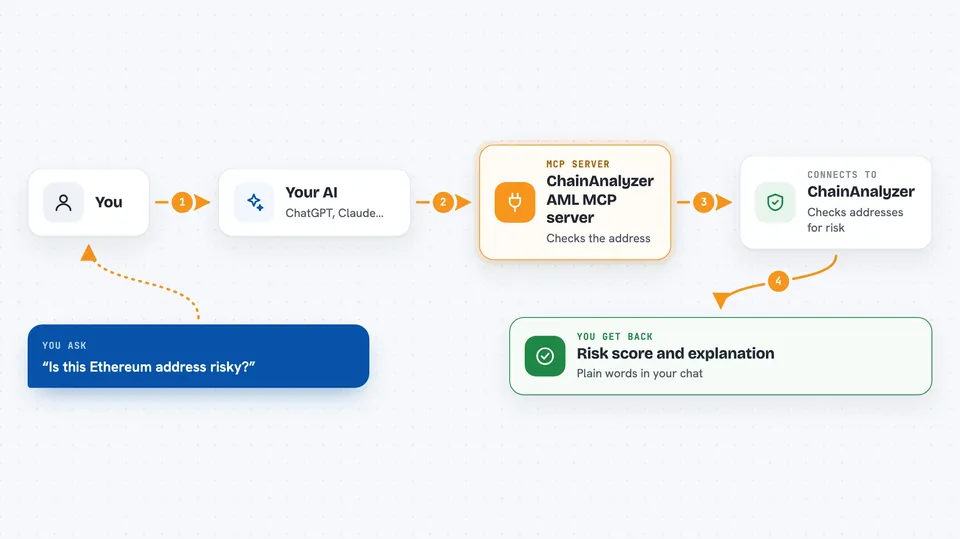
You type a question in your AI chat, like asking whether an address is risky. Your AI sends that request to this helper, which passes it to the ChainAnalyzer service. ChainAnalyzer runs its checks and sends back a result. Your AI then shows you that result in the chat, in plain words. You never have to open the ChainAnalyzer website yourself.
 Click to zoom
What you can do with it
- Check the AML risk score of a blockchain address
- Screen an address against OFAC, FATF and JFSA sanctions lists
- Trace where funds came from and where they went
- Detect CoinJoin and mixing patterns on Bitcoin
- Group wallets that likely belong to the same owner
- Screen a batch of up to 50 addresses at once
- Follow funds across chains and bridges
Try asking your AI
- “Check if this Ethereum address is sanctioned: 0x1234...”
- “What is the risk score for this Solana wallet: ABC123...”
- “Trace the fund flow of this Bitcoin transaction and check for mixing”
- “Screen these 20 addresses for AML compliance”
What it gives back to you
You get back a written answer in your chat, usually with a risk score, a short explanation and a list of what was found. For tracing or clustering, you get a summary of the flow or the group of wallets. For batch screening, you get a result for each address. Everything stays in the conversation, so you can ask follow-up questions.
Before you start
What you need
- A ChainAnalyzer account with a tfk_ API key (Pro plan), or a crypto wallet with USDC if you prefer to pay per check
- Node.js installed on your computer (the free program that runs small tools like this one)
- The Claude desktop app or another AI app that supports MCP servers
Good to know
Each check costs money, either through your subscription or by USDC payment, so keep an eye on how often your AI runs them.
Install it with your AI
Add ChainAnalyzer AML MCP server to your AI, no technical skills needed
You don't install anything by hand. You copy one prompt, paste it into an AI that can work on your computer, and it checks, installs and connects the server for you, asking you when it needs something.
Sign in to get the install prompt
Members get a ready-made prompt that lets the Claude desktop app check ChainAnalyzer AML MCP server, install it and connect it for them, step by step. You don't need any technical skills: you copy, paste and answer a few questions. Your connected AI can also find and install any of the 4,361 MCP servers here for you.
Who it's for
Compliance officers, fraud and AML analysts, crypto investigators and finance teams who need quick blockchain risk checks.




