MCP server · Developer tools
OpenAPI MCP server
by ReAPI-com
Lets your AI read your OpenAPI API specs so it can explain endpoints and write code that matches them.
This is a small helper that connects your AI assistant to your OpenAPI files, the documents that describe how an API works. Once it is set up, your AI can look through those files and answer questions about your API or write code that fits it. It is handy for developers and anyone who works with API documentation in their editor.
What is an MCP server? The 30-second version
On its own, your AI can only chat with you. An MCP server is a small helper program that gives your AI a new skill or a connection to something else. This one connects your AI to your OpenAPI specification files, which are the written descriptions of your APIs. With it running, your AI can look things up in those files and use them when it answers you.
What this MCP server does
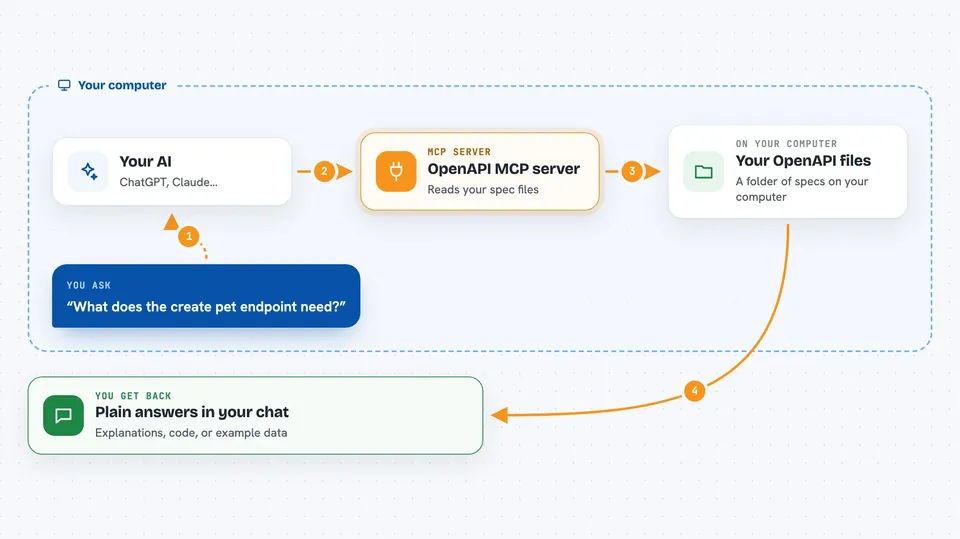
You keep your OpenAPI files in a folder on your computer. This helper scans that folder, reads every spec it finds, and builds a catalog of all the endpoints and data shapes inside them. When you ask your AI something about your API, the AI asks this helper, the helper looks in the catalog, and sends back the details. Your AI then uses that to explain things, write code, or make example data for you.
 Click to zoom
What you can do with it
- List all the APIs and endpoints found in your specs folder
- Explain what a specific endpoint does and what it needs
- Search across your specs for endpoints or data shapes
- Show the full details of one operation or schema
- Generate example request data that matches a schema
- Write code that calls your API correctly
- Refresh the catalog after you add new spec files
Try asking your AI
- “Show me all available APIs in the catalog with their operations”
- “What are the required parameters for creating a new pet?”
- “Generate mock data for the Pet schema”
- “Generate an Axios client for the create pet endpoint”
What it gives back to you
You get answers in your editor's chat, in plain language. It can return lists of endpoints, full details of one operation, or the shape of a data model. It can also hand your AI enough context to write code, example payloads, or documentation for you. When you refresh the catalog, you just get a short success message.
Before you start
What you need
- Node.js installed on your computer
- One or more OpenAPI 3.x specification files (JSON or YAML) in a folder
- An editor that supports MCP, such as Cursor
Good to know
It only reads your local spec files, so it does not change anything on its own, but the code or example data your AI writes from it should still be checked before you use it.
Install it with your AI
Add OpenAPI MCP server to your AI, no technical skills needed
You don't install anything by hand. You copy one prompt, paste it into an AI that can work on your computer, and it checks, installs and connects the server for you, asking you when it needs something.
Sign in to get the install prompt
Members get a ready-made prompt that lets the Claude desktop app check OpenAPI MCP server, install it and connect it for them, step by step. You don't need any technical skills: you copy, paste and answer a few questions. Your connected AI can also find and install any of the 4,361 MCP servers here for you.
Who it's for
Developers and technical writers who work with APIs and want their AI editor to understand their API specs.