MCP server · Apple, iOS and Mac
Apple Shortcuts MCP server
by recursechat
Lets your AI list and run your Apple Shortcuts on your Mac for you.
This is a small helper that connects your AI assistant to the Shortcuts app on your Mac. Once it is set up, you can ask your AI to run one of your shortcuts by name, and it will do it for you. It is handy if you already use Shortcuts and want to trigger them by just typing a sentence.
What is an MCP server? The 30-second version
On its own, your AI can only chat with you. An MCP server is a small helper program that gives your AI a new skill or a connection to an app. This one connects your AI to Apple Shortcuts on your Mac, so it can see your shortcuts and run them when you ask. You stay in control the whole time.
What this MCP server does
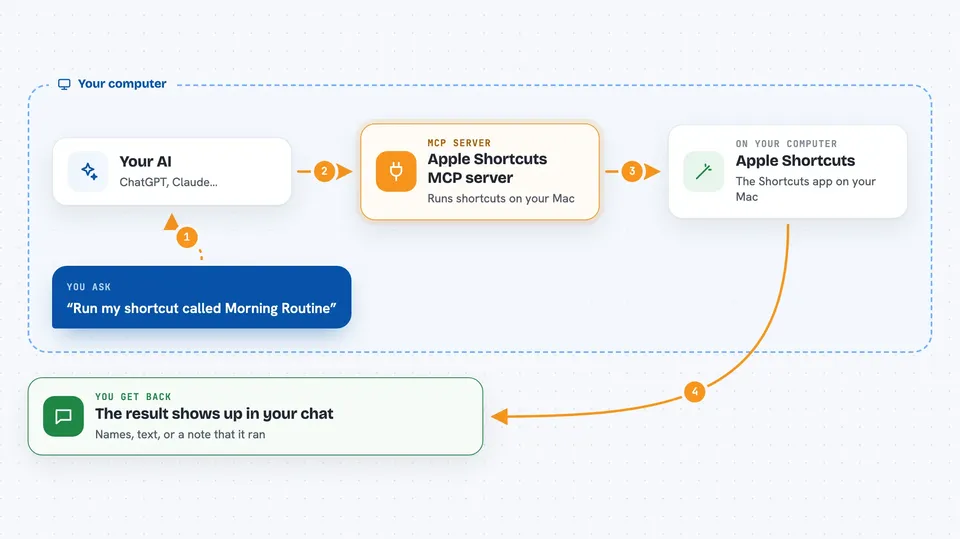
You type a request in your AI chat, like asking it to run a shortcut. The AI passes that request to this helper program running on your Mac. The helper talks to the Shortcuts app and either lists your shortcuts or runs the one you named. Then the result comes back into the chat so you can see what happened.
 Click to zoom
What you can do with it
- List all the shortcuts you have in the Shortcuts app
- Run a shortcut by its name
- Pass a piece of text or input into a shortcut
- Trigger your everyday automations without opening the Shortcuts app
- Check which shortcuts are available before running one
Try asking your AI
- “List my shortcuts”
- “Run my shortcut called Morning Routine”
- “Run the shortcut Get Word of the Day”
- “Play a song using my shortcut”
What it gives back to you
You get answers right in the chat. If you ask for a list, you get the names of your shortcuts. If you run one, you get whatever that shortcut produces, like text, a result, or a confirmation that it ran. It is a simple back and forth, no files to manage.
Before you start
What you need
- A Mac running macOS with the Shortcuts app set up
- Node.js version 18 or newer installed
- The Claude desktop app
Good to know
Shortcuts can change files, send messages, or control apps on your Mac, so only run shortcuts you trust.
Install it with your AI
Add Apple Shortcuts MCP server to your AI, no technical skills needed
You don't install anything by hand. You copy one prompt, paste it into an AI that can work on your computer, and it checks, installs and connects the server for you, asking you when it needs something.
Sign in to get the install prompt
Members get a ready-made prompt that lets the Claude desktop app check Apple Shortcuts MCP server, install it and connect it for them, step by step. You don't need any technical skills: you copy, paste and answer a few questions. Your connected AI can also find and install any of the 4,361 MCP servers here for you.
Who it's for
Mac users who already use Apple Shortcuts and want to trigger them by chatting with their AI.