
MCP server · Finance and crypto
Pix MCP server
Let your AI create Pix QR codes and copy-paste payment codes for Brazilian instant payments.
This is a small helper that lets your AI make Pix payment codes for you. You describe the charge in plain words, and it hands back a QR code and a copy-paste code you can send to someone. It is handy for anyone in Brazil who asks for Pix payments often, like freelancers, small shops, and people splitting bills.
What is an MCP server? The 30-second version
On its own, your AI can only chat. An MCP server is a small helper program that gives your AI a new skill. This one connects your AI to Pix, the Brazilian instant payment system, so it can build payment codes for you. You just ask in normal words, and the helper does the technical part behind the scenes.
What this MCP server does
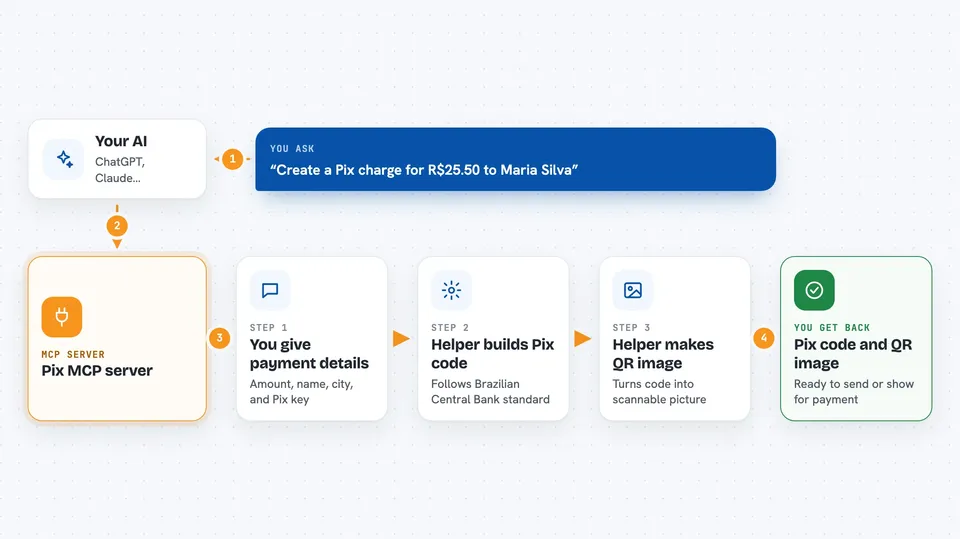
You tell your AI something like who is paying and how much. The AI passes those details to this helper. The helper builds a proper Pix code that follows the Brazilian Central Bank standard, and turns it into a QR code image plus a long copy-paste text code. You get both back in the chat, ready to send to the person who will pay.
 Click to zoom
What you can do with it
- Create a Pix QR code for any valid Pix key
- Get a copy-paste Pix code to send by chat or email
- Set a specific amount in Brazilian reais
- Include the recipient name and city on the charge
- Use email, phone, CPF, CNPJ, or random Pix keys
- Generate codes without signing up for any service
Try asking your AI
- “Create a Pix charge for R$25.50 to Maria Silva for lunch”
- “Make a Pix QR code for R$150 to my shop, recipient name Loja do Joao, city Sao Paulo”
- “Generate a Pix code for R$80 using my email key ana@example.com”
- “I need a Pix QR code for R$1,200 to pay my landlord, name Carlos Souza, city Rio de Janeiro”
What it gives back to you
You get the payment details back, like the amount, recipient name, and city. You also get a Pix copy-paste code in the official format, and a QR code image you can show or send. Everything appears right in your chat, ready to use.
Before you start
What you need
- A valid Pix key (email, phone, CPF, CNPJ, or random key) that is registered with a bank
- Node.js installed on your computer if you want to run it yourself
- The Claude desktop app or another AI tool that supports MCP servers
Good to know
The codes it makes are static, so they do not expire and the recipient has to check payments manually.
Install it with your AI
Add Pix MCP server to your AI, no technical skills needed
You don't install anything by hand. You copy one prompt, paste it into an AI that can work on your computer, and it checks, installs and connects the server for you, asking you when it needs something.
Sign in to get the install prompt
Members get a ready-made prompt that lets the Claude desktop app check Pix MCP server, install it and connect it for them, step by step. You don't need any technical skills: you copy, paste and answer a few questions. Your connected AI can also find and install any of the 4,361 MCP servers here for you.
Who it's for
Freelancers, small business owners, and anyone in Brazil who asks for Pix payments and wants to make codes quickly.




