
MCP server · API
ToolFunnel MCP server
by Rendeverance
One helper that gathers your tools and other MCP servers in one place, so your AI can use them all.
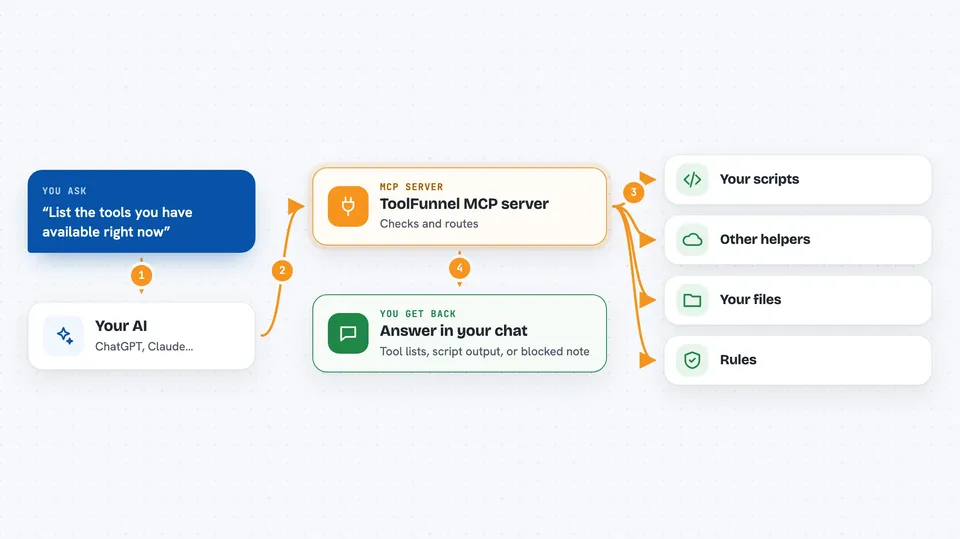
ToolFunnel is a small helper program that sits between your AI assistant and all the tools you want it to use. Instead of connecting your AI to ten different tool servers one by one, you connect it to ToolFunnel once, and ToolFunnel passes the work along. It is handy if you use several AI tools or scripts and want them all in one spot.
What is an MCP server? The 30-second version
On its own, your AI can only chat with you. An MCP server is a small helper program that gives your AI a new skill or a connection to an app or service. ToolFunnel is that helper here: it connects your AI to your own scripts and to other MCP servers, so the AI can look things up or run things for you when you ask. You set it up once, and from then on your AI has one door to everything.
What this MCP server does
You ask your AI to do something, like run one of your scripts or use a tool from another server. Your AI passes the request to ToolFunnel. ToolFunnel checks its rules, then either runs your own tool or forwards the request to the right MCP server. The result comes back to your AI, and your AI shows it to you in the chat. You can also add or remove tools while everything is running, without restarting anything.
 Click to zoom
What you can do with it
- Run your own scripts as AI tools, in any language
- Forward tools from other MCP servers through one connection
- Show your AI short tool summaries to save space and cost
- Turn tools on or off live, without restarting
- Hide tools you do not want your AI to see
- Add simple rules that can block a tool before it runs
- Package your setup as a shareable MCP server with one command
Try asking your AI
- “List the tools you have available right now”
- “Run my backup script and tell me if it worked”
- “Add the filesystem MCP server and show me its tools”
- “Hide the delete tool so the AI cannot use it”
What it gives back to you
You get answers in your normal chat: lists of tools, the output of a script, or the result of a tool from another server. When you ask for a list, you see short names and one-line descriptions. When you run something, you see what it produced, like text, numbers, or a success or failure message. If a rule blocks a tool, you see that it was blocked instead of run.
Before you start
What you need
- Node.js installed on your computer (the free program that runs it)
- The ToolFunnel files from its GitHub page
- Any other MCP servers you want to connect, if you have them
Good to know
It can run scripts and other tools on your computer, so only connect servers and tools you trust, and use the rules to block anything risky.
Install it with your AI
Add ToolFunnel MCP server to your AI, no technical skills needed
You don't install anything by hand. You copy one prompt, paste it into an AI that can work on your computer, and it checks, installs and connects the server for you, asking you when it needs something.
Sign in to get the install prompt
Members get a ready-made prompt that lets the Claude desktop app check ToolFunnel MCP server, install it and connect it for them, step by step. You don't need any technical skills: you copy, paste and answer a few questions. Your connected AI can also find and install any of the 4,609 MCP servers here for you.
Who it's for
People who use several AI tools or scripts and want one tidy place to manage them, without writing code.


