
MCP server · Browser automation
PageMap MCP server
by Retio-ai
Lets your AI read and click through web pages using far fewer tokens.
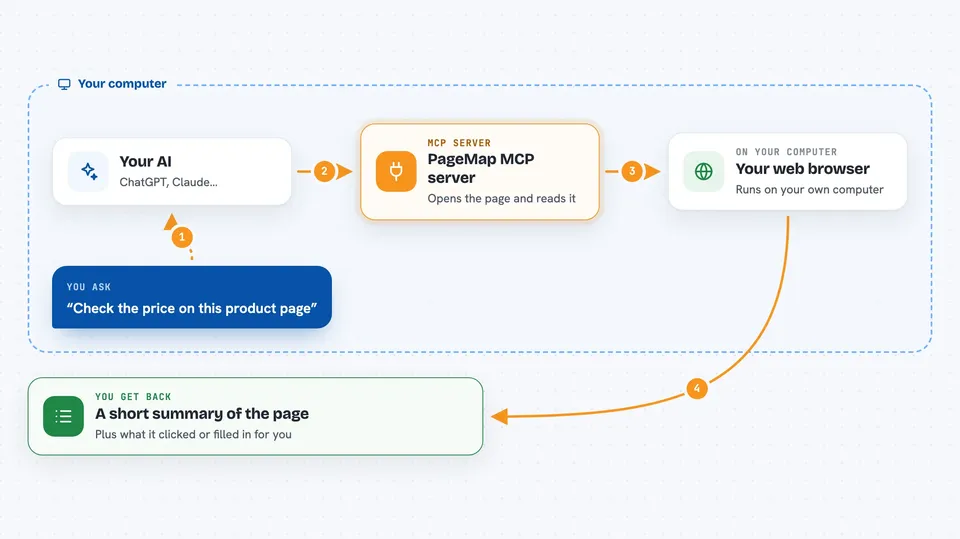
PageMap is a helper that lets your AI open a web page, understand what is on it, and interact with it, like clicking buttons or filling in forms. It is handy if you want your AI to check a product page, fill a form, or gather info from a site without you copying and pasting everything by hand.
What is an MCP server? The 30-second version
On its own, your AI can only chat with you. An MCP server is a small helper program that gives your AI a new skill. This one connects your AI to web pages, so it can look at a page and do things there for you. You just ask in plain words, and the helper does the browsing part.
What this MCP server does
You ask your AI something like 'check the price on this product page'. Your AI sends the web address to PageMap. PageMap opens the page in a browser, reads the important parts, and turns them into a short, clear summary. Then it sends that summary back to your AI, which answers you. If you ask it to click or fill something, PageMap does that too and tells you what changed.
 Click to zoom
What you can do with it
- Open a web page and list its buttons, links, and form fields
- Click a button or link on a page
- Fill in a form with several fields at once
- Scroll down to load more content
- Take a screenshot of the page
- Open and switch between multiple browser tabs
- Fetch several web pages at the same time for comparison
Try asking your AI
- “Open this product page and tell me the price and available sizes”
- “Go to this search page, type 'wireless headphones' and show me the top results”
- “Fill in the contact form on this page with my name and email”
- “Check if this page requires a login before I can see the content”
What it gives back to you
You get back a short, structured summary of the page: its title, the main info like prices or ratings, a numbered list of things you can click or type into, and image links. If you asked it to click or fill something, it tells you what it did and whether the page changed. You can also ask for a screenshot when you want to see the page visually.
Before you start
What you need
- Python 3.11 or newer installed on your computer
- The uv tool (a small program that runs Python helpers)
- The Claude desktop app or another AI app that supports MCP servers
Good to know
It can click and fill things on real websites, so be careful about what you ask it to do, especially on sites where you are logged in or where actions cost money.
Install it with your AI
Add PageMap MCP server to your AI, no technical skills needed
You don't install anything by hand. You copy one prompt, paste it into an AI that can work on your computer, and it checks, installs and connects the server for you, asking you when it needs something.
Sign in to get the install prompt
Members get a ready-made prompt that lets the Claude desktop app check PageMap MCP server, install it and connect it for them, step by step. You don't need any technical skills: you copy, paste and answer a few questions. Your connected AI can also find and install any of the 4,361 MCP servers here for you.
Who it's for
Anyone who wants their AI to browse and interact with websites for them, like checking prices, filling forms, or gathering info from pages.


