
MCP server · Notes
robo-cortex MCP server
Give your AI a memory of coding lessons that flags itself when the code it refers to changes.
robo-cortex is a small memory keeper for coding projects. It stores lessons your AI learns, like a fix that worked or a decision you made, and ties each one to the exact version of the code it came from. It is handy for developers and anyone who uses an AI coding assistant on a project that lives in git.
What is an MCP server? The 30-second version
On its own, your AI can only chat. An MCP server is a small helper program that gives your AI a new skill or a connection to another tool. This one connects your AI to robo-cortex, a local memory store for your project. Once connected, your AI can save lessons it learns and look them up again later, without you copying and pasting anything.
What this MCP server does
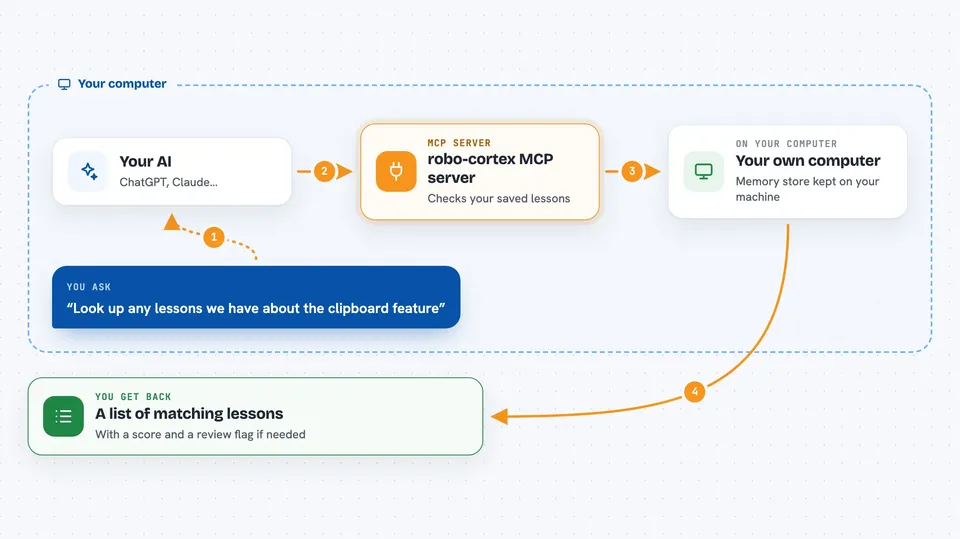
You ask your AI to fix a bug or work on a feature. The AI uses this helper to check the memory store for anything related to the task. If it finds a lesson, it reads it and uses it. When the AI learns something new, it can save that as a memory too. Later, if the code that a memory points to changes, the memory gets flagged so you know to review it.
 Click to zoom
What you can do with it
- Save a lesson your AI learned so it is not forgotten
- Look up past lessons and decisions for a task
- Search memories by keyword
- Attach proof like test output or a command to a memory
- Change a memory's status, for example mark it as no longer true
- See which memories are affected by recent code changes
- Read the full details of a single memory
Try asking your AI
- “Look up any lessons we have about the clipboard feature”
- “Save a memory that Safari 14 breaks CSS grid gap, use flexbox instead”
- “Which memories are affected by the changes in the last commit”
- “Mark memory 7 as superseded by memory 12 because the new pattern handles edge cases”
What it gives back to you
You get back a list of matching memories with a short statement, a score, and a flag if any need review. If you ask for one memory, you get its full details including status, evidence, and linked files. When you save or change a memory, you get a confirmation with the memory's id. Everything appears right in your chat.
Before you start
What you need
- A project that uses git
- Python installed on your computer
- The robo-cortex package installed with the MCP extra
- An AI app that can use MCP servers, like Claude Desktop or Claude Code
Good to know
It can change or flag memories, and a git hook can block commits until you review a memory, though you can bypass it with git commit --no-verify.
Install it with your AI
Add robo-cortex MCP server to your AI, no technical skills needed
You don't install anything by hand. You copy one prompt, paste it into an AI that can work on your computer, and it checks, installs and connects the server for you, asking you when it needs something.
Sign in to get the install prompt
Members get a ready-made prompt that lets the Claude desktop app check robo-cortex MCP server, install it and connect it for them, step by step. You don't need any technical skills: you copy, paste and answer a few questions. Your connected AI can also find and install any of the 4,609 MCP servers here for you.
Who it's for
Developers and technical teams who use AI coding assistants on git projects and want the AI to remember what it learned.


