MCP server · Music
FL Studio MCP server
Let Claude look at your FL Studio mix, suggest fixes, and write notes or chords for you.
This is a helper that connects Claude Desktop to FL Studio 2025, so you can talk to your music project in plain words. You ask for a mix check, a vocal chain, or a chord progression, and Claude carries it out inside FL Studio. It is handy for producers who use FL Studio and want a second pair of ears or a faster way to sketch ideas.
What is an MCP server? The 30-second version
On its own, your AI can only chat. An MCP server is a small helper program that gives your AI a new skill or a connection to an app, and here that app is FL Studio. Once it is set up, Claude can read your mixer, tracks, and patterns, and make changes when you ask. It is like giving your AI a hand that can reach into FL Studio.
What this MCP server does
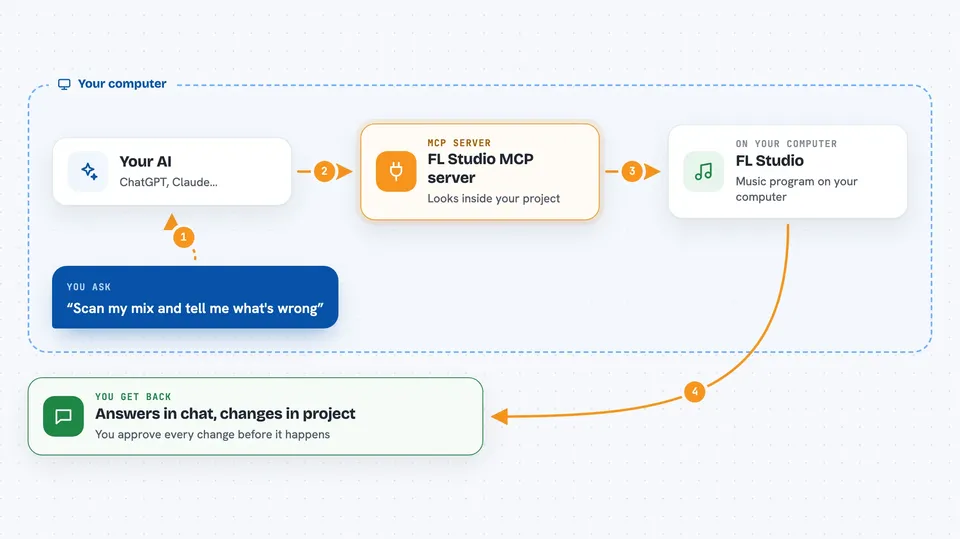
You type a request in Claude, like asking it to scan your mix or set up a vocal chain. Claude sends that request to this helper program, which talks to FL Studio through a small script running inside FL. FL Studio sends back information about your tracks, levels, and plugins, and Claude turns that into a plain answer or a proposed change. For changes, Claude shows you what it wants to do first, and only applies it after you approve. You see the result in the chat, and the change happens in your project.
 Click to zoom
What you can do with it
- Scan your whole mix and get a list of concrete problems with suggested fixes
- Set up a vocal chain or other processing using plugins you already own
- Suggest presets from your actual plugin and preset library
- Write a melody or chord progression into the piano roll in a chosen scale
- Export an arrangement as a standard MIDI file
- Estimate the tempo and key of an audio file
- Color tracks or groups by name or hex code
Try asking your AI
- “Scan my mix and tell me what's wrong.”
- “Set up a vocal chain on the lead vocal using my plugins.”
- “Suggest a vintage bass preset from my Serum library.”
- “Compose an 8-bar melody in D Dorian and write it to the selected channel.”
What it gives back to you
You get answers in the chat: a list of mix problems with evidence, a suggested plugin chain, a preset name, or a short summary of what changed. For note writing, the notes appear in your piano roll. For MIDI export, you get a file you can import. Every change is shown before it is applied and can be rolled back.
Before you start
What you need
- Windows 10/11 or macOS
- FL Studio 2025 or newer
- Claude Desktop (or another MCP client)
- Python 3.10 or newer
- Two virtual MIDI ports named exactly FLStudioMCP RX and FLStudioMCP TX (loopMIDI on Windows, IAC Driver on macOS)
Good to know
It can change your FL Studio project, so review each proposed change before approving, and remember that loading plugins, loading audio files, and rendering audio must still be done by hand in FL Studio.
Install it with your AI
Add FL Studio MCP server to your AI, no technical skills needed
You don't install anything by hand. You copy one prompt, paste it into an AI that can work on your computer, and it checks, installs and connects the server for you, asking you when it needs something.
Sign in to get the install prompt
Members get a ready-made prompt that lets the Claude desktop app check FL Studio MCP server, install it and connect it for them, step by step. You don't need any technical skills: you copy, paste and answer a few questions. Your connected AI can also find and install any of the 4,361 MCP servers here for you.
Who it's for
Music producers and beatmakers who use FL Studio and want AI help with mixing, sound design, and composition.