
MCP server · Research
Partle Marketplace MCP server
by rubenayla
Search products and nearby shops on Partle, get prices and links, or add listings, right from your AI chat.
This is a small helper that connects your AI assistant to Partle, a marketplace where people buy and sell things and find nearby physical stores. Once it is connected, you can ask your AI to look up products, compare prices, or find a shop close to you instead of waiting for a delivery. It is handy if you shop locally, run a small shop, or want your AI to help you list something for sale.
What is an MCP server? The 30-second version
On its own, your AI can only chat with you. An MCP server is a small helper program that gives your AI a new skill or a connection to an app or service. This one connects your AI to Partle, so it can search the Partle catalogue, look up stores, and even add listings for you when you ask. You do not need to understand how it works under the hood. You just talk to your AI like normal.
What this MCP server does
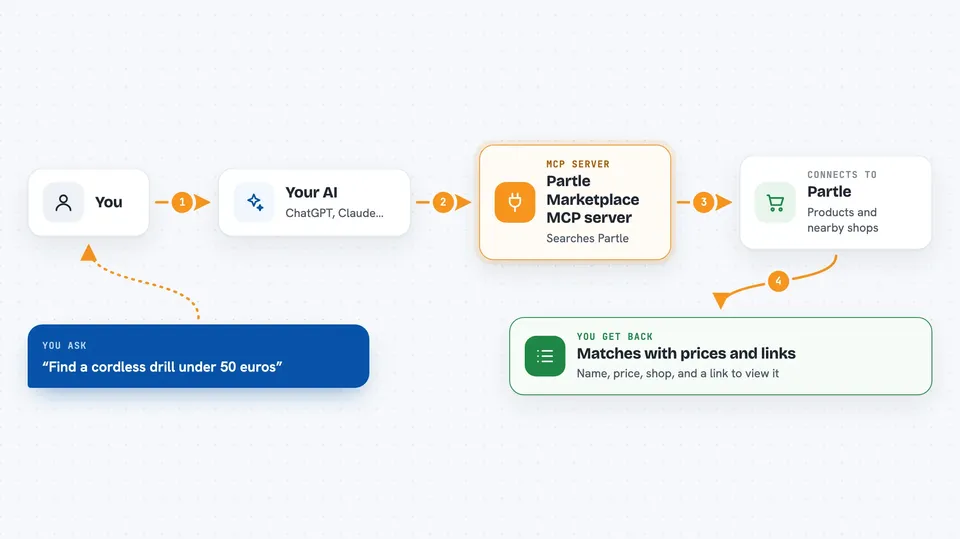
You ask your AI something like find a drill under 50 euros. Your AI passes that request to this helper. The helper talks to Partle, which looks through its products and stores. Then your AI shows you the matches in the chat, with names, prices, the store, and a link to view each listing. If you want to add or change something, the helper can do that too, but only after you have connected your Partle account.
 Click to zoom
What you can do with it
- Search Partle products by name, price range, tags, or store
- Look up full details for a single product or store
- Find nearby physical stores so you can buy locally
- Browse public buy requests from people looking for things
- Add a new product listing to Partle
- Edit or remove a listing you own
- Track your own inventory of items you own, want, or have sold
Try asking your AI
- “Use Partle to find a cordless drill under 50 euros.”
- “Are there any bike shops near Madrid on Partle?”
- “Show me what people are looking to buy on Partle right now.”
- “Add a listing on Partle for a used desk lamp, 15 euros, good condition.”
What it gives back to you
You get back a short list of matching products or stores, each with a name, price, the shop it is from, and a link to view it on Partle. For a single item, you get the full record with description and details. When you ask it to add or change something, it tells you what it did. Everything shows up as normal text in your chat.
Before you start
What you need
- An AI assistant that supports MCP servers, like Claude Desktop or claude.ai
- For searching and browsing: nothing else, it is public
- For adding or editing listings: a free Partle account, connected through a one-click sign-in or an API key from your Partle account page
Good to know
Adding, editing, or deleting listings changes real data on Partle, so check with your AI before confirming anything you do not want changed.
Install it with your AI
Add Partle Marketplace MCP server to your AI, no technical skills needed
You don't install anything by hand. You copy one prompt, paste it into an AI that can work on your computer, and it checks, installs and connects the server for you, asking you when it needs something.
Sign in to get the install prompt
Members get a ready-made prompt that lets the Claude desktop app check Partle Marketplace MCP server, install it and connect it for them, step by step. You don't need any technical skills: you copy, paste and answer a few questions. Your connected AI can also find and install any of the 4,609 MCP servers here for you.
Who it's for
People who like to buy locally, small shop owners, and anyone who wants their AI to help with shopping, listings, or tracking items for sale.


