
MCP server · Analytics
PageSpeed Insights MCP server
by ruslanlap
Ask your AI to check how fast any web page loads, on phone or desktop, and what to fix first.
This is a small helper that connects your AI assistant to Google's PageSpeed Insights and Chrome UX Report. Once it is set up, you can just paste a web address and ask how fast the page is. It is handy for anyone who looks after a website and wants plain answers instead of a wall of charts.
What is an MCP server? The 30-second version
On its own, your AI can only chat with you. An MCP server is a small helper program that gives your AI a new skill or a connection to another service. This one connects your AI to Google PageSpeed Insights, the free tool that measures how quickly web pages load. So when you ask about a page, your AI can go and fetch real speed numbers for you instead of guessing.
What this MCP server does
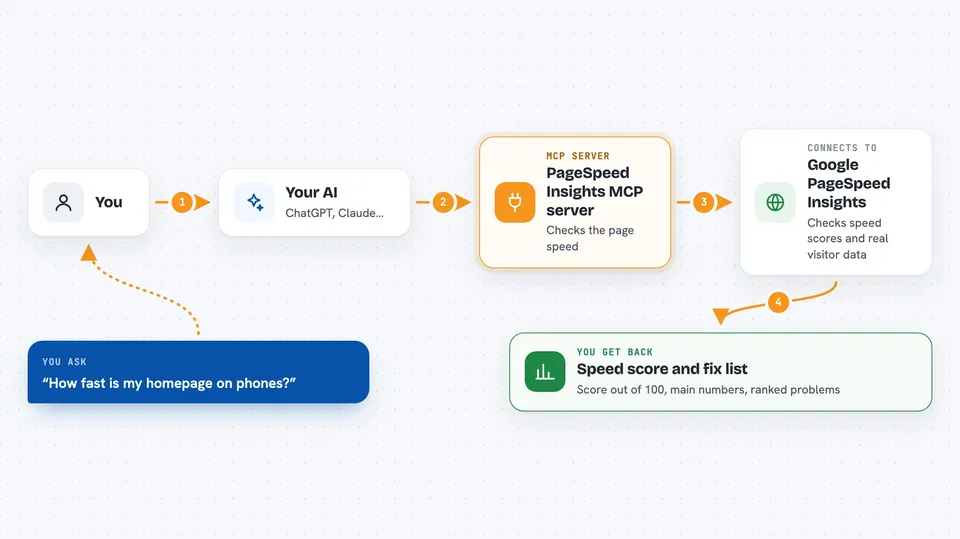
You ask your AI something like how fast your homepage is. Your AI passes that request to this helper program. The helper talks to Google's PageSpeed Insights and Chrome UX Report services and collects the results. Then it hands the numbers and a list of suggested fixes back to your AI. Your AI writes it all up for you in the chat in plain language.
 Click to zoom
What you can do with it
- Check the speed score of any web page on phone or desktop
- See how real visitors experience your site, not just a test run
- Compare two pages side by side to see which is faster
- Run the same check on several pages at once
- Get a ranked list of what to fix first and why
- Spot heavy images, slow scripts and things blocking the page
- Save a baseline and check later whether speed got worse
What it gives back to you
You get back a score out of 100 for the page, plus the main speed numbers like how long until something appears on screen. You also get a list of problems, ranked by how much they matter, with short explanations. Sometimes you get screenshots or details about specific images and scripts. It all shows up as a normal written answer in your chat.
Before you start
What you need
- The Claude desktop app or another AI app that supports MCP servers
- A Google API key with the PageSpeed Insights API turned on (Google gives you one for free)
- Node.js installed on your computer
Good to know
The speed numbers can vary a little between runs, so a single check is just one sample; ask for a few runs if you need a reliable picture.
Install it with your AI
Add PageSpeed Insights MCP server to your AI, no technical skills needed
You don't install anything by hand. You copy one prompt, paste it into an AI that can work on your computer, and it checks, installs and connects the server for you, asking you when it needs something.
Sign in to get the install prompt
Members get a ready-made prompt that lets the Claude desktop app check PageSpeed Insights MCP server, install it and connect it for them, step by step. You don't need any technical skills: you copy, paste and answer a few questions. Your connected AI can also find and install any of the 4,609 MCP servers here for you.
Who it's for
Website owners, marketers, and developers who want quick, plain answers about page speed without digging through dashboards.



