MCP server · Notes
SAIHM memory for AI agents
by SAIHM-Admin
Give your AI a memory that follows you between chats and tools, encrypted on your own machine.
SAIHM gives your AI assistant a memory that lasts longer than one chat. Normally your assistant forgets everything the moment a session ends. With SAIHM connected, it can remember things you tell it and bring them back later, in this chat or in a different assistant. It is handy if you keep repeating the same context over and over.
What is an MCP server? The 30-second version
On its own, your AI can only chat with you in the current window. An MCP server is a small helper program that gives your AI a new skill or a connection to a service. This one connects your AI to SAIHM, a memory service. Once it is connected, your AI can save things you want it to keep and look them up again when you ask.
What this MCP server does
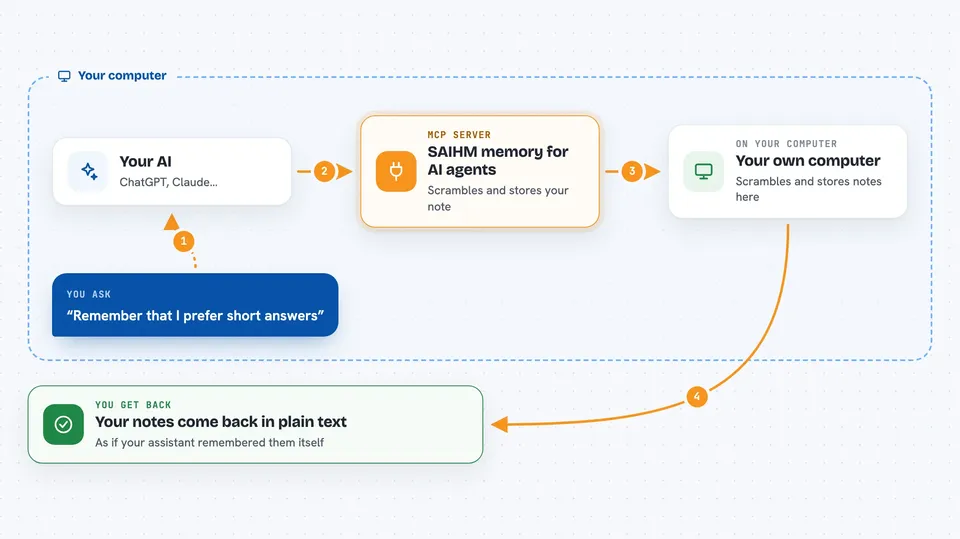
You tell your assistant something worth keeping, like a preference or a detail about a client. The assistant passes that to the SAIHM helper, which scrambles it on your own computer before it goes anywhere. When you later ask your assistant to recall your SAIHM memories, the helper fetches the scrambled copy and unscrambles it on your machine. You see the plain text in the chat, and the service in the middle only ever held unreadable scrambled text. You can also share one memory with someone else's agent for a set time, or erase a memory for good.
 Click to zoom
What you can do with it
- Save a preference or fact so your assistant remembers it next time
- Recall your saved memories at the start of a new chat
- Share one memory with a colleague's agent until a set time
- Take back a share you gave earlier
- Check how much of your free allowance is left
- Permanently erase a memory you no longer want kept
Try asking your AI
- “Recall my SAIHM memories before you start.”
- “Remember that I prefer short answers and no preamble.”
- “Share that note with my colleague's agent until 5:00 pm today.”
- “Forget everything I told you about the Henderson account.”
What it gives back to you
When you ask it to recall, you get your saved notes back as plain text in the chat, as if your assistant had remembered them itself. When you save something, you get a short confirmation. When you ask about your allowance, you get a simple status with what is left and your settings. Erasing gives you a confirmation that the memory is gone for good.
Before you start
What you need
- The Claude desktop app, Cursor, Cline, or another tool that supports MCP
- Node.js installed on your computer (the setup command uses it)
- A free SAIHM identity, created by running the free-join command once
Good to know
The forget action erases a memory for good with no undo, so be sure before you ask for it.
Install it with your AI
Add SAIHM memory for AI agents to your AI, no technical skills needed
You don't install anything by hand. You copy one prompt, paste it into an AI that can work on your computer, and it checks, installs and connects the server for you, asking you when it needs something.
Sign in to get the install prompt
Members get a ready-made prompt that lets the Claude desktop app check SAIHM memory for AI agents, install it and connect it for them, step by step. You don't need any technical skills: you copy, paste and answer a few questions. Your connected AI can also find and install any of the 4,066 MCP servers here for you.
Who it's for
Anyone who uses an AI assistant regularly and is tired of repeating the same background details in every new chat.