
MCP server · Security
Thales CipherTrust CAKM MCP server
by sanyambassi
Lets your AI check and manage database encryption keys on SQL Server and Oracle through Thales CipherTrust.
This is a helper that connects your AI assistant to the Thales CipherTrust system that looks after database encryption keys. It works with Microsoft SQL Server and Oracle databases. It is handy for database administrators and security teams who deal with encryption every day.
What is an MCP server? The 30-second version
On its own, your AI can only chat with you. An MCP server is a small helper program that gives your AI a new skill or a connection to an app or service. This one connects your AI to your database encryption setup, so the AI can look up key status or carry out encryption tasks when you ask. You stay in charge; the AI just does the running around.
What this MCP server does
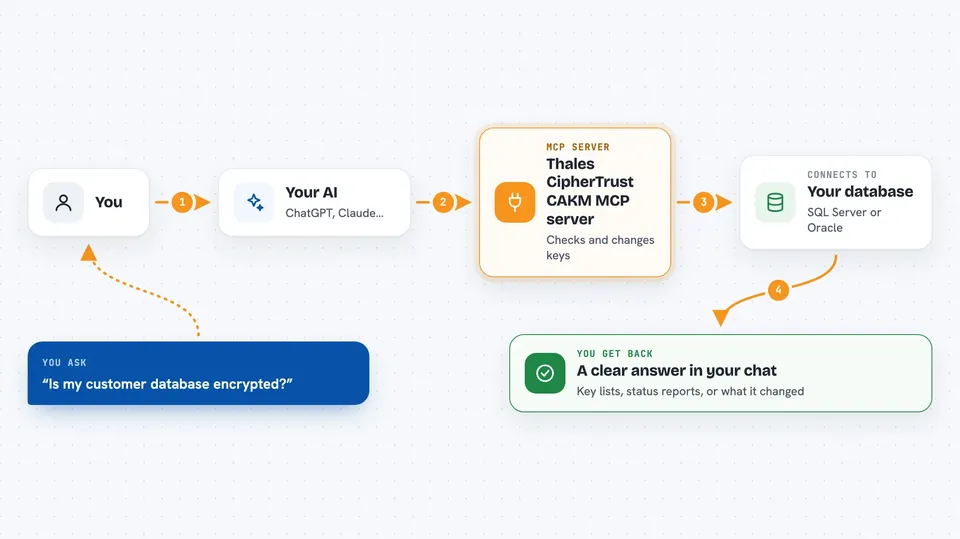
You type a request in plain words, like asking about the encryption status of one of your databases. Your AI passes that request to this helper program. The helper talks to your database server, which in turn talks to Thales CipherTrust Manager to get or change what is needed. Then you get an answer back in the chat, such as a list of keys or a status report. It can also carry out actions like rotating a key or encrypting a database, if you ask it to.
 Click to zoom
What you can do with it
- Check the encryption status of your SQL Server and Oracle databases
- List the encryption keys on a database connection
- Rotate a master encryption key
- Encrypt or decrypt a SQL Server database
- Manage Oracle wallets, including opening, closing and backups
- Set up Oracle encryption with or without auto-login
- Encrypt or decrypt a specific Oracle tablespace
Try asking your AI
- “Show me the TDE status of all my databases”
- “List all the asymmetric keys on my prod_sql connection”
- “Rotate the master key on the Db05 database using the prod_sql connection”
- “What is the wallet status for my oracle_cdb2 connection”
What it gives back to you
You get answers in the chat, usually as lists or short status reports. For example, you might see a list of keys with their names and states, or a summary of whether encryption is on and which wallet is in use. When you ask it to make a change, it tells you what it did, such as confirming a key was rotated or a database was encrypted.
Before you start
What you need
- A Thales CipherTrust Manager account with the right permissions
- Connection details for your SQL Server or Oracle database (host, port, username, password)
- For Oracle, the Oracle home path, SID or service name, and wallet location
- The uv tool installed on your computer (the setup guide shows how)
Good to know
This server can change or delete encryption keys and restart databases, so only point it at systems where you are allowed to make those changes and double-check before saying yes.
Install it with your AI
Add Thales CipherTrust CAKM MCP server to your AI, no technical skills needed
You don't install anything by hand. You copy one prompt, paste it into an AI that can work on your computer, and it checks, installs and connects the server for you, asking you when it needs something.
Sign in to get the install prompt
Members get a ready-made prompt that lets the Claude desktop app check Thales CipherTrust CAKM MCP server, install it and connect it for them, step by step. You don't need any technical skills: you copy, paste and answer a few questions. Your connected AI can also find and install any of the 4,361 MCP servers here for you.
Who it's for
Database administrators and security engineers who manage encryption on SQL Server or Oracle and use Thales CipherTrust.





