
MCP server · Research
ScraperCity MCP server
by scrapercity
Lets your AI pull business leads, find and check emails, and look up phone numbers for you.
ScraperCity is a service that gathers business contact information for you, like names, emails, and phone numbers. This MCP server connects that service to your AI assistant, so you can just ask for leads in plain words instead of clicking around a website. It is handy if you do sales, recruiting, or marketing and need lists of people or companies.
What is an MCP server? The 30-second version
On its own, your AI can only chat with you. An MCP server is a small helper program that gives your AI a new skill or a connection to an outside service. This one connects your AI to ScraperCity, so when you ask for leads or emails, the AI can actually go fetch them for you. You do not need to understand how it works under the hood. You just talk to your AI like normal.
What this MCP server does
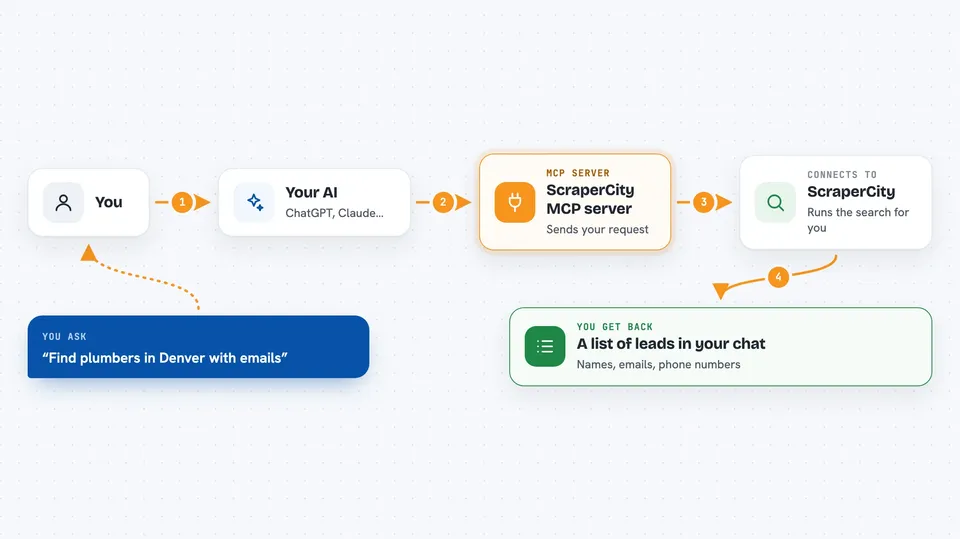
You ask your AI something like find plumbers in Denver with emails. The AI passes that request to this helper, which sends it to ScraperCity. ScraperCity runs the search, which can take anywhere from a minute to a day or more depending on the type. When it is done, the results come back into your chat as a list, and you can ask your AI to save them to a file.
 Click to zoom
What you can do with it
- Find business contacts by job title, industry, and location
- Pull local business listings from Google Maps with phone and email
- Check whether an email address is real and deliverable
- Find a work email from a person's name and company
- Look up mobile phone numbers from a LinkedIn profile or email
- Search for Shopify or WooCommerce store owners and their contacts
- Run a background check by name
Try asking your AI
- “Find 500 marketing directors at software companies in California”
- “Get me plumbers in Denver with their emails and phone numbers”
- “Validate this list of emails and tell me which ones are bad”
- “Find the work email for Jane Doe at Acme Corp”
What it gives back to you
You get back a list of leads, usually with names, companies, emails, phone numbers, and sometimes extra details like reviews or job titles. Your AI shows this in the chat, and you can ask it to save everything to a spreadsheet or CSV file. For some searches it also tells you how many results it found and what it cost. If a search is still running, it will tell you to wait and check again.
Before you start
What you need
- A ScraperCity account (there is a free trial with $5 of credit)
- An API key from your ScraperCity dashboard (a kind of password for apps)
- Money or credits on your account, since each search costs a small amount
- An AI app that supports MCP servers, like Claude Desktop, Claude Code, Cursor, or Windsurf
Good to know
Every search costs real money from your ScraperCity balance, and some searches (like Apollo) can take a day or more to finish, so check the price and wait time before running a big one.
Install it with your AI
Add ScraperCity MCP server to your AI, no technical skills needed
You don't install anything by hand. You copy one prompt, paste it into an AI that can work on your computer, and it checks, installs and connects the server for you, asking you when it needs something.
Sign in to get the install prompt
Members get a ready-made prompt that lets the Claude desktop app check ScraperCity MCP server, install it and connect it for them, step by step. You don't need any technical skills: you copy, paste and answer a few questions. Your connected AI can also find and install any of the 4,361 MCP servers here for you.
Who it's for
Sales reps, recruiters, marketers, and small business owners who need lists of business contacts without doing the digging by hand.


