
MCP server · Developer tools
Heap Seance MCP server
Lets your AI inspect a running Java app for memory leaks using jcmd, jmap, jstat, JFR and MAT.
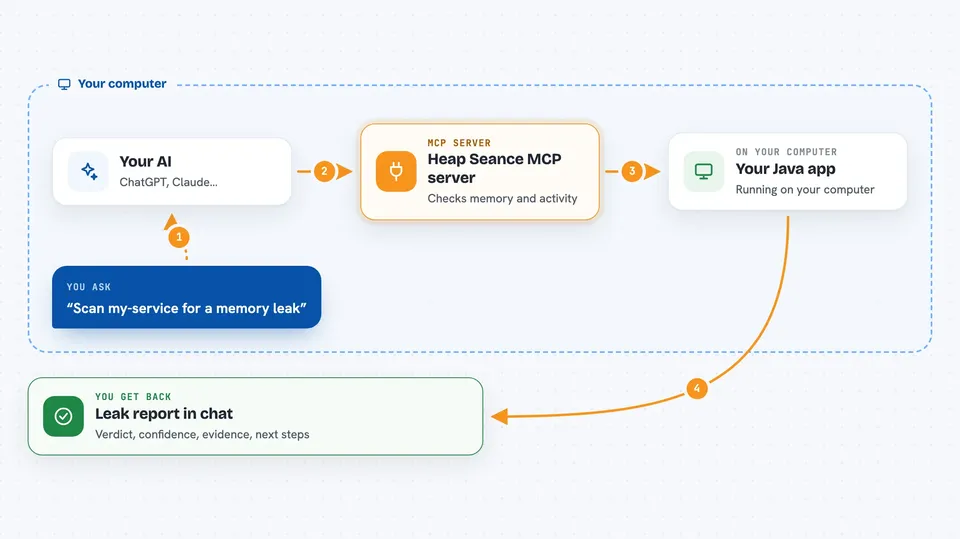
Heap Seance is a helper for finding memory leaks in Java programs. It plugs into Claude Code and runs a set of standard Java tools for you, then tells you what it found and how sure it is. It is handy if you look after a Java service that slowly eats memory until it falls over.
What is an MCP server? The 30-second version
On its own, your AI can only chat. An MCP server is a small helper program that gives your AI a new skill or a connection to something else. This one connects your AI to the Java tools already on your machine, like jcmd and jmap, so it can look inside a running Java app for you. You ask in plain words, and the helper does the technical part.
What this MCP server does
You tell your AI which Java app to look at, by name or by process number. The AI calls this helper, and the helper runs the Java tools on that app to take snapshots of what is in memory and how often garbage collection is running. It can also record a JFR file, take a full heap dump, and run Eclipse MAT to find what is holding onto objects. Then it gives you back a verdict with a confidence level, the evidence it used, and suggested next steps. If the first pass looks weak, you can ask for a deeper investigation.
 Click to zoom
What you can do with it
- List the Java programs running on your machine
- Take a snapshot of which classes have the most objects in memory
- Watch garbage collection over time to see if memory is under pressure
- Record a JFR file and summarize the events inside it
- Take a full heap dump for closer inspection
- Run Eclipse MAT to find likely leak suspects
- Profile where new objects are being allocated
Try asking your AI
- “Scan my-service for a memory leak”
- “Do a deep leak investigation on process 12345”
- “List the Java processes running right now”
- “Take a heap dump of my-service and run MAT on it”
What it gives back to you
You get a short report in the chat: a verdict, a confidence level like low or high, the key evidence, the suspect classes, and where any files were saved. Deep mode also suggests who is holding onto the objects and how you might fix it. The raw files, like .jfr and .hprof, are kept on disk so you or your team can look at them later.
Before you start
What you need
- The Claude Code app
- uv installed (a tool that runs Python projects)
- Python 3.10 or newer
- A JDK 17 or newer for the Java tools, with JAVA_HOME set
- Eclipse MAT (only if you want the deep investigation)
Good to know
It takes heap dumps and recordings of a running app, which can pause the app briefly and use disk space, so try it on a test or staging copy first if you can.
Install it with your AI
Add Heap Seance MCP server to your AI, no technical skills needed
You don't install anything by hand. You copy one prompt, paste it into an AI that can work on your computer, and it checks, installs and connects the server for you, asking you when it needs something.
Sign in to get the install prompt
Members get a ready-made prompt that lets the Claude desktop app check Heap Seance MCP server, install it and connect it for them, step by step. You don't need any technical skills: you copy, paste and answer a few questions. Your connected AI can also find and install any of the 4,609 MCP servers here for you.
Who it's for
Java developers and anyone who has to keep a Java service running without it slowly running out of memory.



