MCP server · Social media
TikTok MCP server
by Seym0n
Let your AI read TikTok video subtitles, pull post details, and search TikTok for you.
This is a small helper that connects your AI assistant to TikTok. Once it is set up, you can paste a TikTok link and ask your AI what the video says or how it is doing. It is handy for anyone who works with short videos, like social media managers, marketers, or curious creators.
What is an MCP server? The 30-second version
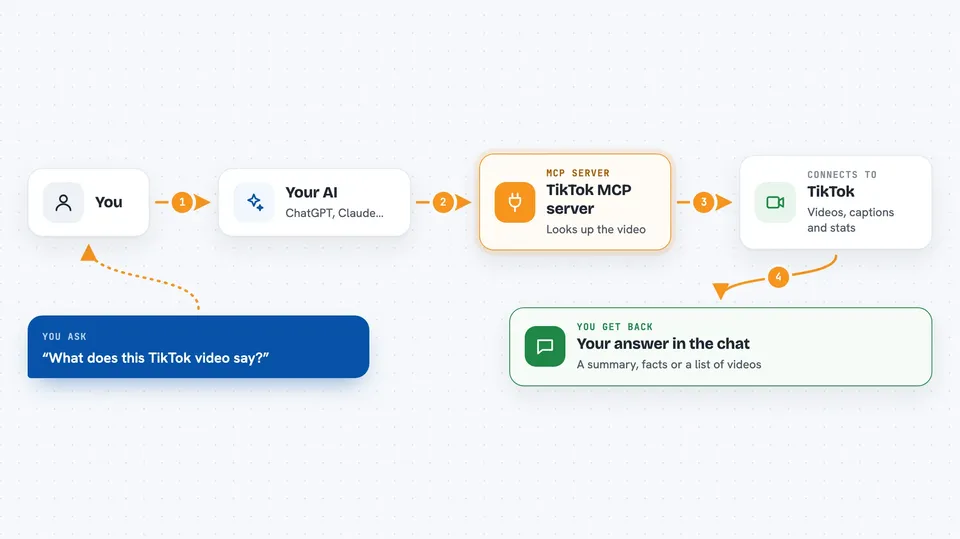
On its own, your AI can only chat with you using what it already knows. An MCP server is a small helper program that gives your AI a new skill or a connection to an app or service. This one connects your AI to TikTok through a service called TikNeuron, so the AI can look up videos, read their subtitles, and check their numbers when you ask. You stay in the chat, and the helper does the fetching in the background.
What this MCP server does
You paste a TikTok link or type a search word into your AI chat. The AI passes your request to this helper program. The helper talks to TikTok through TikNeuron and brings back the information. Then the AI shows it to you in plain language, like a summary of what the video says or a list of matching videos. You never have to leave the chat to look things up yourself.
 Click to zoom
What you can do with it
- Get the subtitle or spoken content of a TikTok video from its link
- See a video's description, creator, hashtags, and posting date
- Check likes, shares, comments, views, and bookmarks on a post
- Search TikTok for videos matching a word or topic
- Ask your AI to summarize or explain what a video is about
- Compare engagement numbers across a few videos you paste in
Try asking your AI
- “Here is a TikTok link, what does this video say?”
- “How many views and likes does this TikTok have?”
- “Search TikTok for cooking tutorial videos and list the top ones.”
- “Summarize the hashtags and description of this TikTok post.”
What it gives back to you
You get answers in the chat, written in normal sentences. For a subtitle request, you get the spoken text of the video. For post details, you get a list of facts like creator name, hashtags, view counts, and the date it was posted. For a search, you get a list of matching videos with their details, plus a way to ask for more results.
Before you start
What you need
- Node.js version 18 or higher installed on your computer
- Git installed on your computer
- A TikNeuron account and MCP API key (a kind of password for apps, which you get from tikneuron.com)
Good to know
It needs your TikNeuron API key, so keep that key private and do not share it with anyone.
Install it with your AI
Add TikTok MCP server to your AI, no technical skills needed
You don't install anything by hand. You copy one prompt, paste it into an AI that can work on your computer, and it checks, installs and connects the server for you, asking you when it needs something.
Sign in to get the install prompt
Members get a ready-made prompt that lets the Claude desktop app check TikTok MCP server, install it and connect it for them, step by step. You don't need any technical skills: you copy, paste and answer a few questions. Your connected AI can also find and install any of the 4,361 MCP servers here for you.
Who it's for
Social media managers, marketers, content creators, and anyone who needs to look up or analyze TikTok videos without leaving their AI chat.