MCP server · Social media
YouTube Subtitles MCP server
by anaisbetts
Let your AI read the subtitles of a YouTube video so it can summarize or answer questions about it.
This is a small helper that lets your AI read the subtitles of a YouTube video. Once it is connected, you can paste a video link and ask for a summary or the main points. It is handy for anyone who watches talks, tutorials, or interviews and wants the gist without sitting through the whole thing.
What is an MCP server? The 30-second version
On its own, your AI can only chat with you using what it already knows. An MCP server is a small helper program that gives your AI a new skill or a connection to another service. This one connects your AI to YouTube, so it can go and fetch the subtitles of a video when you ask. You stay in the chat, and the helper does the fetching behind the scenes.
What this MCP server does
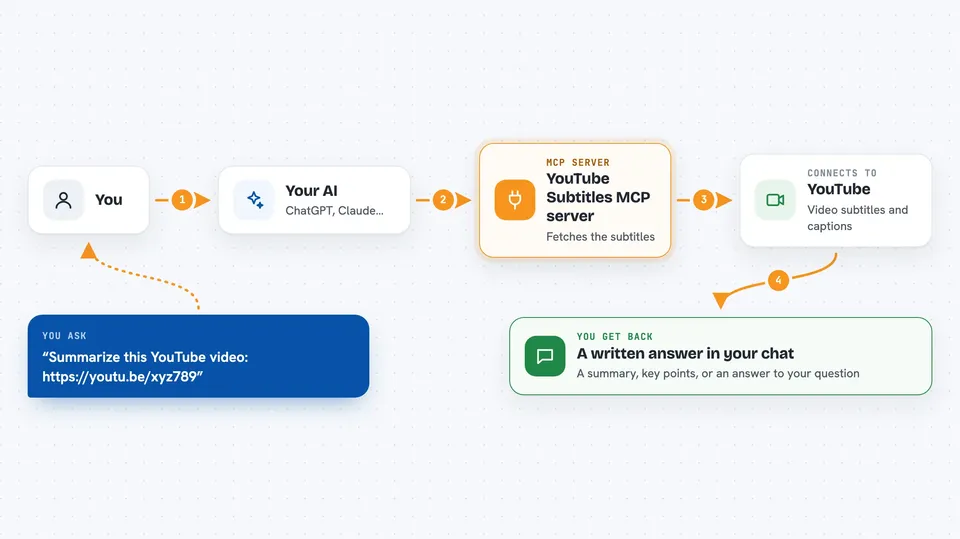
You paste a YouTube link into your chat and ask for a summary or a question about the video. Your AI passes that link to this helper. The helper uses a free tool called yt-dlp to download the subtitles from YouTube. It hands the text back to your AI, which then reads it and replies to you. You get an answer based on what was actually said in the video.
 Click to zoom
What you can do with it
- Summarize a YouTube video from its link
- Pull out the main points of a long talk or interview
- Answer questions about what was said in a video
- Find a specific quote or topic inside a video
- Turn a video into notes you can skim
Try asking your AI
- “Summarize this YouTube video: https://www.youtube.com/watch?v=abc123”
- “What are the main points of this talk? https://youtu.be/xyz789”
- “Did this interview mention anything about pricing? https://www.youtube.com/watch?v=def456”
- “Give me a short list of takeaways from this tutorial video”
What it gives back to you
You get a written answer in the chat, not a file. It might be a short summary, a bullet list of main points, or a direct answer to your question. The reply is based on the video's subtitles, so it reflects what was actually said. If the video has no subtitles, there is nothing to read and your AI will tell you so.
Before you start
What you need
- The yt-dlp tool installed on your computer (Homebrew on Mac or WinGet on Windows both work)
- An MCP installer or a way to add MCP servers to your AI app
- A YouTube video that has subtitles available
Good to know
It only reads subtitles from videos you point it at, so it does not change anything on YouTube, but it does need yt-dlp installed on your machine to work.
Install it with your AI
Add YouTube Subtitles MCP server to your AI, no technical skills needed
You don't install anything by hand. You copy one prompt, paste it into an AI that can work on your computer, and it checks, installs and connects the server for you, asking you when it needs something.
Sign in to get the install prompt
Members get a ready-made prompt that lets the Claude desktop app check YouTube Subtitles MCP server, install it and connect it for them, step by step. You don't need any technical skills: you copy, paste and answer a few questions. Your connected AI can also find and install any of the 4,361 MCP servers here for you.
Who it's for
Anyone who watches a lot of YouTube for work or study and wants quick summaries, notes, or answers without watching the whole video.