
MCP server · Security
s-gw credential gateway
by sgateway
Let your AI run approved commands using your secret keys without ever seeing them.
s-gw is a small program that sits between your AI coding assistant and your passwords, tokens, and keys. Instead of handing your real secrets to the AI, it gives the AI a harmless label and asks you to approve each use. It is handy for anyone who lets an AI helper run commands on their computer but does not want their keys exposed.
What is an MCP server? The 30-second version
On its own, your AI can only chat and write text. An MCP server is a small helper program that gives your AI a new skill or a connection to something outside the chat. This one connects your AI to s-gw, a local credential gateway, so the AI can ask for a named handle instead of a real secret. When you approve, s-gw quietly uses your real key behind the scenes and hands back clean results.
What this MCP server does
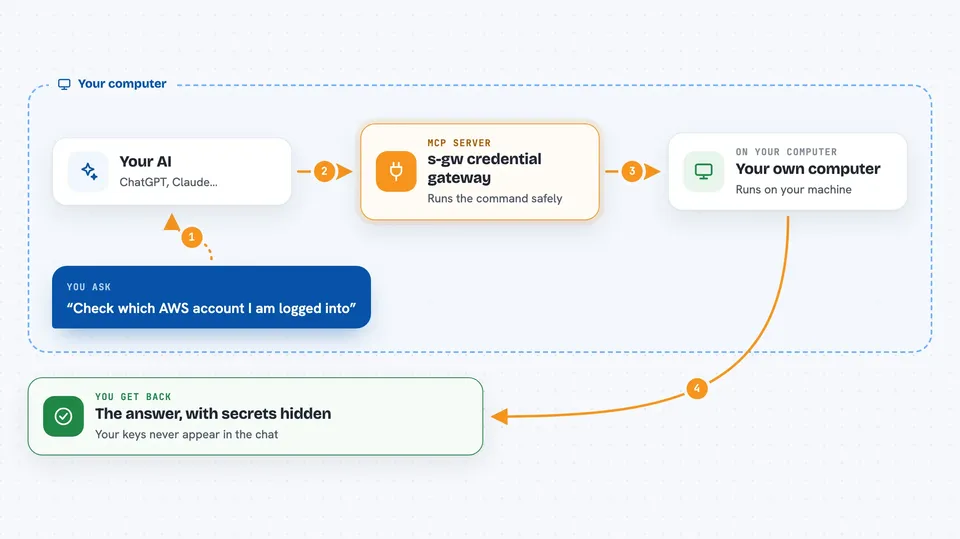
You ask your AI to do something that needs a secret, like check your cloud account. The AI asks s-gw for a handle, which is just a safe label for the real key. s-gw shows you a request with the agent name, the command, the handle, and where it will run. You approve or deny it. If you approve, s-gw runs the command on your machine with the real key injected only into that one process, then scans the output and replaces any secret values with handles before the AI sees them.
 Click to zoom
What you can do with it
- Keep raw API keys and passwords out of your AI chat
- Approve each use of a secret one time, for a session, or for a time window
- Run commands that need credentials without pasting the credential anywhere
- See a list of your stored credential handles without seeing the values
- Review an audit history of requests, approvals, and runs
- Launch coding agents with credential-looking values swapped for handles
- Connect s-gw to agents like Claude Code, Codex, Cursor, and others
Try asking your AI
- “Check which AWS account I am logged into using the prod-readonly handle”
- “Run the deploy script with my staging token”
- “List the credential handles you can see”
- “Show me the recent approval requests waiting for me”
What it gives back to you
You get back the normal output of the command, but with any detected secret values replaced by handle names. The AI also receives a record of what was requested, approved, and run. In the chat you see the result of the task, not your actual keys. You can also open the local console to see the approval queue, credential list, and activity history.
Before you start
What you need
- Node.js 20 or newer
- A computer running macOS, Windows 10/11, or Linux
- On Linux, the secret-tool package for storing secrets
- A coding agent you want to connect, like Claude Code or Codex
Good to know
This is an early preview that has not had an independent security audit, and it cannot protect you if your computer account is already compromised or if you approve a harmful command.
Install it with your AI
Add s-gw credential gateway to your AI, no technical skills needed
You don't install anything by hand. You copy one prompt, paste it into an AI that can work on your computer, and it checks, installs and connects the server for you, asking you when it needs something.
Sign in to get the install prompt
Members get a ready-made prompt that lets the Claude desktop app check s-gw credential gateway, install it and connect it for them, step by step. You don't need any technical skills: you copy, paste and answer a few questions. Your connected AI can also find and install any of the 4,609 MCP servers here for you.
Who it's for
Developers and technical teams who let AI coding agents run commands but want to keep their real credentials private.




