
MCP server · Coding
CodeGraphContext MCP server
Lets your AI map your codebase and answer questions about how the pieces connect.
CodeGraphContext is a helper that reads the code on your computer and builds a map of how everything links together. Once it is connected to your AI assistant, you can ask questions about your project and get answers based on that map instead of guesswork. It is handy for developers and anyone who has to understand a codebase they did not write.
What is an MCP server? The 30-second version
On its own, your AI can only chat with you using what it already knows. An MCP server is a small helper program that gives your AI a new skill or a connection to something else. This one connects your AI to a map of your local code, so it can look things up there when you ask. You do not need to understand how it works inside; you just ask a question and the AI uses this helper to find the answer.
What this MCP server does
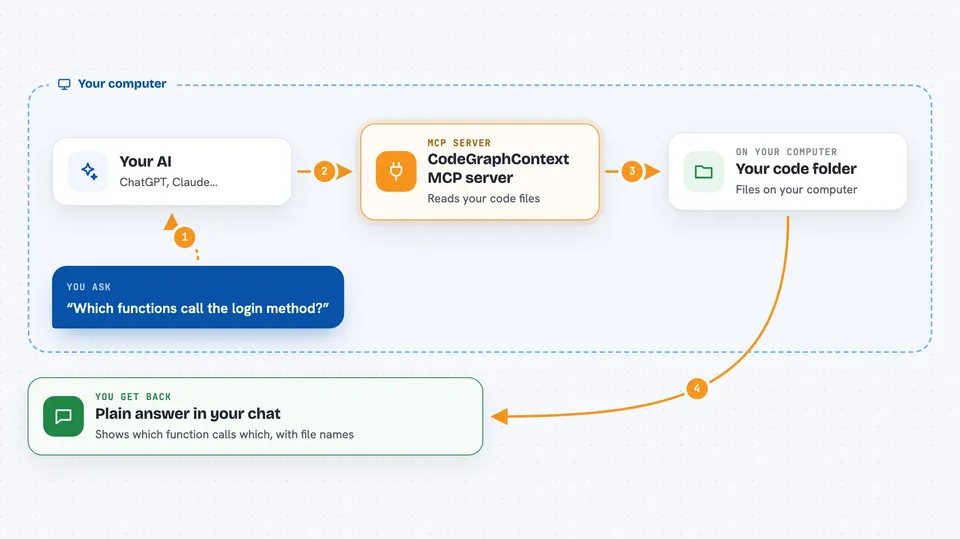
You point CodeGraphContext at a folder of code, and it reads through the files and builds a map of functions, classes, and how they call each other. That map is saved in a small database on your machine. When you ask your AI something about the code, the AI asks this helper, the helper looks in the map, and sends back the relevant pieces. You then see a plain answer in your chat, such as which function calls another one or where a class is used.
 Click to zoom
What you can do with it
- Find who calls a particular function
- Trace a chain of calls across several files
- See the class hierarchy in your project
- Spot code that is never used
- Check which files import a module
- Watch a folder and update the map when files change
- Load a ready-made map for a well-known open source project
Try asking your AI
- “Which functions call the login method?”
- “Show me the chain of calls that starts at main.”
- “Is this helper function used anywhere in the project?”
- “What classes inherit from BaseHandler?”
What it gives back to you
You get answers in plain language in your chat, often with a short list of file names and function names. It can also show small diagrams or summaries of how things connect. If you ask it to index a folder, it tells you when the map is ready. Nothing in your code is changed; it only reads.
Before you start
What you need
- Python 3.10 or newer installed on your computer
- The codegraphcontext package installed (pip install codegraphcontext)
- An AI assistant that supports MCP, like Claude Desktop or a compatible code editor
Good to know
It reads the code folders you point it at, so only index folders you are allowed to share with your AI assistant.
Install it with your AI
Add CodeGraphContext MCP server to your AI, no technical skills needed
You don't install anything by hand. You copy one prompt, paste it into an AI that can work on your computer, and it checks, installs and connects the server for you, asking you when it needs something.
Sign in to get the install prompt
Members get a ready-made prompt that lets the Claude desktop app check CodeGraphContext MCP server, install it and connect it for them, step by step. You don't need any technical skills: you copy, paste and answer a few questions. Your connected AI can also find and install any of the 4,609 MCP servers here for you.
Who it's for
Developers, maintainers, and anyone who needs to understand an unfamiliar codebase without reading every file.



