
MCP server · Security
SidClaw governance proxy
by sidclawhq
Your AI's tool calls get checked against your rules, and risky actions wait for your approval.
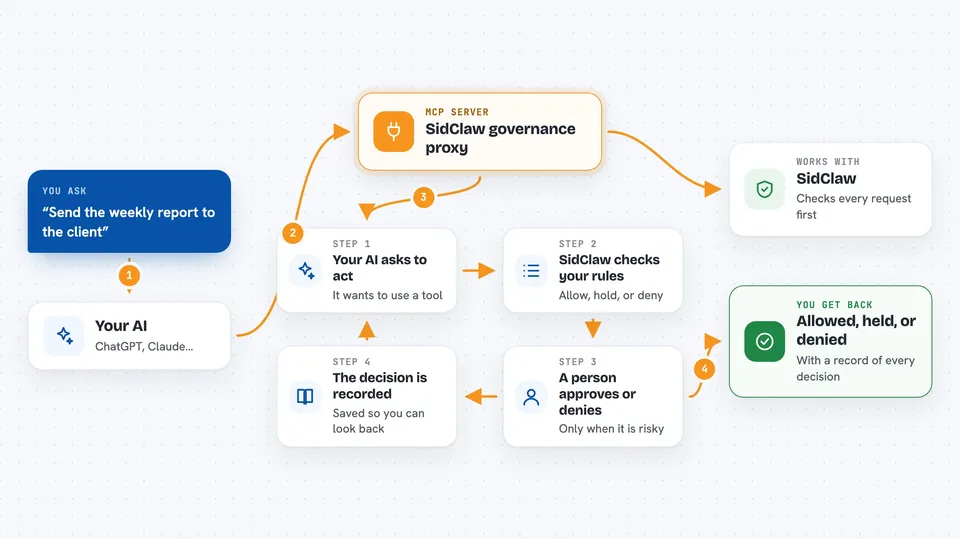
SidClaw is a helper that sits between your AI assistant and the tools it wants to use. Before the AI does something, SidClaw checks your rules and, if the action looks risky, asks a human to approve or deny it. It is handy for anyone letting an AI assistant touch real systems like email, databases, or servers.
What is an MCP server? The 30-second version
On its own, your AI can only chat and suggest things. An MCP server is a small helper program that gives your AI a new skill or a connection to an app or service. This one is a governance proxy, which means it wraps other MCP servers and adds a checkpoint in front of them. So when your AI tries to use a tool, SidClaw first checks your rules and can pause the action for a human to review.
What this MCP server does
You connect SidClaw to your AI assistant the same way you connect any other MCP server. When the AI wants to use a tool, the request goes to SidClaw first instead of straight to the tool. SidClaw looks at your policies and decides: allow it, hold it for human approval, or deny it. If approval is needed, a reviewer sees the details and clicks approve or deny. Either way, a record of the decision is saved so you can look back later.
 Click to zoom
What you can do with it
- Wrap any MCP server so its tools are checked against your rules
- Pause risky actions and ask a human to approve or deny them
- Block actions that your policies say should never run
- Send approval requests to Slack, Teams, Telegram, or email
- Keep a tamper-evident audit trail of every decision
- Give each AI agent an identity with its own permissions
- Run a local demo dashboard to see how approvals look
Try asking your AI
- “Show me the recent tool calls that were held for approval”
- “What policies are currently active for my agent”
- “Approve the pending email send request from the support agent”
- “List the audit trail for the last hour of agent activity”
What it gives back to you
SidClaw gives back a decision for each tool call: allowed, held for approval, or denied. When something is held, you see a card with the details of who asked, what they want to do, and why. After a decision, you get a record in the audit trail. In the chat, this usually shows up as a short status message or a link to the approval dashboard.
Before you start
What you need
- A SidClaw account (free signup at app.sidclaw.com)
- An API key from SidClaw (a kind of password for apps; the site gives you one)
- An agent ID for the AI you want to govern
- Node.js 18 or newer if you run the MCP proxy with npx
Good to know
SidClaw can block or hold actions, so if your policies are too strict you may stop useful work; review your rules and approvals carefully.
Install it with your AI
Add SidClaw governance proxy to your AI, no technical skills needed
You don't install anything by hand. You copy one prompt, paste it into an AI that can work on your computer, and it checks, installs and connects the server for you, asking you when it needs something.
Sign in to get the install prompt
Members get a ready-made prompt that lets the Claude desktop app check SidClaw governance proxy, install it and connect it for them, step by step. You don't need any technical skills: you copy, paste and answer a few questions. Your connected AI can also find and install any of the 4,609 MCP servers here for you.
Who it's for
Teams and office workers who let AI assistants use real tools and want a human checkpoint before anything risky happens.



