MCP server · Developer tools
Skill-Cortex MCP server
by Sim-xia
Lets your AI find and use saved Claude Code Skills from any editor or command line tool.

Skill-Cortex is a small helper program that gives your AI access to a library of Claude Code Skills, which are little instruction files that teach the AI how to do a specific task. It is handy if you have collected skills over time and want your AI to find and use them no matter which editor you work in. You do not need to be a programmer to benefit from it, though someone does need to set it up once.
What is an MCP server? The 30-second version
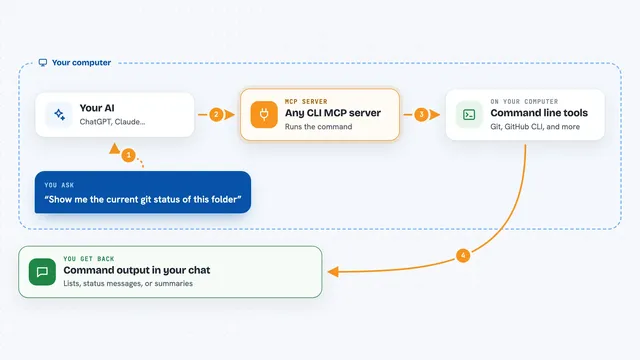
On its own, your AI can only chat with you. An MCP server is a small helper program that gives your AI a new skill or a connection to something useful. This one connects your AI to a folder of Claude Code Skills, which are text files that describe how to do particular jobs. Once it is connected, your AI can look through those skill files and pull out the right one when you ask.
What this MCP server does
You ask your AI something, and if a saved skill could help, the AI asks this helper to look through your skill folders. The helper scans and indexes the SKILL.md files it finds, then searches them by keyword or tag. It can hand back a short summary, just the instructions, just the examples, or the whole file, so your AI does not waste space on things it does not need. You then get an answer that uses the skill, or a list of matching skills to pick from.
 Click to zoom
What you can do with it
- Browse your skills as a tree by category
- Search skills by keyword or tag
- Read a skill's summary, instructions, examples, or full text
- List and update tags on your skills
- Create a new skill with a template
- Delete a skill you created, with a confirmation step first
- Import skills from public repositories using a script
Try asking your AI
- “Find a skill about working with databases”
- “Show me the instructions for my python helper skill”
- “List all skills tagged coding”
- “Create a new skill called writing-helper for drafting emails”
What it gives back to you
You get back lists of skills, short summaries, or the exact part of a skill file you asked for, shown right in the chat. If you create or delete a skill, it tells you what it did and where the skill lives. Search results come with the skill's name, description, and tags so you can pick the right one.
Before you start
What you need
- Python 3.11 or higher
- The pip package manager
- Some skill files placed in ~/.claude/skills or ./.skills, since none are included by default
- An editor or AI tool that can connect to MCP servers
Good to know
It can create and delete skill files in your .skills folder, so check the preview before confirming a delete.
Install it with your AI
Add Skill-Cortex MCP server to your AI, no technical skills needed
You don't install anything by hand. You copy one prompt, paste it into an AI that can work on your computer, and it checks, installs and connects the server for you, asking you when it needs something.
Sign in to get the install prompt
Members get a ready-made prompt that lets the Claude desktop app check Skill-Cortex MCP server, install it and connect it for them, step by step. You don't need any technical skills: you copy, paste and answer a few questions. Your connected AI can also find and install any of the 4,609 MCP servers here for you.
Who it's for
People who have collected Claude Code Skills and want to use them from any editor or command line tool, especially developers and writers who reuse the same instructions often.