
MCP server · Developer tools
VibeAlive MCP server
by skullzarmy
Lets your AI scan a Next.js project to find unused files and dead API endpoints.
VibeAlive is a helper tool for people who work on Next.js websites. It looks through your project and points out files and API routes that nobody uses anymore. If you keep a codebase tidy, or you just want to know what is safe to delete, this is for you.
What is an MCP server? The 30-second version
On its own, your AI can only chat with you. An MCP server is a small helper program that gives your AI a new skill or a connection to something else. This one connects your AI to VibeAlive, a code analysis tool for Next.js projects. Once it is connected, your AI can run a scan of your project and tell you what it found, without you typing commands yourself.
What this MCP server does
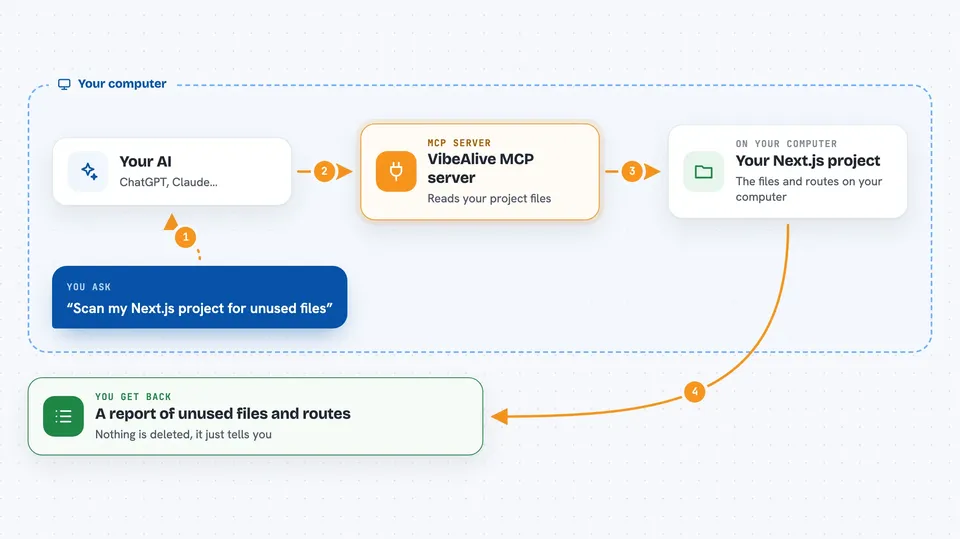
You ask your AI to check your Next.js project for unused files or dead API routes. The AI passes that request to the VibeAlive helper running on your computer. VibeAlive reads your project, works out how the files depend on each other, and spots the ones nothing else points to. It also checks which API endpoints are never called. Then it hands the results back to your AI, which explains them to you in the chat.
 Click to zoom
What you can do with it
- Find files in your Next.js project that nothing else uses
- Spot API endpoints that are never called
- Detect which Next.js router your project uses (App Router, Pages Router, or both)
- Produce a report you can read or save
- Run focused scans for themes, SEO, performance, and accessibility
- Get the report in another language, like Spanish or French
Try asking your AI
- “Scan my Next.js project and tell me which files are not used anywhere”
- “Are there any API routes in this project that nothing calls?”
- “Which router is this Next.js project using?”
- “Give me a report of dead code in this project”
What it gives back to you
You get a report in the chat listing the unused files and unused API endpoints it found, usually with the file paths so you can go look. It can also produce the report as JSON or Markdown if you want to save it. Your AI will often summarise the findings and suggest what might be safe to remove. Nothing is deleted for you; it just tells you what it found.
Before you start
What you need
- A Next.js project on your computer
- Node.js installed (the tool runs through npx)
- An AI app that can use MCP servers, like the Claude desktop app
Good to know
It reads your project files to analyse them, but it only reports what it finds and does not change or delete anything.
Install it with your AI
Add VibeAlive MCP server to your AI, no technical skills needed
You don't install anything by hand. You copy one prompt, paste it into an AI that can work on your computer, and it checks, installs and connects the server for you, asking you when it needs something.
Sign in to get the install prompt
Members get a ready-made prompt that lets the Claude desktop app check VibeAlive MCP server, install it and connect it for them, step by step. You don't need any technical skills: you copy, paste and answer a few questions. Your connected AI can also find and install any of the 4,609 MCP servers here for you.
Who it's for
Developers and technical folks who maintain Next.js projects and want to keep them clean.




