
MCP server · Research
Ashby Job Boards MCP server
by smeet666
Search public Ashby job boards by company, filter openings, read full postings and compare published pay.
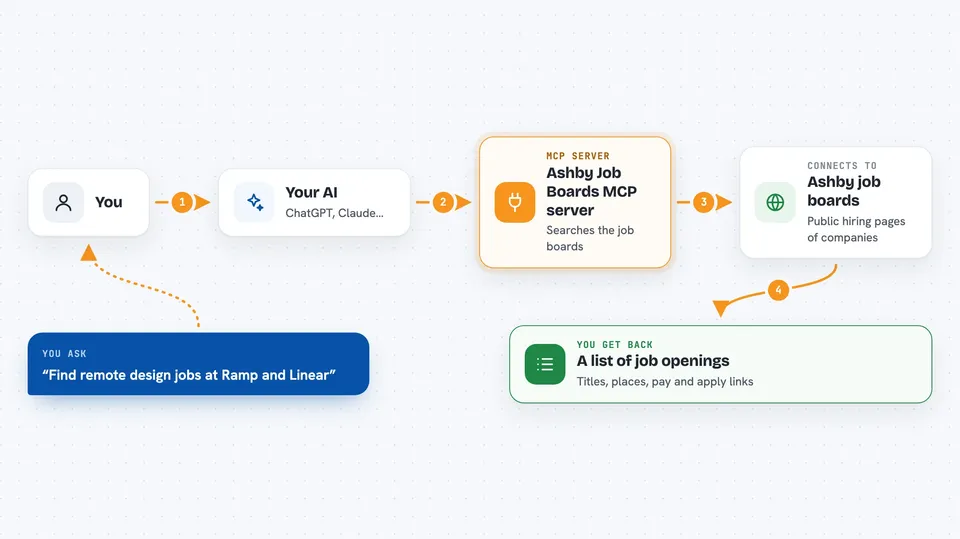
Ashby is hiring software, and every company that uses it gets a public job board with its open roles. This helper lets your AI look through those boards for you, so you can ask about openings at a company in plain words. It is handy if you are job hunting, comparing offers, or keeping an eye on who is hiring.
What is an MCP server? The 30-second version
On its own, your AI can only chat with you. An MCP server is a small helper program that gives your AI a new skill or a connection to an app or service. This one connects your AI to public Ashby job boards, so it can look up companies, search their postings and read the details for you. You just ask, and the AI uses this helper behind the scenes.
What this MCP server does
You name the companies you care about, and your AI passes those names to this helper. The helper finds each company's public Ashby board and searches its postings. It can narrow the results by department, team, location, country, employment type, remote work, how recent a posting is, or whether pay is published. When you want details, it reads one posting in full, advert included. It can also put the pay of several postings side by side.
 Click to zoom
What you can do with it
- Check whether a company is hiring on Ashby
- Search openings at up to ten companies at once
- Filter roles by department, team, location or remote work
- Read a full job posting, advert included
- List the words a board uses for its departments and teams
- Compare published salaries across several postings
- See which postings publish no pay at all
Try asking your AI
- “Is Ramp hiring on Ashby?”
- “Find me remote design roles at Ramp and Linear.”
- “Read me that posting in full.”
- “Put the salaries of those engineering postings side by side.”
What it gives back to you
You get back lists of postings with the title, department, team, employment type, location, whether it is remote, when it was published and links to view or apply. When you read one posting, you get the full advert text and any pay the company published. Pay comparisons come back as rows, one per posting, showing the currency and the period. If a company published no pay, it says so instead of showing a zero.
Before you start
What you need
- Node.js 24 or newer if you install it with npx
- The Claude desktop app or another chat client that supports MCP servers
Good to know
Pay figures are only what each company chose to publish, and different postings may be quoted in different currencies or periods, so check before comparing.
Install it with your AI
Add Ashby Job Boards MCP server to your AI, no technical skills needed
You don't install anything by hand. You copy one prompt, paste it into an AI that can work on your computer, and it checks, installs and connects the server for you, asking you when it needs something.
Sign in to get the install prompt
Members get a ready-made prompt that lets the Claude desktop app check Ashby Job Boards MCP server, install it and connect it for them, step by step. You don't need any technical skills: you copy, paste and answer a few questions. Your connected AI can also find and install any of the 4,361 MCP servers here for you.
Who it's for
Job seekers, recruiters and anyone comparing roles or pay across companies that use Ashby.


