
MCP server · Research
BnF catalogue MCP server
by smeet666
Look up French national library records for authors, their works and editions, right in your chat.
This is a small helper that connects your AI chat to data.bnf.fr, the open catalogue of the French national library. It lets you search for an author or a work, read the full record, and see which editions and digitised copies the library holds. It is handy if you research French literature, history or culture, or if you just want to check a fact about a writer.
What is an MCP server? The 30-second version
On its own, your AI can only chat with you. An MCP server is a small helper program that gives your AI a new skill or a connection to an app or service. This one connects your AI to the BnF open catalogue, so it can look up authors, works and editions for you when you ask. You do not need to install anything complicated, and there is no account or password.
What this MCP server does
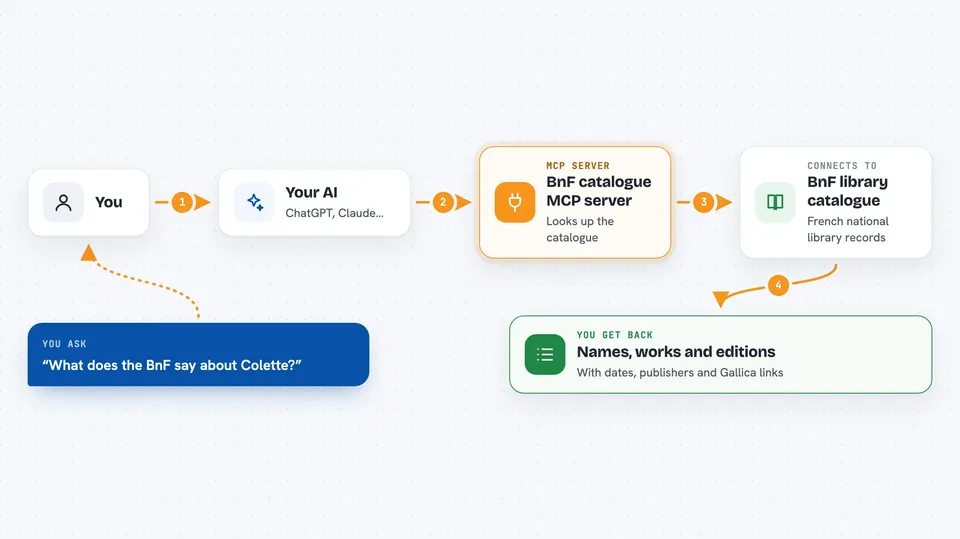
You ask your AI a question in plain words, like who Colette was or what Marguerite Duras wrote. Your AI passes that question to this helper. The helper talks to data.bnf.fr, the library's public catalogue, and brings back the matching records. Then your AI shows you the answer in the chat, with names, dates, works and links. If you want more detail on one person or one work, the AI can read that full record too.
 Click to zoom
What you can do with it
- Search for an author by name in the BnF catalogue
- Read a person's full record, with dates, places and occupations
- List all the works credited to one author
- Search for a work by its title
- List the editions of a work the library holds
- Find digitised copies in Gallica for a person or a work
- Check whether a record is established or still provisional
Try asking your AI
- “What does the BnF say about Colette?”
- “List everything Marguerite Duras wrote.”
- “Which editions of that work does the library hold?”
- “Are any of them digitised in Gallica?”
What it gives back to you
You get back lists and records in the chat: names with dates, places and occupations, works with their years and creators, editions with publishers and ISBNs, and links to digitised copies in Gallica. Each answer also names the source and the date it was retrieved, as the library asks. If a record is still provisional, the answer says so. You can keep asking follow-up questions on the same person or work.
Before you start
What you need
- A chat client that supports MCP, like Claude Desktop or Cursor
- Node.js 24 or newer, if you use the npx install
- Docker, only if you prefer the Docker install
Good to know
The BnF asks that you always name the source and the date of retrieval when you show what you got, and that you mention when a record is still provisional.
Install it with your AI
Add BnF catalogue MCP server to your AI, no technical skills needed
You don't install anything by hand. You copy one prompt, paste it into an AI that can work on your computer, and it checks, installs and connects the server for you, asking you when it needs something.
Sign in to get the install prompt
Members get a ready-made prompt that lets the Claude desktop app check BnF catalogue MCP server, install it and connect it for them, step by step. You don't need any technical skills: you copy, paste and answer a few questions. Your connected AI can also find and install any of the 4,361 MCP servers here for you.
Who it's for
Researchers, students, librarians, journalists and anyone curious about French authors, works and editions held by the national library of France.





