MCP server · Research
Lever job boards MCP server
by smeet666
Search public Lever job boards and read full job postings for any company you name.
This is a small helper that lets your AI look at public job boards run by Lever, the hiring software many companies use. You tell it which companies you care about, and it finds their open roles for you. It is handy if you are job hunting or keeping an eye on who is hiring.
What is an MCP server? The 30-second version
On its own, your AI can only chat with you using what it already knows. An MCP server is a small helper program that gives your AI a new skill or a connection to an app or service. This one connects your AI to Lever's public job boards, so it can look up companies and their open roles when you ask. You do not need to install anything complicated or sign up for an account.
What this MCP server does
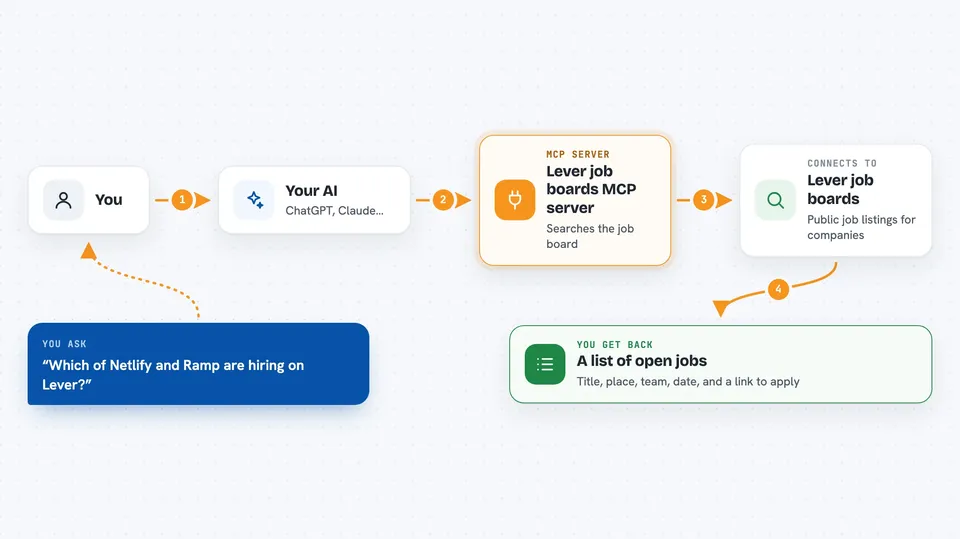
You ask your AI something like which companies are hiring, or what jobs are open at a certain place. Your AI passes that to this helper. The helper turns the company name into the right Lever board, searches the openings there, and applies any filters you asked for, like location or remote work. Then it hands the results back to your AI, which shows them to you in the chat. If you want, it can also read one job posting in full, including the advert text.
 Click to zoom
What you can do with it
- Check which companies have open roles on Lever
- Search for jobs by keyword, team, location, or department
- Filter for remote, hybrid, or onsite roles
- Filter by country, salary, or how recently a job was posted
- Read a full job posting including the advert
- List the exact wording a company uses for its teams and locations
Try asking your AI
- “Which of Included Health, Netlify and Ramp are hiring on Lever?”
- “Find me remote engineering roles at those three companies.”
- “Read me that opening in full.”
- “Anything posted in the last two weeks at Netlify?”
What it gives back to you
You get back a list of jobs with the title, location, team, when it was posted, and a link to apply. If you ask for a full posting, you get the whole advert text and any salary range the company published. Everything shows up right in your chat as a tidy answer. If a company has no openings or the name was not found, it tells you that too.
Before you start
What you need
- The Claude desktop app or another chat client that supports MCP servers
- Node.js 24 or newer (or Docker, if you prefer that route)
Good to know
This only reads public job boards, so it cannot change or delete anything, but it does contact Lever's servers on your behalf and asks you to credit and link the company when you share a posting.
Install it with your AI
Add Lever job boards MCP server to your AI, no technical skills needed
You don't install anything by hand. You copy one prompt, paste it into an AI that can work on your computer, and it checks, installs and connects the server for you, asking you when it needs something.
Sign in to get the install prompt
Members get a ready-made prompt that lets the Claude desktop app check Lever job boards MCP server, install it and connect it for them, step by step. You don't need any technical skills: you copy, paste and answer a few questions. Your connected AI can also find and install any of the 4,361 MCP servers here for you.
Who it's for
Job seekers, recruiters, and anyone who wants to keep track of who is hiring at specific companies.