
MCP server · Analytics
LLMKit MCP server
by smigolsmigol
See what your AI sessions cost and check your budget, right inside your AI chat.
LLMKit is a small helper that keeps an eye on how much your AI usage costs. It can look at your coding sessions and show you the money side of things. It is handy if you use AI tools a lot and want to know what you are spending.
What is an MCP server? The 30-second version
On its own, your AI can only chat. An MCP server is a small helper program that gives your AI a new skill or a connection to another service. This one connects your AI to LLMKit, a tool that tracks AI spending and budgets. Once it is connected, you can just ask your AI about costs and budgets, and it will go and find the answer for you.
What this MCP server does
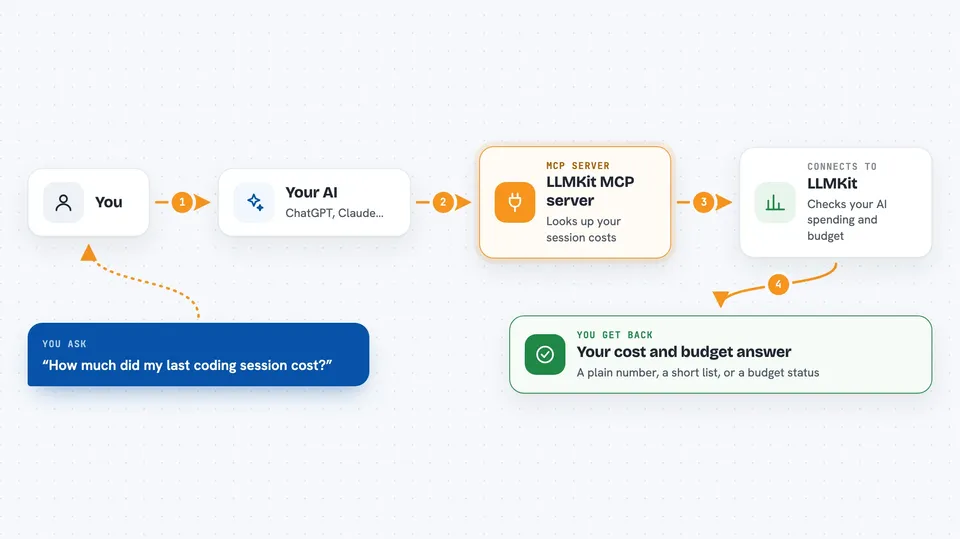
You ask your AI something about your AI spending, like how much a session cost. Your AI passes that question to this helper. The helper looks at your local coding session data, or at your LLMKit account if you have a key, and works out the numbers. Then your AI tells you the answer in plain words in the chat. If you have a key, it can also check budgets and keys for you.
 Click to zoom
What you can do with it
- Check how much a coding session cost
- Look at your recent AI spending
- See your budget and how much is left
- List your LLMKit keys
- Check if the LLMKit service is up
- Summarize a session's usage
Try asking your AI
- “How much did my last Claude Code session cost?”
- “Show me my AI spending this week”
- “What is my current budget and how much is left?”
- “Is the LLMKit service healthy right now?”
What it gives back to you
You get back plain answers in the chat, like a number for a cost, a short list of sessions, or a budget status. Sometimes it is a small table or a few bullet points. It does not change anything by itself unless you ask it to. Mostly it just tells you what it found.
Before you start
What you need
- The Claude desktop app or another app that supports MCP servers
- Node.js installed on your computer (the helper runs through npx)
- Optional: an LLMKit API key if you want to check budgets and keys (the README says new keys are not available right now)
Good to know
If you connect it with an LLMKit key, it can see your account details like budgets and keys, so keep that key private.
Install it with your AI
Add LLMKit MCP server to your AI, no technical skills needed
You don't install anything by hand. You copy one prompt, paste it into an AI that can work on your computer, and it checks, installs and connects the server for you, asking you when it needs something.
Sign in to get the install prompt
Members get a ready-made prompt that lets the Claude desktop app check LLMKit MCP server, install it and connect it for them, step by step. You don't need any technical skills: you copy, paste and answer a few questions. Your connected AI can also find and install any of the 4,609 MCP servers here for you.
Who it's for
People who use AI coding tools a lot and want to keep an eye on what it costs, like developers and team leads.



